17
B. Deur handmatig openen of sluiten
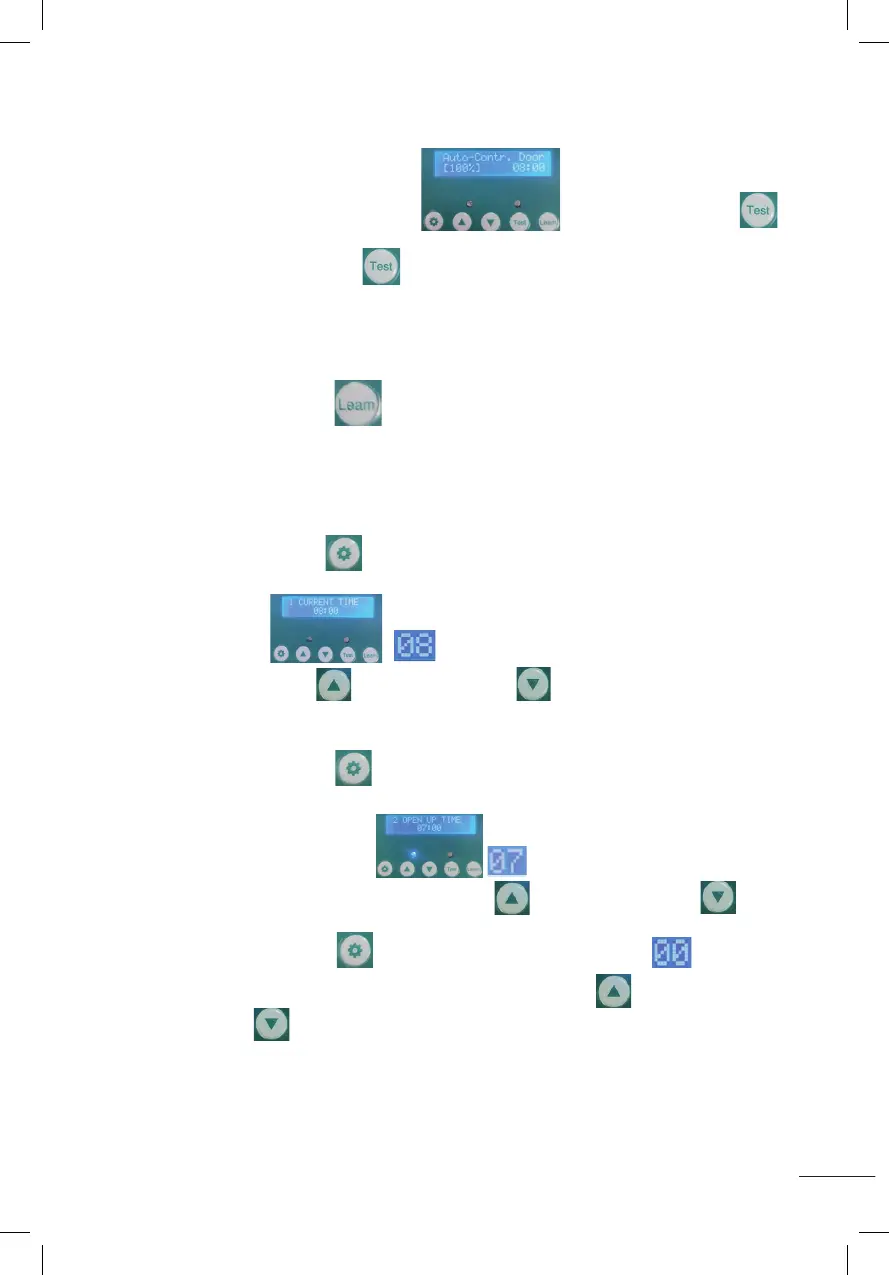
1. Nach der Anzeige wie im Bild gezeigt Halten Sie die Testtaste
1 Sekunde lang gedrückt und lassen Sie sie dann los. Die Tür fährt auf die Einstellhöhe.
2. Halten Sie dann die Testtaste 1 Sekunde lang gedrückt und lassen Sie sie los. Die
Tür fällt nach unten. Sollte beim Abstieg etwas im Weg sein, stoppt die Tür automatisch.
Bei Entnahme des Gegenstandes klappt die Tür automatisch ein.
Nach mehr als 30 Sekunden geht die Tür nicht mehr herunter.
C. Passende Fernbedienung
Halten Sie die Leam-Taste 1 Sekunde lang gedrückt und lassen Sie sie dann los.
Drücken Sie dann zweimal eine beliebige Taste auf der Fernbedienung. Die blaue LED
blinkt zweimal, um anzuzeigen, dass die Kopplung abgeschlossen ist. Anschließend
können Sie die Tür mit der Fernbedienung öffnen oder schließen.
1. STELLEN SIE DIE AKTUELLE UHRZEIT EIN (00~23)
Halten Sie die Einstelltaste 1 Sekunde lang gedrückt und lassen Sie sie dann los,
wie im Bild gezeigt beginnt zu blinken, wie im Bild gezeigt,
drücken Sie die Erhöhen- oder Verringern-Taste , um die Stunde einzustellen.
2. STELLEN SIE DIE ZEIT EIN, ZU DER DIE TÜR GEÖFFNET WERDEN SOLL (00~11)
Drücken Sie die Einstelltaste 1 Sekunde lang und lassen Sie sie los.
Das Display zeigt wie abgebildet beginnt zu blinken, wie in
der Abbildung gezeigt. Drücken Sie die Erhöhen- oder Verringern-Taste ,
um die Stunde einzustellen.
Drücken Sie die Einstelltaste 1 Sekunde lang und lassen Sie sie los. beginnt zu
blinken, wie in der Abbildung gezeigt. Drücken Sie die Erhöhen- oder
Verringern-Taste , um die Minuten anzupassen.
B: Opening or closing door manually:
1.After displaying as shown (Auto-Contr.Door(100%)), Press and hold the test button
for 1 second and release,the door will rise to the setting height.
2.Then press and hold the test button
for 1 second and release, the door drops to the bottom. If
there is something in the way when descending, the door will automatically stop. When the object is
removed, the door automatically descends into place. But more than 30 seconds the door will not descend.
C:Matching remote control:
Press the leam button for 1 second then release, then press any key of the remote control twice,
the blue LED flashes twice, indicating that the pairing is completed, then you can use the remote control to
open or close the door.
1.Set the current time(00~23)
Press the setting button for 1 second and release, displaying as shown (CURRENT
TIME)
,it will start to flash as shown in the figure ,press the increase button or the decrease
button to adjust the hour .
B: Opening or closing door manually:
1.After displaying as shown (Auto-Contr.Door(100%)), Press and hold the test button
for 1 second and release,the door will rise to the setting height.
2.Then press and hold the test button
for 1 second and release, the door drops to the bottom. If
there is something in the way when descending, the door will automatically stop. When the object is
removed, the door automatically descends into place. But more than 30 seconds the door will not descend.
C:Matching remote control:
Press the leam button for 1 second then release, then press any key of the remote control twice,
the blue LED flashes twice, indicating that the pairing is completed, then you can use the remote control to
open or close the door.
1.Set the current time(00~23)
Press the setting button for 1 second and release, displaying as shown (CURRENT
TIME)
,it will start to flash as shown in the figure ,press the increase button or the decrease
button to adjust the hour .
B: Opening or closing door manually:
1.After displaying as shown (Auto-Contr.Door(100%)), Press and hold the test button
for 1 second and release,the door will rise to the setting height.
2.Then press and hold the test button
for 1 second and release, the door drops to the bottom. If
there is something in the way when descending, the door will automatically stop. When the object is
removed, the door automatically descends into place. But more than 30 seconds the door will not descend.
C:Matching remote control:
Press the leam button for 1 second then release, then press any key of the remote control twice,
the blue LED flashes twice, indicating that the pairing is completed, then you can use the remote control to
open or close the door.
1.Set the current time(00~23)
Press the setting button for 1 second and release, displaying as shown (CURRENT
TIME)
,it will start to flash as shown in the figure ,press the increase button or the decrease
button to adjust the hour .
B: Opening or closing door manually:
1.After displaying as shown (Auto-Contr.Door(100%)), Press and hold the test button
for 1 second and release,the door will rise to the setting height.
2.Then press and hold the test button
for 1 second and release, the door drops to the bottom. If
there is something in the way when descending, the door will automatically stop. When the object is
removed, the door automatically descends into place. But more than 30 seconds the door will not descend.
C:Matching remote control:
Press the leam button for 1 second then release, then press any key of the remote control twice,
the blue LED flashes twice, indicating that the pairing is completed, then you can use the remote control to
open or close the door.
1.Set the current time(00~23)
Press the setting button for 1 second and release, displaying as shown (CURRENT
TIME)
,it will start to flash as shown in the figure ,press the increase button or the decrease
button to adjust the hour .
B: Opening or closing door manually:
1.After displaying as shown (Auto-Contr.Door(100%)), Press and hold the test button
for 1 second and release,the door will rise to the setting height.
2.Then press and hold the test button
for 1 second and release, the door drops to the bottom. If
there is something in the way when descending, the door will automatically stop. When the object is
removed, the door automatically descends into place. But more than 30 seconds the door will not descend.
C:Matching remote control:
Press the leam button for 1 second then release, then press any key of the remote control twice,
the blue LED flashes twice, indicating that the pairing is completed, then you can use the remote control to
open or close the door.
1.Set the current time(00~23)
Press the setting button for 1 second and release, displaying as shown (CURRENT
TIME)
,it will start to flash as shown in the figure ,press the increase button or the decrease
button to adjust the hour .
B: Opening or closing door manually:
1.After displaying as shown (Auto-Contr.Door(100%)), Press and hold the test button
for 1 second and release,the door will rise to the setting height.
2.Then press and hold the test button
for 1 second and release, the door drops to the bottom. If
there is something in the way when descending, the door will automatically stop. When the object is
removed, the door automatically descends into place. But more than 30 seconds the door will not descend.
C:Matching remote control:
Press the leam button for 1 second then release, then press any key of the remote control twice,
the blue LED flashes twice, indicating that the pairing is completed, then you can use the remote control to
open or close the door.
1.Set the current time(00~23)
Press the setting button for 1 second and release, displaying as shown (CURRENT
TIME)
,it will start to flash as shown in the figure ,press the increase button or the decrease
button to adjust the hour .
B: Opening or closing door manually:
1.After displaying as shown (Auto-Contr.Door(100%)), Press and hold the test button
for 1 second and release,the door will rise to the setting height.
2.Then press and hold the test button
for 1 second and release, the door drops to the bottom. If
there is something in the way when descending, the door will automatically stop. When the object is
removed, the door automatically descends into place. But more than 30 seconds the door will not descend.
C:Matching remote control:
Press the leam button for 1 second then release, then press any key of the remote control twice,
the blue LED flashes twice, indicating that the pairing is completed, then you can use the remote control to
open or close the door.
1.Set the current time(00~23)
Press the setting button for 1 second and release, displaying as shown (CURRENT
TIME)
,it will start to flash as shown in the figure ,press the increase button or the decrease
button to adjust the hour .
B: Opening or closing door manually:
1.After displaying as shown (Auto-Contr.Door(100%)), Press and hold the test button
for 1 second and release,the door will rise to the setting height.
2.Then press and hold the test button
for 1 second and release, the door drops to the bottom. If
there is something in the way when descending, the door will automatically stop. When the object is
removed, the door automatically descends into place. But more than 30 seconds the door will not descend.
C:Matching remote control:
Press the leam button for 1 second then release, then press any key of the remote control twice,
the blue LED flashes twice, indicating that the pairing is completed, then you can use the remote control to
open or close the door.
1.Set the current time(00~23)
Press the setting button for 1 second and release, displaying as shown (CURRENT
TIME)
,it will start to flash as shown in the figure ,press the increase button or the decrease
button to adjust the hour .
B: Opening or closing door manually:
1.After displaying as shown (Auto-Contr.Door(100%)), Press and hold the test button
for 1 second and release,the door will rise to the setting height.
2.Then press and hold the test button
for 1 second and release, the door drops to the bottom. If
there is something in the way when descending, the door will automatically stop. When the object is
removed, the door automatically descends into place. But more than 30 seconds the door will not descend.
C:Matching remote control:
Press the leam button for 1 second then release, then press any key of the remote control twice,
the blue LED flashes twice, indicating that the pairing is completed, then you can use the remote control to
open or close the door.
1.Set the current time(00~23)
Press the setting button for 1 second and release, displaying as shown (CURRENT
TIME)
,it will start to flash as shown in the figure ,press the increase button or the decrease
button to adjust the hour .
B: Opening or closing door manually:
1.After displaying as shown (Auto-Contr.Door(100%)), Press and hold the test button
for 1 second and release,the door will rise to the setting height.
2.Then press and hold the test button
for 1 second and release, the door drops to the bottom. If
there is something in the way when descending, the door will automatically stop. When the object is
removed, the door automatically descends into place. But more than 30 seconds the door will not descend.
C:Matching remote control:
Press the leam button for 1 second then release, then press any key of the remote control twice,
the blue LED flashes twice, indicating that the pairing is completed, then you can use the remote control to
open or close the door.
1.Set the current time(00~23)
Press the setting button for 1 second and release, displaying as shown (CURRENT
TIME)
,it will start to flash as shown in the figure ,press the increase button or the decrease
button to adjust the hour .
B: Opening or closing door manually:
1.After displaying as shown (Auto-Contr.Door(100%)), Press and hold the test button
for 1 second and release,the door will rise to the setting height.
2.Then press and hold the test button
for 1 second and release, the door drops to the bottom. If
there is something in the way when descending, the door will automatically stop. When the object is
removed, the door automatically descends into place. But more than 30 seconds the door will not descend.
C:Matching remote control:
Press the leam button for 1 second then release, then press any key of the remote control twice,
the blue LED flashes twice, indicating that the pairing is completed, then you can use the remote control to
open or close the door.
1.Set the current time(00~23)
Press the setting button for 1 second and release, displaying as shown (CURRENT
TIME)
,it will start to flash as shown in the figure ,press the increase button or the decrease
button
to adjust the hour .
2. Set the time to open the door(00~11)
Press the setting button for 1 second and release, displaying as shown
(OPEN UP TIME),it will start to flash as shown in the figure ,press the increase button or the
decrease button to adjust the hour .
Press the setting button for 1 second and release,it will start to flash as shown in the figure ,
press the increase button or the decrease button to adjust the minutes .
3.Set Lumens while door opening (00~23) (time range of door opening: 00~11)
Press the setting button for 1 second then release, displaying as shown
(OPEN LIGHT SET 14),it will start to flash as shown in the figure ,press the increase button or
the decrease button to adjust the Lumens.(Number 0 means minimum Lumens, weakest light.
Number 23 means maximum Lumens, strongest light)
4.Set the time to close the door(12~23)
Press the setting button for 1 second then release, displaying as shown
(CLOSE DOWM TIME),it will start to flash as shown in the figure , press the increase button or the
decrease button to adjust the hour .
Press the setting button
for 1 second and release,it will start to flash as shown in the figure ,
press the increase button or the decrease button to adjust the minutes .
2. Set the time to open the door(00~11)
Press the setting button for 1 second and release, displaying as shown
(OPEN UP TIME),it will start to flash as shown in the figure ,press the increase button or the
decrease button to adjust the hour .
Press the setting button for 1 second and release,it will start to flash as shown in the figure ,
press the increase button or the decrease button to adjust the minutes .
3.Set Lumens while door opening (00~23) (time range of door opening: 00~11)
Press the setting button for 1 second then release, displaying as shown
(OPEN LIGHT SET 14),it will start to flash as shown in the figure ,press the increase button or
the decrease button to adjust the Lumens.(Number 0 means minimum Lumens, weakest light.
Number 23 means maximum Lumens, strongest light)
4.Set the time to close the door(12~23)
Press the setting button for 1 second then release, displaying as shown
(CLOSE DOWM TIME),it will start to flash as shown in the figure , press the increase button or the
decrease button to adjust the hour .
Press the setting button
for 1 second and release,it will start to flash as shown in the figure ,
press the increase button or the decrease button to adjust the minutes .
2. Set the time to open the door(00~11)
Press the setting button for 1 second and release, displaying as shown
(OPEN UP TIME),it will start to flash as shown in the figure ,press the increase button or the
decrease button to adjust the hour .
Press the setting button for 1 second and release,it will start to flash as shown in the figure ,
press the increase button or the decrease button to adjust the minutes .
3.Set Lumens while door opening (00~23) (time range of door opening: 00~11)
Press the setting button for 1 second then release, displaying as shown
(OPEN LIGHT SET 14),it will start to flash as shown in the figure ,press the increase button or
the decrease button to adjust the Lumens.(Number 0 means minimum Lumens, weakest light.
Number 23 means maximum Lumens, strongest light)
4.Set the time to close the door(12~23)
Press the setting button for 1 second then release, displaying as shown
(CLOSE DOWM TIME),it will start to flash as shown in the figure , press the increase button or the
decrease button to adjust the hour .
Press the setting button
for 1 second and release,it will start to flash as shown in the figure ,
press the increase button or the decrease button to adjust the minutes .
2. Set the time to open the door(00~11)
Press the setting button for 1 second and release, displaying as shown
(OPEN UP TIME),it will start to flash as shown in the figure ,press the increase button or the
decrease button
to adjust the hour .
Press the setting button for 1 second and release,it will start to flash as shown in the figure ,
press the increase button or the decrease button to adjust the minutes .
3.Set Lumens while door opening (00~23) (time range of door opening: 00~11)
Press the setting button for 1 second then release, displaying as shown
(OPEN LIGHT SET 14),it will start to flash as shown in the figure ,press the increase button or
the decrease button to adjust the Lumens.(Number 0 means minimum Lumens, weakest light.
Number 23 means maximum Lumens, strongest light)
4.Set the time to close the door(12~23)
Press the setting button for 1 second then release, displaying as shown
(CLOSE DOWM TIME),it will start to flash as shown in the figure , press the increase button or the
decrease button to adjust the hour .
Press the setting button
for 1 second and release,it will start to flash as shown in the figure ,
press the increase button or the decrease button to adjust the minutes .
2. Set the time to open the door(00~11)
Press the setting button for 1 second and release, displaying as shown
(OPEN UP TIME),it will start to flash as shown in the figure ,press the increase button or the
decrease button
to adjust the hour .
Press the setting button for 1 second and release,it will start to flash as shown in the figure ,
press the increase button or the decrease button to adjust the minutes .
3.Set Lumens while door opening (00~23) (time range of door opening: 00~11)
Press the setting button for 1 second then release, displaying as shown
(OPEN LIGHT SET 14),it will start to flash as shown in the figure ,press the increase button or
the decrease button to adjust the Lumens.(Number 0 means minimum Lumens, weakest light.
Number 23 means maximum Lumens, strongest light)
4.Set the time to close the door(12~23)
Press the setting button for 1 second then release, displaying as shown
(CLOSE DOWM TIME),it will start to flash as shown in the figure , press the increase button or the
decrease button to adjust the hour .
Press the setting button
for 1 second and release,it will start to flash as shown in the figure ,
press the increase button or the decrease button to adjust the minutes .
2. Set the time to open the door(00~11)
Press the setting button for 1 second and release, displaying as shown
(OPEN UP TIME),it will start to flash as shown in the figure ,press the increase button or the
decrease button to adjust the hour .
Press the setting button for 1 second and release,it will start to flash as shown in the figure ,
press the increase button or the decrease button to adjust the minutes .
3.Set Lumens while door opening (00~23) (time range of door opening: 00~11)
Press the setting button for 1 second then release, displaying as shown
(OPEN LIGHT SET 14),it will start to flash as shown in the figure ,press the increase button or
the decrease button to adjust the Lumens.(Number 0 means minimum Lumens, weakest light.
Number 23 means maximum Lumens, strongest light)
4.Set the time to close the door(12~23)
Press the setting button for 1 second then release, displaying as shown
(CLOSE DOWM TIME),it will start to flash as shown in the figure , press the increase button or the
decrease button to adjust the hour .
Press the setting button
for 1 second and release,it will start to flash as shown in the figure ,
press the increase button or the decrease button to adjust the minutes .
2. Set the time to open the door(00~11)
Press the setting button for 1 second and release, displaying as shown
(OPEN UP TIME),it will start to flash as shown in the figure ,press the increase button or the
decrease button to adjust the hour .
Press the setting button for 1 second and release,it will start to flash as shown in the figure ,
press the increase button or the decrease button to adjust the minutes .
3.Set Lumens while door opening (00~23) (time range of door opening: 00~11)
Press the setting button for 1 second then release, displaying as shown
(OPEN LIGHT SET 14),it will start to flash as shown in the figure ,press the increase button or
the decrease button to adjust the Lumens.(Number 0 means minimum Lumens, weakest light.
Number 23 means maximum Lumens, strongest light)
4.Set the time to close the door(12~23)
Press the setting button for 1 second then release, displaying as shown
(CLOSE DOWM TIME),it will start to flash as shown in the figure , press the increase button or the
decrease button to adjust the hour .
Press the setting button
for 1 second and release,it will start to flash as shown in the figure ,
press the increase button or the decrease button to adjust the minutes .


 To Next Page
 Loading...