8
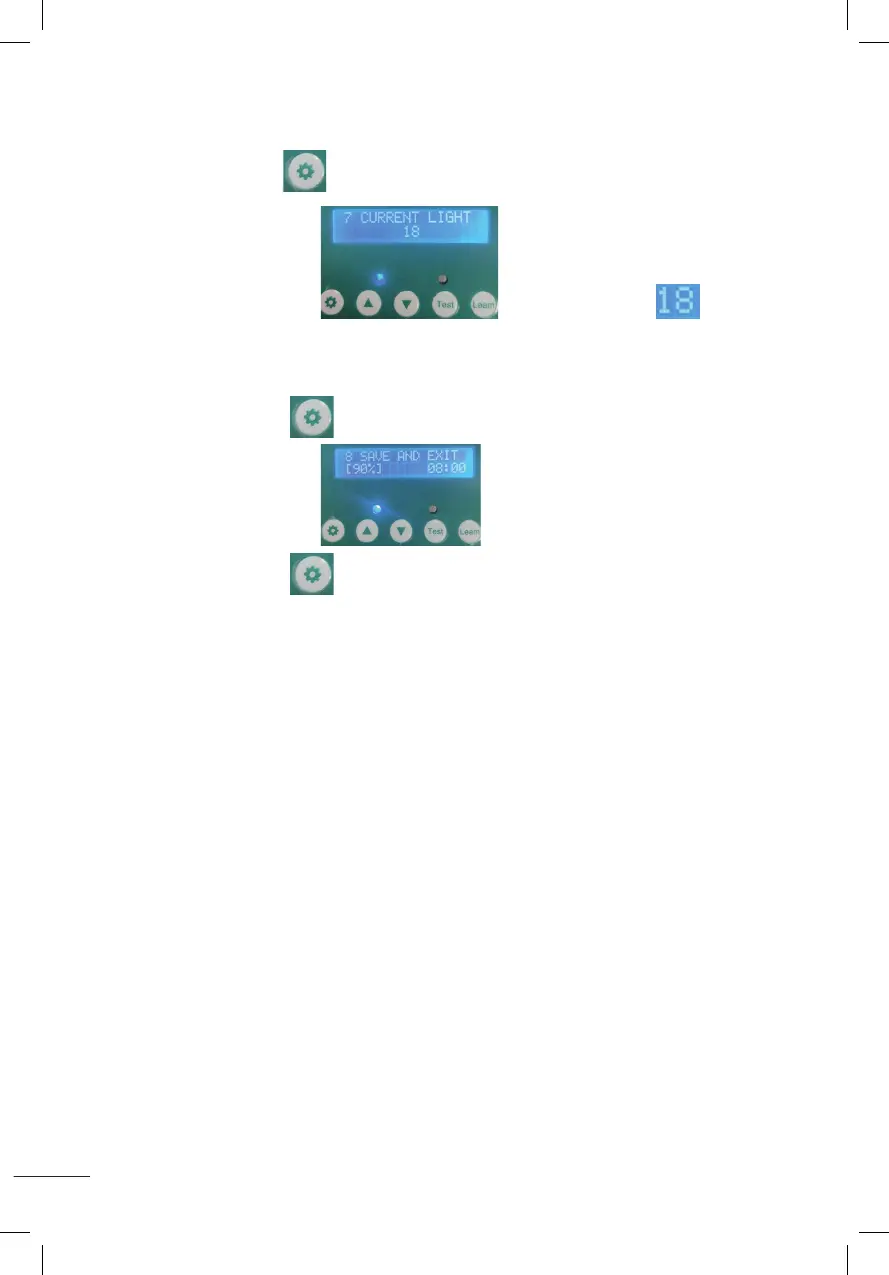
7. AUTOMATISCHE DETECTIE VAN HUIDIGE LUMENS
Druk de instelknop gedurende 1 seconde in en laat hem dan los, weergegeven
zoals op de afbeelding De huidige lumen is zoals
weergegeven in de afbeelding.
8. SLA DE INSTELLINGEN OP EN GA TERUG NAAR HET BEGINSCHERM
Houd de instelknop 1 seconde ingedrukt en laat vervolgens los, weergegeven
zoals op de afbeelding
Houd de instelknop gedurende 1 seconde ingedrukt en laat vervolgens los,
de ingestelde parameters worden opgeslagen en zal terugkeren naar het
beginscherm.
7.Automatic sensing of current Lumens
Press the setting button for 1 second then release,it will display as shown
and the current Lumens is 18 as shown in the figure .
8.Save the settings and return to the desktop
Press the setting button for 1 second then release,it will display as shown
press the setting button again for 1 second then release,it will save the set parameters and return.
7.Automatic sensing of current Lumens
Press the setting button for 1 second then release,it will display as shown
and the current Lumens is 18 as shown in the figure .
8.Save the settings and return to the desktop
Press the setting button for 1 second then release,it will display as shown
press the setting button again for 1 second then release,it will save the set parameters and return.
7.Automatic sensing of current Lumens
Press the setting button for 1 second then release,it will display as shown
and the current Lumens is 18 as shown in the figure .
8.Save the settings and return to the desktop
Press the setting button for 1 second then release,it will display as shown
press the setting button again for 1 second then release,it will save the set parameters and return.
7.Automatic sensing of current Lumens
Press the setting button for 1 second then release,it will display as shown
and the current Lumens is 18 as shown in the figure .
8.Save the settings and return to the desktop
Press the setting button for 1 second then release,it will display as shown
press the setting button again for 1 second then release,it will save the set parameters and return.
7.Automatic sensing of current Lumens
Press the setting button for 1 second then release,it will display as shown
and the current Lumens is 18 as shown in the figure .
8.Save the settings and return to the desktop
Press the setting button for 1 second then release,it will display as shown
press the setting button again for 1 second then release,it will save the set parameters and return.
7.Automatic sensing of current Lumens
Press the setting button for 1 second then release,it will display as shown
and the current Lumens is 18 as shown in the figure .
8.Save the settings and return to the desktop
Press the setting button for 1 second then release,it will display as shown
press the setting button again for 1 second then release,it will save the set parameters and return.


 To Next Page
 Loading...