7
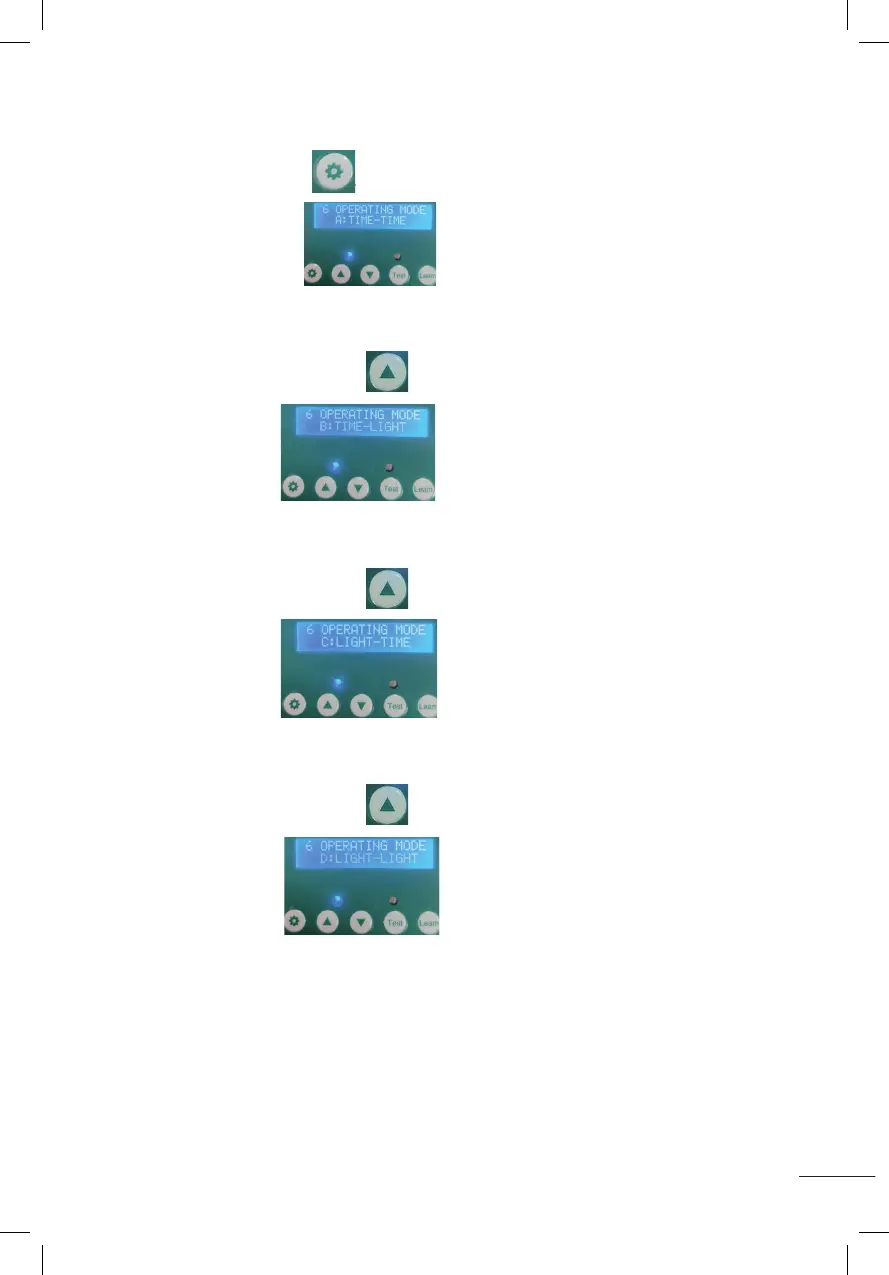
6. INSTELLEN VAN MODES (A-B-C-D) VOOR TIJD EN LICHTSENSOR.
A. Houd de instelknop 1 seconde ingedrukt en laat hem los, weergegeven zoals
op de afbeelding
MODE A: TIME-TIME: Deur open volgens ingestelde tijd - deur toe volgens
ingestelde tijd.
B. Druk op de toenameknop , weergegeven zoals op
de afbeelding
MODE B: TIME-LIGHT: Deur open volgens ingestelde tijd - deur toe volgens
ingestelde lumen.
C. Druk op de toenameknop , weergegeven zoals op
de afbeelding
MODE C: LIGHT-TIME: Deur open volgens ingestelde lumen - deur toe volgens
ingestelde tijd.
D. Druk op de toenameknop , weergegeven zoals op
de afbeelding
MODE D: LIGHT-LIGHT: Deur open volgens ingestelde lumen - deur toe volgens
ingestelde lumen.
5.Set Lumens while door closing(00~23)(time range of door closing::12~23)
Press the setting button for 1 second then release, displaying as shown
(CLOSE LIGHT SET 12), it will start to flash as shown in the figure ,press the increase button or the
decrease button to adjust the Lumens.(Number 0 means minimum Lumens, weakest light. Number
23 means maximum Lumens, strongest light)
6.Setting Timing and Light Sensor Mixing Modes (A-B-C-D)
A:Press the setting button for 1 second and release,it will display as shown
A:TIME-TIME: Indicates time on - time off.
B: Press the increase button ,it will display as shown
B:TIME-LIGHT:Indicates time on-light off.
C:Press the increase button ,it will display as shown
C:LIGHT-TIME:Indicates light on-time off.
D: Press the increase button ,it will display as shown
D:LIGHT-LIGHT:Indicates light on-light off.
5.Set Lumens while door closing(00~23)(time range of door closing::12~23)
Press the setting button for 1 second then release, displaying as shown
(CLOSE LIGHT SET 12), it will start to flash as shown in the figure ,press the increase button or the
decrease button to adjust the Lumens.(Number 0 means minimum Lumens, weakest light. Number
23 means maximum Lumens, strongest light)
6.Setting Timing and Light Sensor Mixing Modes (A-B-C-D)
A:Press the setting button for 1 second and release,it will display as shown
A:TIME-TIME: Indicates time on - time off.
B: Press the increase button ,it will display as shown
B:TIME-LIGHT:Indicates time on-light off.
C:Press the increase button ,it will display as shown
C:LIGHT-TIME:Indicates light on-time off.
D: Press the increase button ,it will display as shown
D:LIGHT-LIGHT:Indicates light on-light off.
5.Set Lumens while door closing(00~23)(time range of door closing::12~23)
Press the setting button for 1 second then release, displaying as shown
(CLOSE LIGHT SET 12), it will start to flash as shown in the figure ,press the increase button or the
decrease button to adjust the Lumens.(Number 0 means minimum Lumens, weakest light. Number
23 means maximum Lumens, strongest light)
6.Setting Timing and Light Sensor Mixing Modes (A-B-C-D)
A:Press the setting button for 1 second and release,it will display as shown
A:TIME-TIME: Indicates time on - time off.
B: Press the increase button ,it will display as shown
B:TIME-LIGHT:Indicates time on-light off.
C:Press the increase button ,it will display as shown
C:LIGHT-TIME:Indicates light on-time off.
D: Press the increase button ,it will display as shown
D:LIGHT-LIGHT:Indicates light on-light off.
5.Set Lumens while door closing(00~23)(time range of door closing::12~23)
Press the setting button for 1 second then release, displaying as shown
(CLOSE LIGHT SET 12), it will start to flash as shown in the figure ,press the increase button or the
decrease button to adjust the Lumens.(Number 0 means minimum Lumens, weakest light. Number
23 means maximum Lumens, strongest light)
6.Setting Timing and Light Sensor Mixing Modes (A-B-C-D)
A:Press the setting button for 1 second and release,it will display as shown
A:TIME-TIME: Indicates time on - time off.
B: Press the increase button ,it will display as shown
B:TIME-LIGHT:Indicates time on-light off.
C:Press the increase button ,it will display as shown
C:LIGHT-TIME:Indicates light on-time off.
D: Press the increase button ,it will display as shown
D:LIGHT-LIGHT:Indicates light on-light off.
5.Set Lumens while door closing(00~23)(time range of door closing::12~23)
Press the setting button for 1 second then release, displaying as shown
(CLOSE LIGHT SET 12), it will start to flash as shown in the figure ,press the increase button or the
decrease button to adjust the Lumens.(Number 0 means minimum Lumens, weakest light. Number
23 means maximum Lumens, strongest light)
6.Setting Timing and Light Sensor Mixing Modes (A-B-C-D)
A:Press the setting button for 1 second and release,it will display as shown
A:TIME-TIME: Indicates time on - time off.
B: Press the increase button ,it will display as shown
B:TIME-LIGHT:Indicates time on-light off.
C:Press the increase button ,it will display as shown
C:LIGHT-TIME:Indicates light on-time off.
D: Press the increase button ,it will display as shown
D:LIGHT-LIGHT:Indicates light on-light off.
5.Set Lumens while door closing(00~23)(time range of door closing::12~23)
Press the setting button for 1 second then release, displaying as shown
(CLOSE LIGHT SET 12), it will start to flash as shown in the figure ,press the increase button or the
decrease button to adjust the Lumens.(Number 0 means minimum Lumens, weakest light. Number
23 means maximum Lumens, strongest light)
6.Setting Timing and Light Sensor Mixing Modes (A-B-C-D)
A:Press the setting button for 1 second and release,it will display as shown
A:TIME-TIME: Indicates time on - time off.
B: Press the increase button ,it will display as shown
B:TIME-LIGHT:Indicates time on-light off.
C:Press the increase button ,it will display as shown
C:LIGHT-TIME:Indicates light on-time off.
D: Press the increase button ,it will display as shown
D:LIGHT-LIGHT:Indicates light on-light off.
5.Set Lumens while door closing(00~23)(time range of door closing::12~23)
Press the setting button for 1 second then release, displaying as shown
(CLOSE LIGHT SET 12), it will start to flash as shown in the figure ,press the increase button or the
decrease button to adjust the Lumens.(Number 0 means minimum Lumens, weakest light. Number
23 means maximum Lumens, strongest light)
6.Setting Timing and Light Sensor Mixing Modes (A-B-C-D)
A:Press the setting button for 1 second and release,it will display as shown
A:TIME-TIME: Indicates time on - time off.
B: Press the increase button ,it will display as shown
B:TIME-LIGHT:Indicates time on-light off.
C:Press the increase button ,it will display as shown
C:LIGHT-TIME:Indicates light on-time off.
D: Press the increase button ,it will display as shown
D:LIGHT-LIGHT:Indicates light on-light off.
5.Set Lumens while door closing(00~23)(time range of door closing::12~23)
Press the setting button for 1 second then release, displaying as shown
(CLOSE LIGHT SET 12), it will start to flash as shown in the figure ,press the increase button or the
decrease button to adjust the Lumens.(Number 0 means minimum Lumens, weakest light. Number
23 means maximum Lumens, strongest light)
6.Setting Timing and Light Sensor Mixing Modes (A-B-C-D)
A:Press the setting button for 1 second and release,it will display as shown
A:TIME-TIME: Indicates time on - time off.
B: Press the increase button ,it will display as shown
B:TIME-LIGHT:Indicates time on-light off.
C:Press the increase button ,it will display as shown
C:LIGHT-TIME:Indicates light on-time off.
D: Press the increase button ,it will display as shown
D:LIGHT-LIGHT:Indicates light on-light off.


 To Next Page
 Loading...