
 Need help?
Do you have a question about the MAYFLASH F500V2 and is the answer not in the manual?
Welcome message and contact information for Mayflash support.
Highlights compatibility, customization, and unique design aspects of the arcade stick.
Details on joystick modes, turbo functions, LED status lights, and headset usage.
Instructions for downloading and installing firmware updates for the arcade stick.
Instructions for connecting the arcade stick to PC, macOS, Raspberry Pi, and Steam.
Steps to connect the arcade stick to Android devices, noting OTG cable requirement.
Guide for connecting the arcade stick to the Nintendo Switch console.
Steps for connecting the arcade stick to the NEOGEO mini system.
Instructions for connecting the arcade stick to Sega Genesis and Mega Drive mini.
Guide for connecting the arcade stick to a PlayStation 4 console.
Steps for connecting the arcade stick to a PlayStation 3 console.
Instructions for connecting the arcade stick to Xbox One and Series X/S consoles.
Guide for connecting the arcade stick to an Xbox 360 console using a wired controller.
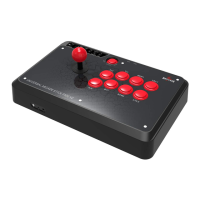
The Mayflash Arcade Stick F500V2 is a versatile fighting stick designed for an enhanced gaming experience across multiple platforms. This device is compatible with a wide range of systems, including Switch, PlayStation 4, PlayStation 3, Xbox Series S/X, Xbox One, Xbox 360, PC Windows, Android, macOS, Raspberry Pi, Steam, NEOGEO mini, SEGA MEGA DRIVE mini, and SEGA GENESIS mini. Its robust construction and customizable features make it an ideal choice for both casual and competitive gamers.
The Arcade Stick F500V2 offers comprehensive control with its joystick and eight function buttons (A/X, B/O, X/Π, Y/Δ, RB/R1, RT/R2, LB/L1, LT/L2). The stick's functionality can be switched between "Left Joystick" (LS), "POV" (DPAD), and "Right Joystick" (RS) modes, providing flexibility for different game types and player preferences.
A key feature is the TURBO function, which allows users to set individual buttons for rapid fire. There are two TURBO speeds available: 15 times per second (TURBO-1) and 25 times per second (TURBO-2). To activate TURBO for a button, simply press and hold the desired button along with the "TURBO" button on the stick. A flashing TURBO LED indicates that the setting is active. To remove the TURBO setting for a specific button, press and hold that button and the TURBO button again. All TURBO settings can be cleared by quickly pressing the TURBO button twice.
The device includes LED indicators to signify the current system mode:
The Arcade Stick F500V2 also supports headset functionality, allowing users to enjoy background music and online chat on PS4, Xbox Series X/S, Xbox One, and Xbox 360. For Xbox 360 consoles, it is important to connect the headset to the original wired Xbox 360 controller. A dedicated Mic Mute button is available on the front side of the stick, with an accompanying Mute LED to indicate microphone status.
For PC usage, the stick supports both XINPUT and DINPUT modes. The D-Pad and X/Y Analog Axis modes can be exchanged, offering further customization for PC gaming. The device also includes a vibration function, which can be experienced through a customized wrist strap (sold separately), adding an immersive tactile feedback to gameplay.
The fighting stick boasts a substantial build with rubber feet to ensure it stays firmly in place on hard, flat surfaces. Its construction includes two metal panels (metal cover and metal base), contributing to its weight and providing a solid, secure feel. The top panel is made of beautiful and strong acrylic, allowing for easy customization. The lever and buttons are designed and placed in an arcade-style layout, providing an authentic arcade experience.
Connecting the Arcade Stick F500V2 to various consoles is straightforward:
For optimal performance, it is recommended to use genuine Xbox or PlayStation controllers and quality certified USB cables when connecting them to the Arcade Stick. The device also transforms a wireless console controller into a wired controller when connected via a standard USB cable (except for Xbox 360, which requires an official wired controller).
The Mayflash Arcade Stick F500V2 is designed with future updates in mind. Mayflash regularly releases firmware updates to introduce new features, modifications, or improvements. Users can download the latest firmware from the official Mayflash website (www.mayflash.com).
The update process is user-friendly:
This ensures that the Arcade Stick F500V2 remains up-to-date with the latest functionalities and compatibility improvements, extending its lifespan and enhancing the user experience.
 General
| Type | Arcade Fight Stick |
|---|---|
| Connectivity | USB |
| Joystick | Sanwa Denshi joystick |
| Cable Length | 3 m |
| Turbo Function | Yes |
| Macro Function | Yes |
| Customizable Artwork | Yes |
| Touchpad | No |
| SOCD Cleaner | Yes |
| Compatibility | PC, PS3, PS4, Xbox One, Xbox Series X/S, Nintendo Switch |
| Buttons | 8 action buttons |
| Input | USB |
| Headphone Jack | Yes |

 To Next Page