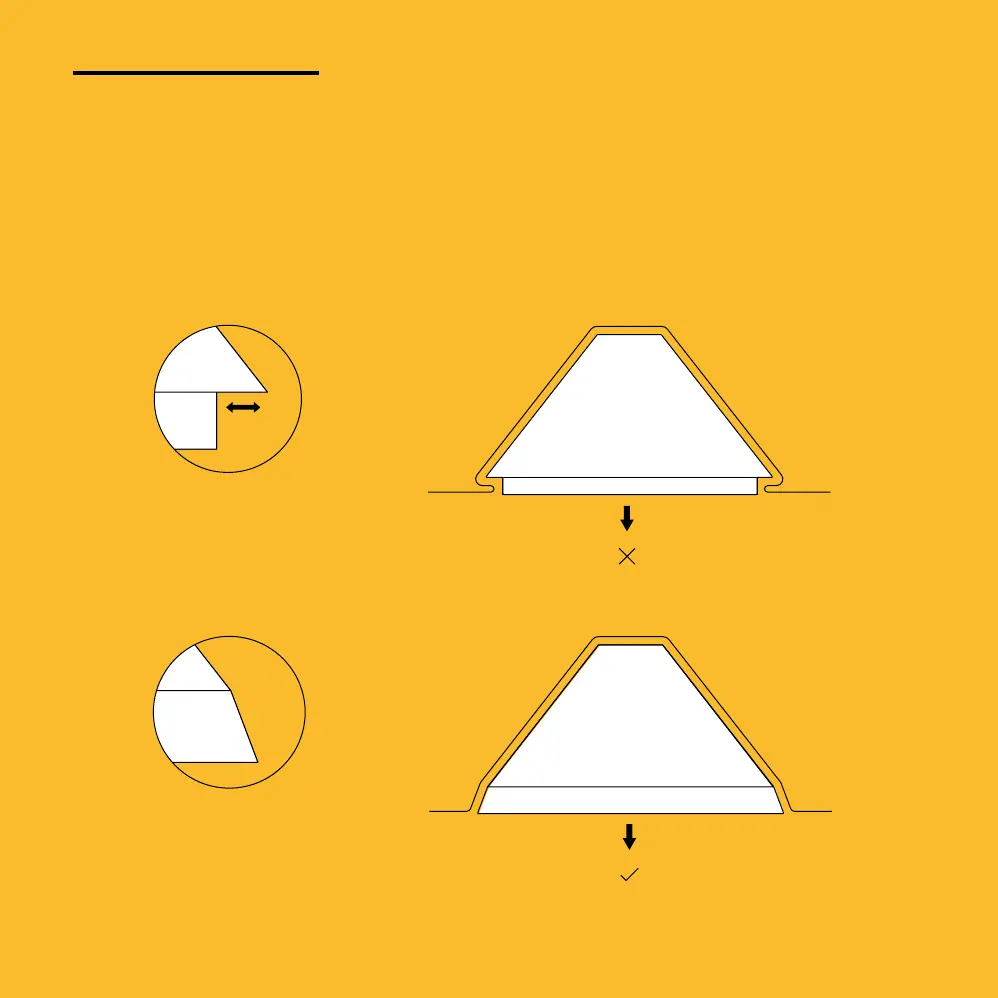
Rule #1
Remove all
undercuts
Undercuts make it difcult to remove
templates once they have been formed.
Make sure your design doesn’t have any
ledges or indents that could stop a template
from being removed.
Undercut
No undercut
34
UndercutsDraft Angles
Air Holes Tips
Ensure that your objects are as close to the center of the
vacuum plate as possible.
If you are placing multiple objects on the plate, ensure that you
leave at least 3cm between them. Leave more space for taller
or larger objects.
Generally, templates that you design for the FormBox should be
wider than they are tall. This ensures the sheet does not stretch
out too thin at the top.
When designing templates for the FormBox, try and avoid sharp
an gles less than 90 degrees. This can c
ause ‘webbing’, as the
sheet material can bunch and fold o
nto itself.
Your FormBox is great at picking up texture. Try experimenting
Don’t forget, if you need to turn the vacuum off in the middle of
suction, press the timer start button when the timer light turns
red to cut the power to the vacuum cleaner.
Visit www.make.mayku.me to learn even more about how
to use your FormBox in creative ways and share ideas with
your fellow makers!
design to the vacu um plate. This will help your Mayku Form
Sheet get into the tiniest of spaces.
been formed. Make sure your design doesn’t have any ledges
or indents that could stop a template from being removed.
Air FreeAir Blocked
UndercutsDraft Angles
Air Holes Tips
Ensure that your objects are as close to the center of the
vacuum plate as possible.
If you are placing multiple objects on the plate, ensure that you
leave at least 3cm between them. Leave more space for taller
or larger objects.
Generally, templates that you design for the FormBox should be
wider than they are tall. This ensures the sheet does not stretch
out too thin at the top.
When designing templates for the FormBox, try and avoid sharp
an gles less than 90 degrees. This can c
ause ‘webbing’, as the
sheet material can bunch and fold o
nto itself.
Your FormBox is great at picking up texture. Try experimenting
Don’t forget, if you need to turn the vacuum off in the middle of
suction, press the timer start button when the timer light turns
red to cut the power to the vacuum cleaner.
Visit www.make.mayku.me to learn even more about how
to use your FormBox in creative ways and share ideas with
your fellow makers!
design to the vacu um plate. This will help your Mayku Form
Sheet get into the tiniest of spaces.
been formed. Make sure your design doesn’t have any ledges
or indents that could stop a template from being removed.
Air FreeAir Blocked


 To Next Page
 Loading...