15
Installation and User Instructions14
Mayku Multiplier
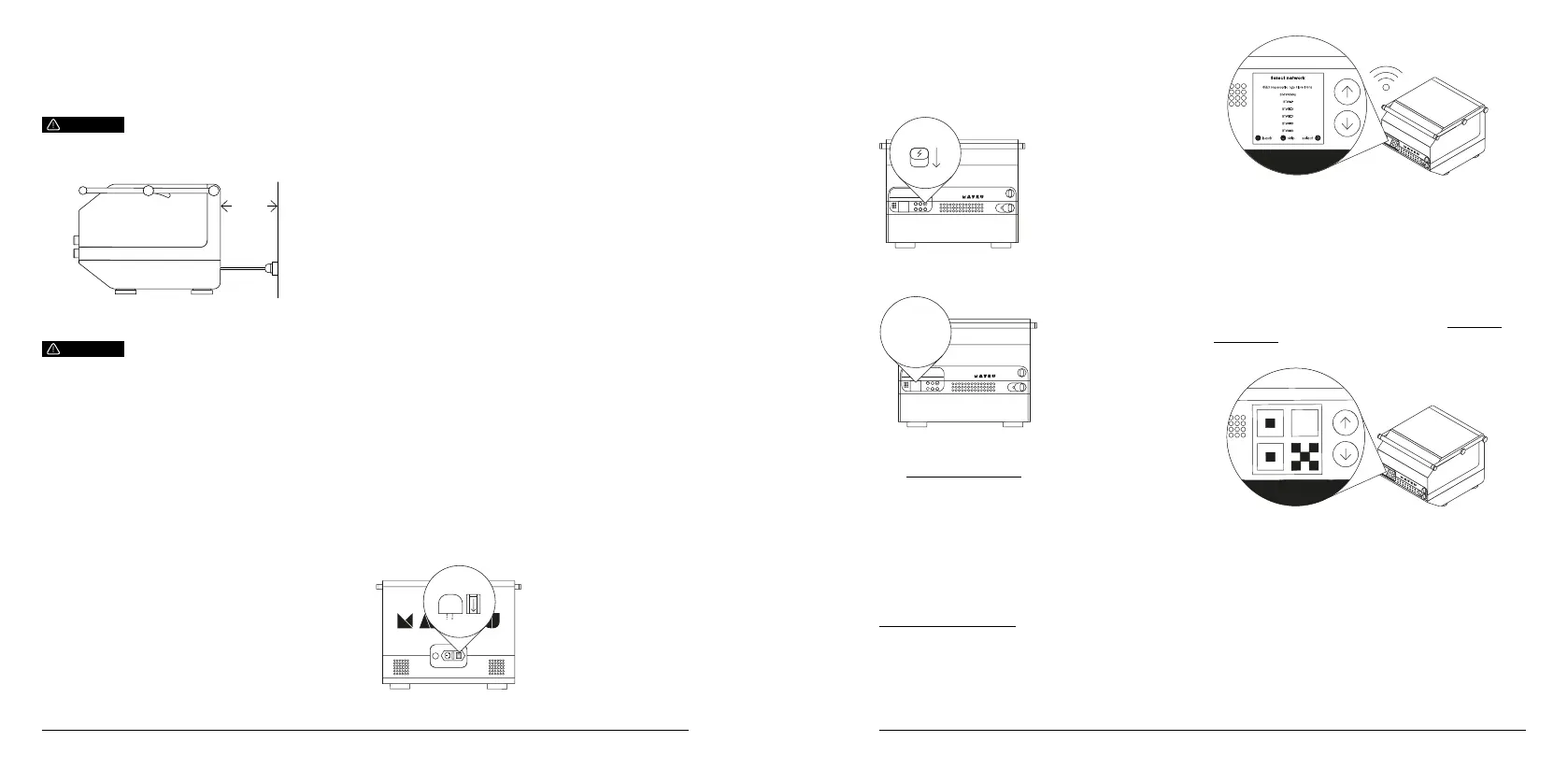
4.2.4. Minimum space required
The machine dimensions are:
585mm (L) x 515mm (W) x 420mm (H)
A minimum of 150mm is required behind the machine
to allow for cables and other accessories.
CAUTION
150mm
4.2.5. Installation of the Mayku Multiplier
Ensure that both safety release valves (located on
the bottom of the machine) are not blocked during
positioning.
No tools are required for installation.
To install the Mayku Multiplier:
1. Once the machine is in its nal position check
to ensure there is 150mm of space behind the
machine, and the safety release valves on the base
are not blocked.
2. Plug the machine in, ensuring that it is connected to
an outlet that is between 110-240V and can handle
the rated current depending on the region (12A
110V, 6A 240V).
CAUTION
4.2.6. Reduction of noise and vibrations
To reduce noise and vibrations:
1. Ensure the Multiplier is placed on a level and even
surface.
2. Ensure the work surface is of solid construction.
4.2.7. Stability of machinery
To ensure the stability of machinery:
1. Ensure the Multiplier is on a surface that is rated for
the weight of the machine.
2. All four feet shall be fully on the surface.
4.3. How to commission the Multiplier
4.3.1. Training of operators
It is the responsibility of the individual / company to
ensure all operators of the Multiplier have read and
agree to all sections of this user manual.
4.3.2. Commissioning the machinery
Regular maintenance should be carried out to
ensure smooth and safe operation of the Multiplier.
Maintenance can be found by going to Menu >
Maintenance on the machine. Employers shall
conduct a risk assessment and national requirement
to inform employees on hazards. Mayku will not be
held liable for any injuries caused by an unsafe work
environment due to not following these procedures.
5. Operation/use
5.1. How to use the Mayku Multiplier
5.1.1. Power on
Make sure that the mains cable is connected to the
machine, and turn the power switch to the ON position.
01
5.1.2. Turn on
Push the on/off button to the ON position to power up
the machine.
02
5.1.3. Follow on-screen instructions
03
5.1.4. Connecting to WiFi
The Multiplier can be updated wirelessly over WiFi.
This means we can add new material proles, new
functions and new accessories to your machine over
time.
For more information on connectivity, please visit:
compliance.mayku.me
For further guidance on using the Multiplier, please
visit: platform.mayku.me
5.1.5. Machine registration
Scan the QR code on the front of your quick start
guide to register and activate your machine, and gain
access to the Multiplier Academy — your community
hub of resources, projects and personalised help to
get the most out of your Multiplier.
You can also register any time by visiting: platform.
mayku.me. Or, you can scan the QR code that pops
up on your machine.
5.1.6. Starting/stopping the product’s operation
The machine can be stopped at any time during
forming by following the below:
• Hold the ‘X’ button
• Select ‘Abort’
To emergency shut down your machine, switch off the
machine at the mains, lower the lid and unlock both
locks.
5.1.7. Checks before using the machine


 To Next Page
 Loading...