DRIVER’S VIEW
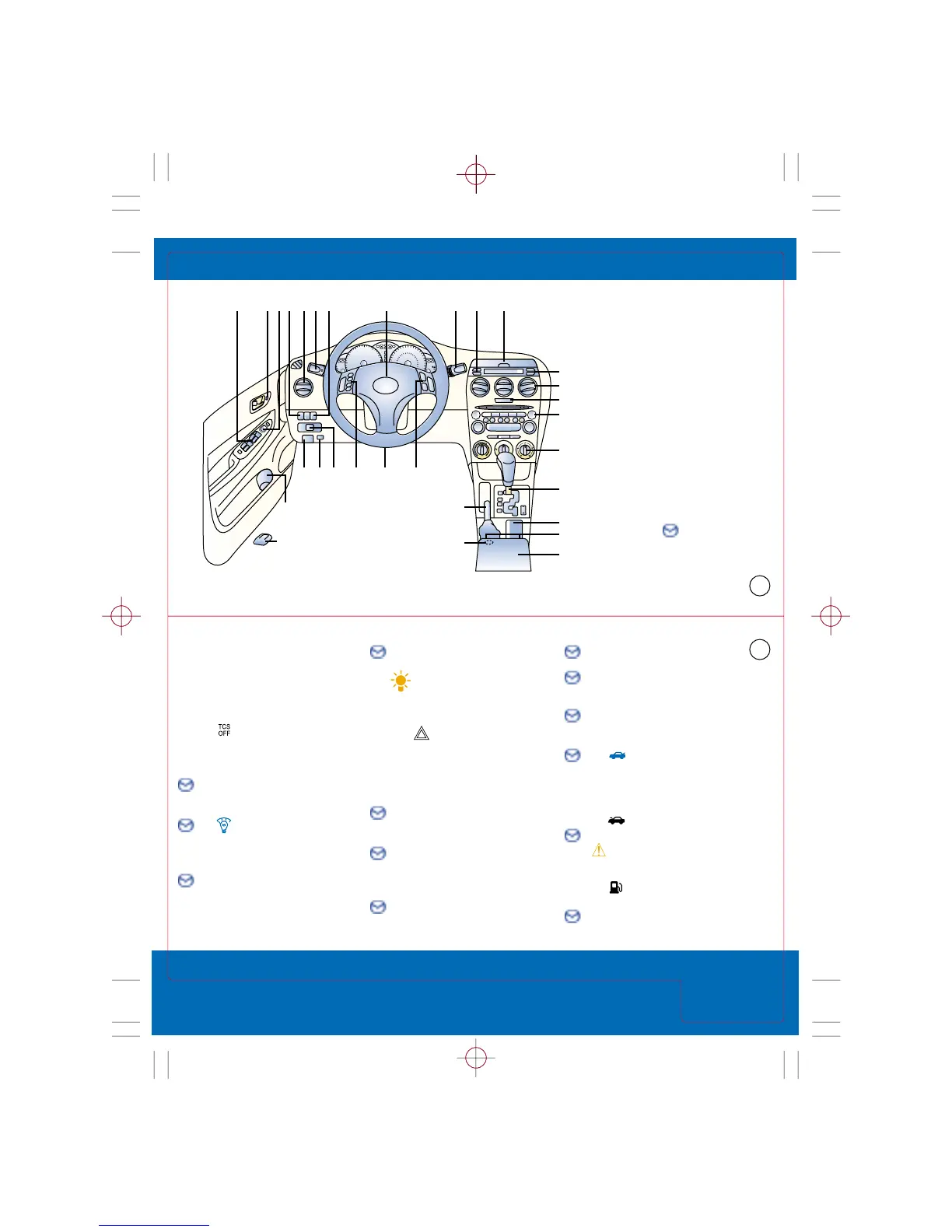
1. Power window switches,
see Switches
2. Power door locks,
see Locks
3. Dual power mirrors,
see Switches
4. Traction Control
System*,
see Driving Tips
5. Air vents
6. Turn signal/lighting
control lever,
see Driver Controls
7. Instrument
panel lighting,
see Getting Started
8. Horn/Air bag
9. Wiper/washer
control lever,
see Driver Controls
10. Storage
11. Information display,
see Owner’s Manual
Tip: Dimmer cancel
function increases display
intensity only when
headlights are on
12. Hazard warning
switch, Press on/off
13. Audio system,
see Audio Systems
14. Climate control panel,
see Climate Controls
15. Gearshift lever (A/T)*,
see Transmission
16. Cup holder
17. Heated seats*,
see Interior Lights/Console
18. Console,
see Interior Lights/Console
19. Accessory socket
20. Parking brake lever,
see Interior Lights/Console
21. Cruise control,
see Getting Started
22. Tilt/telescopic
steering-wheel lever,
see Getting Started
23. Audio control
switches*,
see Getting Started
24. Remote trunk-lid
release
Push to open trunk; main
switch in glove box must be
ON, see Getting Started
25. Hood release handle
26. Bottle holder
CAUTION: Use plastic bottles
with caps, cups may spill
when door is closed
27. Remote fuel-door
release
28. Clock/set buttons,
see Getting Started
Getting Started
Mazda6 Quick Tips
®
are
designed to quickly familiarize
you with some important
features of your Mazda6
This Driver’s View tab is your
index to the Quick Tips
®
, locate
the item you would like to
learn more about and then
turn to the listed tab
Be sure to see the tab called
Getting Started, this section
contains important operating
tips about your Mazda6
Items identified with
this symbol call out
important information
Driver’s
View
Quick Tips 2004 Mazda Mazda6 page 2
page 3



 To Next Page