Setup
1
31
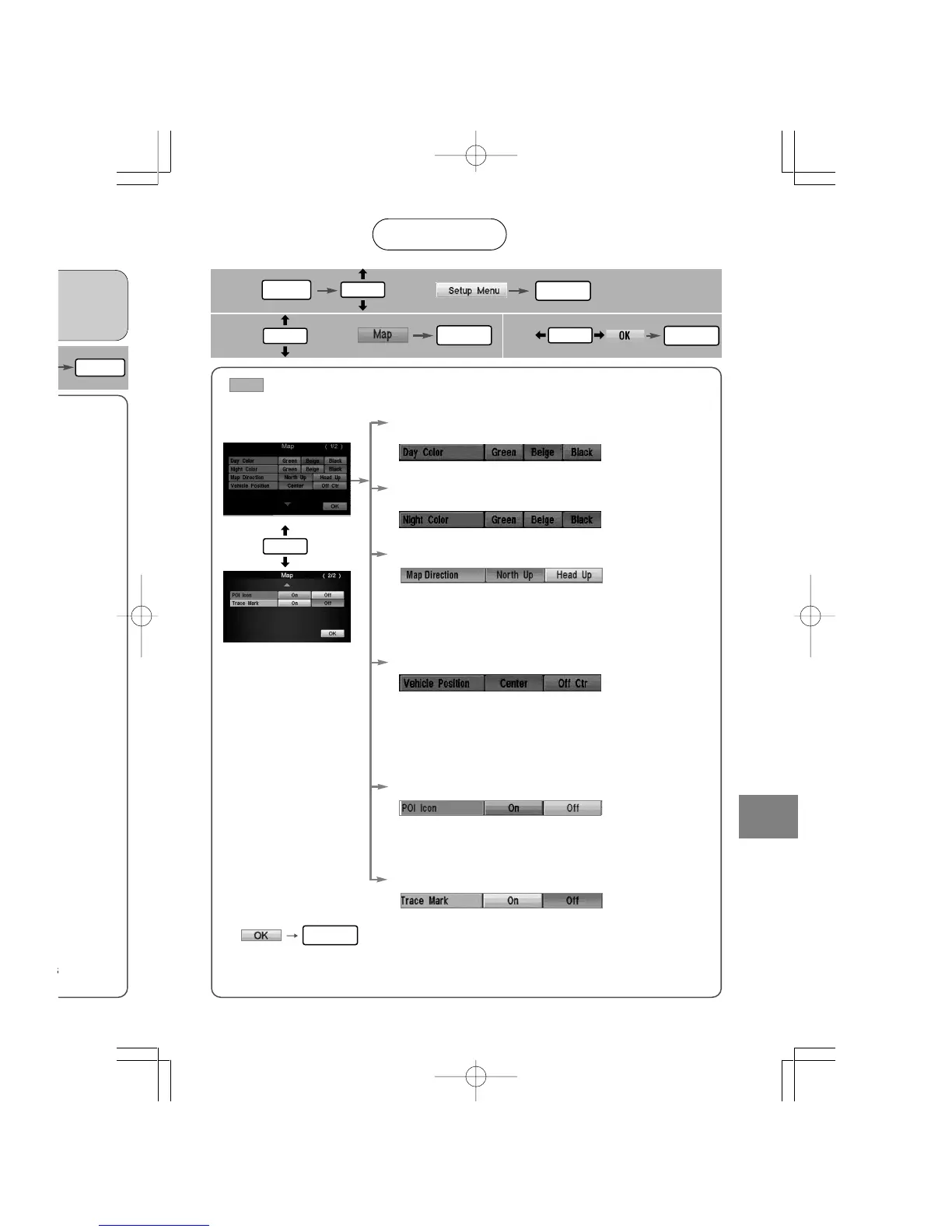
Open the [Map]
screen
Map
■ How to exit
■ Color (daytime)
■ Map Direction
●North Up : Geographic north is always up on the map.
●Head Up : The direction you are going is always up on the
map.
■ Vehicle Position
●Center : The current vehicle position indicator is displayed
in the center of the screen.
●Off Ctr : The current vehicle position indicator is displayed
at the bottom of the screen.
■ POI Icon
●On : POI icons appear in their marked positions.
●Off : POI icons do not appear in their marked positions.
■ Trace Mark
●On : The traced route is marked.
●Off : The traced route is not marked.
■ Color (nighttime)
User setting
: Default
select
3
select
2
MENU
ENTER
ENTER
ENTER
ENTER
ENTER
ENTER
ENTER
ENTER













 To Next Page