17
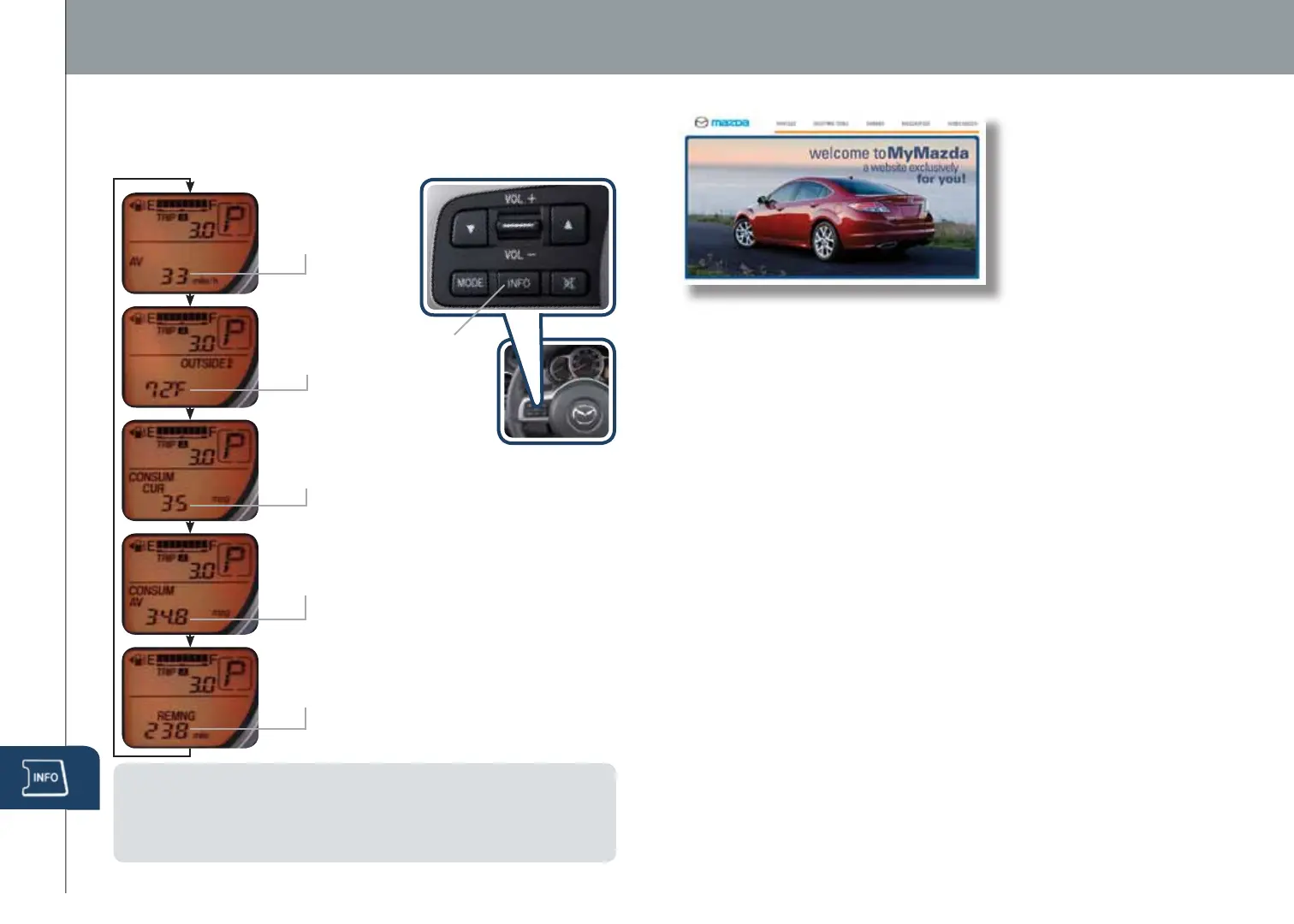
Information Display
MyMazda.com
—The Official Site
for Mazda Owners
•
Insider access to exclusive events and promotions
• Personalized maintenance schedules
• Zoom-Zoom Owner Magazine
•
Warranty information and on-line Owner’s Manuals
• Wallpaper, videos and other fun stuff
• Accessories specically designed for your vehicle
• Car Care Discount Coupons available from your Mazda Dealer
Visit and register at MyMazda.com today!
Roadside assistance is available 24 hours a day, 365 days a year.
Using the toll free phone number or iPhone APP (which uses
GPS-enabled technology to determine your exact location), will
put you in touch with a roadside assistance agent.
Phone: 1-800-866-1998
The APP can be downloaded, free of charge, by logging onto
http://mazda.crosscountry-auto.com/
After downloading APP, customer name, email, iPhone number
and VIN are required.
www.MazdaUSA.com
PERSONALIZE YOUR MAZDA2 WITH GENUINE MAZDA ACCESSORIES:
• Auto Dimming Rearview
Mirror with Compass
and HomeLink
®
• Cargo Net
• Roof Rack with available
attachments to transport
your bike, kayak,
surfboard, snowboard,
luggage and more
• Side Sill Extensions
• Tailpipe Finisher
• Mazda2 or Zoom Zoom
License Plate Frame
• Wheel Locks
• Fog Lights
• Splash Guards
• All Weather Floor Mats
• Rear Bumper Guard
• 3.5mm Audio Cable
• Portable Navigation
Devices by Garmin
• Motorola T305 Bluetooth
Calling Device
• First Aid Kit
• Roadside Assistance Kit
Register today on MyMazda.com
—the ultimate destination for
Mazda Owners. Once registered,
you’ll be able to take advantage
of benets exclusively for
Mazda Owners:
INFO
Push INFO button (optional) on steering wheel to display the following (actual
text information will vary on your vehicle):
• Average MPH (AV)
• Outside Temp
(OUTSIDE)
• Consumer Current MPG
(CONSUM CUR)
• Consumer Avg MPG (CONSUM AV)
• Remaining Miles (REMNG)
NOTE:
• To clear Average MPH or Consumer Avg MPG, push and hold INFO button
when selected screen is displayed.
• To change the ambient temperature display between °F and °C or vice versa,
push and hold INFO button for three seconds when Outside Temp is displayed.
INFO
Button
280334_11a_Mazda2_SSG_052010.indd 17-18 5/20/10 11:45 AM



 To Next Page