54
BLUETOOTH
®
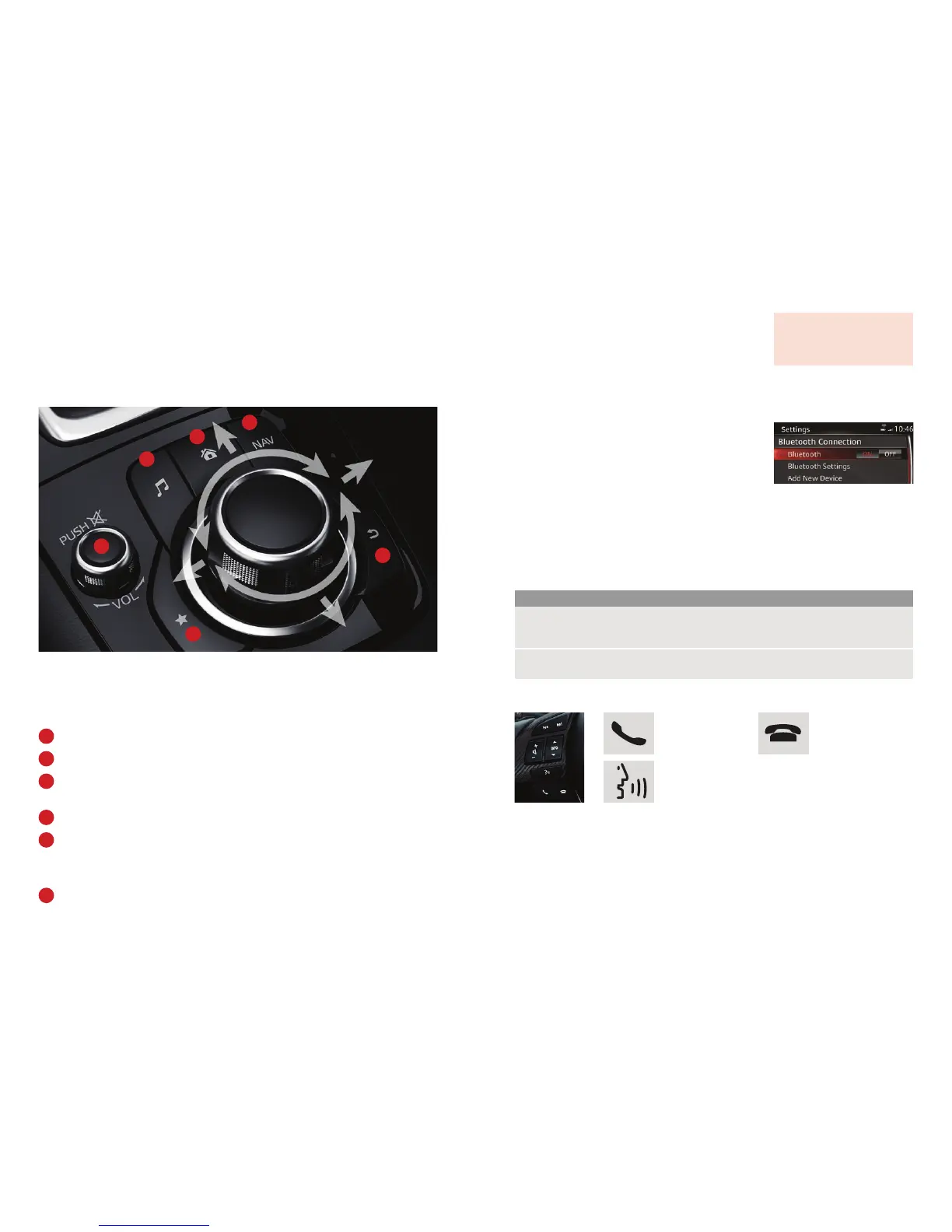
The Multimedia Commander is used to control all of the functions of the infotainment
and connectivity system and can be moved left/right/up/down as well as turning to navigate
through the menus.
Press the commander button to select a feature or enter a command.
Entertainment – access the audio menu.
Home – return to the main menu screen.
Navigation – access the navigation menu.
(where navigation is not fitted a GPS location screen will be displayed)
Volume – Turn to adjust volume. Push down to mute audio.
Favourites – access your stored favourites:
50 radio stations across AM/FM
50 contacts
50 navigation points (where navigation is fitted).
Back – returns to previous screen.
PAIRING YOUR BLUETOOTH
®
PHONE OR AUDIO DEVICE
1. Turn on Bluetooth
®
on your phone or audio device and
ensure it is visible to other devices
2. Select Communication from the Home screen
3. If no phone is currently connected to the system it will
automatically prompt to connect a device. Select Connect
4. Ensure Bluetooth
®
is turned ON at the top of the menu
5. Select Add New Device
6. On your phone or audio device, perform a search for Bluetooth
®
devices
7. Select “Mazda” from the device list on your phone or audio device
8. If required, enter the pairing code shown on the vehicle display, or simply confirm that the
code shown matches the one shown on the display by pressing Yes or OK
9. Press Yes on the car’s screen to confirm
10. Phone or device is now connected.
STEERING WHEEL-MOUNTED BLUETOOTH
®
CONTROLS
MAKING/RECEIVING A TELEPHONE CALL
1. To make a call, either use the TALK button and say a command such as “Call Matt at home”,
access the Communication menu, or you could access one of your favourite contacts from the
Favourites menu (see next page)
2. To make a call via the Communication menu, select Contacts and scroll to the desired contact
3. Select the contact and desired telephone number if more than one number is available
4. To end a call, press the End Call button on the screen or steering wheel.
Please note:
Phones compatible with sharing contacts, call history or text messaging may require permission to be
given on the phone for these functions. This will depend on the mobile device. Please refer to your phone’s
instruction manual for information.
To enable text message notifications when using an iPhone
®
, please ensure that Show Notifications is set
to On within the Bluetooth
®
settings for the Mazda connection on your phone.
MULTIMEDIA
COMMANDER
To make or
accept a call.
To end or reject
a call.
TALK button. Use to input a voice control command.
Press again to skip voice guidance and speak next command.
3
1
2
3
4
5
6
2
1
4
5
6
ENTER
For more information regarding
Bluetooth
®
, including a list of
compatible devices, please visit
mazda.co.uk/mazda3/connectivity



 To Next Page