Black plate (194,1)
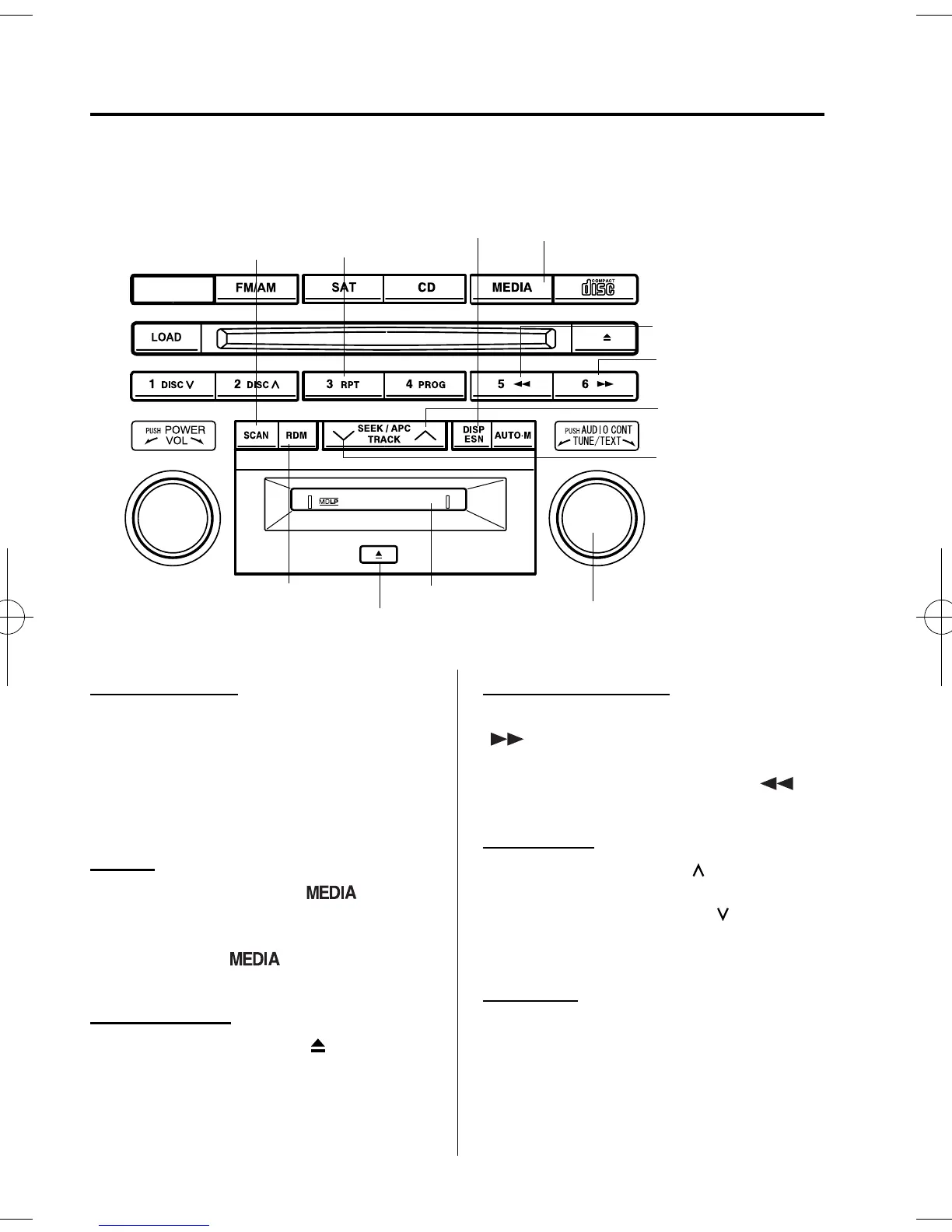
qOperating the Mini Disc (MD) Player
í
Repeat button
MD play button
Scan button
MD slot
Track up button
Track down button
Reverse button
MD eject button
Random button
Display feed dial
Display button
Fast-forward
button
Inserting the MD
Insert the MD, label-side up with the
arrow pointed to the slot. The auto-
loading mechanism will set the MD and
begin play. There will be a short lapse
before play begins while the player reads
the digital signals on the MD.
Playing
Press the MD play button (
) to start
play when a MD is in the unit.
If there isn't a MD in the unit when the
MD play button (
) is pressed,
“NO DISC” will flash on and off.
Ejecting the MD
Press the MD eject button (
) to eject the
MD.
Fast-forward/Reverse
Press and hold the fast-forward button
(
) to advance through a track at high
speed.
Press and hold the reverse button (
)
to reverse through a track at high speed.
Track search
Press the track up button (
) once to skip
forward to the beginning of the next track.
Press the track down button (
)onceto
skip back to the beginning of the current
track.
Music scan
This feature helps to find a progra m by
playing about the first 10 seconds of each
track.
6-36
Interior Comfort
í
Some models.
Audio System
Mazda5_8U38-EA-05D_Edition1 Page194
Monday, March 28 2005 2:20 PM
Form No.8U38-EA-05D





 To Next Page