16
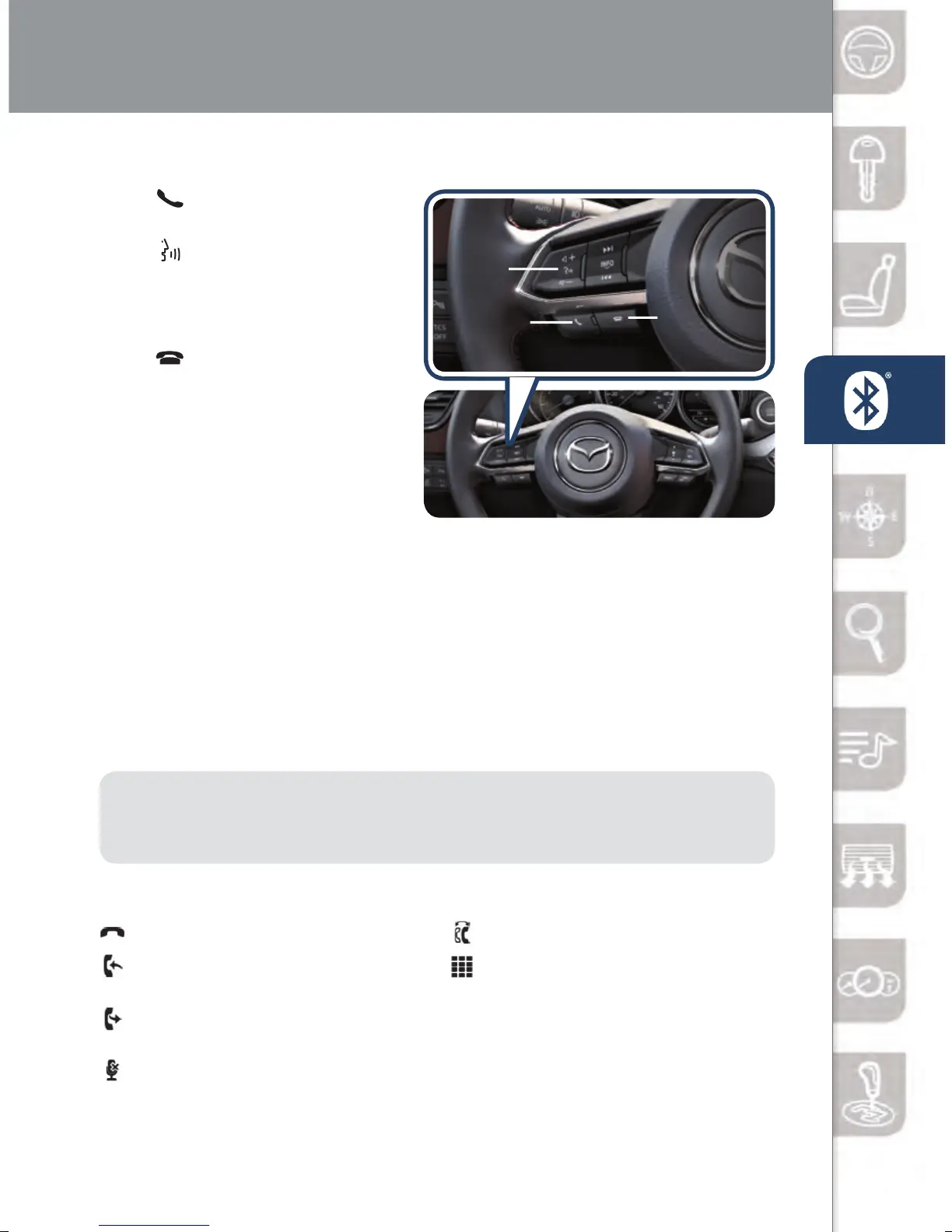
TO MAKE OR RECEIVE A HANDS-FREE CALL
Push
button: To receive/
swap a call.
Push
button: To talk.
• To start voice recognition session.
• To skip system’s lady
voice guidance.
Push
button: To hang up.
• To end voice recognition session
(this button is also used to hang
up call).
Automatic Bluetooth
Reconnection:
• On engine start, the last
connected device will automatically be re-connected after several seconds.
• To switch phones, go to Device Settings and select Bluetooth.
For a stable Bluetooth connection:
• Make sure there is no metal object nor any obstacle blocking Bluetooth
signal between vehicle’s display and your mobile device.
• Turn OFF unnecessary applications on your mobile device. When your
mobile device is busy, it often drops Bluetooth connection.
• Turn OFF energy saving mode on your mobile device.
PAIRING YOUR BLUETOOTH
®
PHONE OR AUDIO DEVICE
(if equipped)
NOTE: Some phone models do not support all features. If your phone or
device does not pair, please visit www.mazdausa.com/mazdaconnect or contact
(800) 430-0153 for further assistance or to report a phone/audio device concern.
The following icons are displayed on the touchscreen during a call:
Ends a call.
Transfers a call from hands‐
free to the mobile phone.
Transfers a call from the
mobile phone to hands‐free.
Mutes the microphone.
Switches the call on hold.
Allows transmitting DTMF (Dual
Tone Multi‐Frequency) signal via
the numerical keypad (generally
to a home telephone answering
machine or an automated
guidance call center).
HANG UP
TALK
Receive
/Swap


 To Next Page