JOBNAME: No Job Name PAGE: 28 SESS: 1 OUTPUT: Thu Sep 15 08:22:27 2005
/ford_pdm/ford/own2002/mbs/og
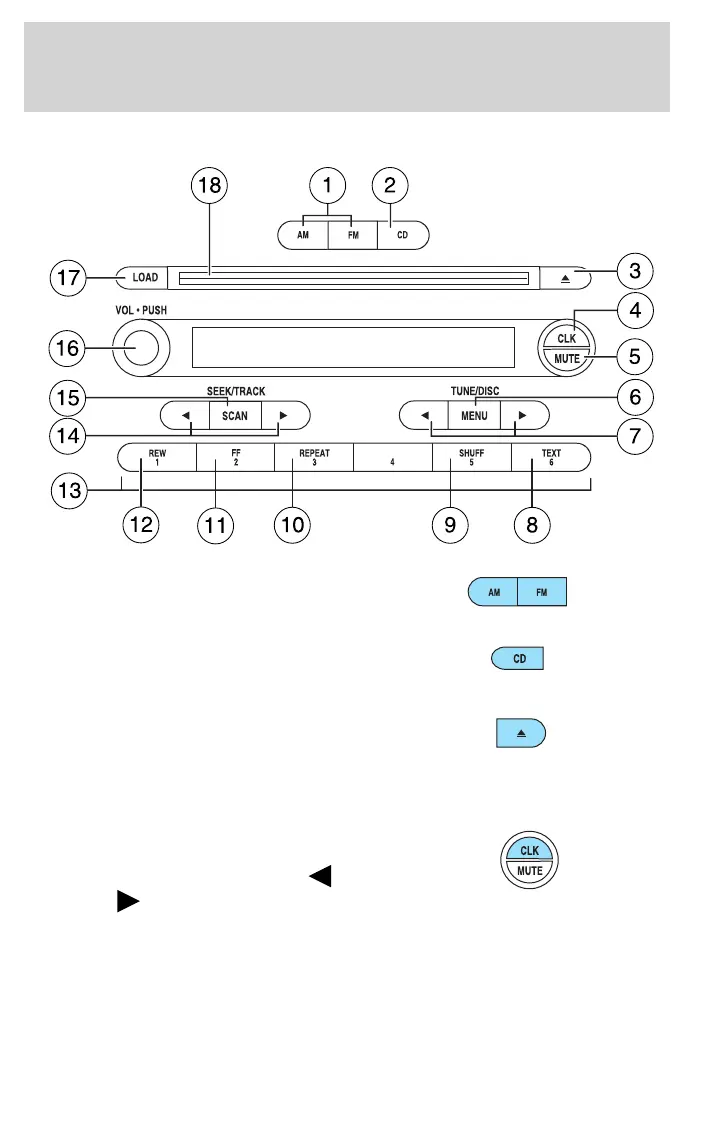
Premium in-dash CD6/MP3 disc audio system
1. AM/FM: Press to select
AM/FM1/FM2 frequency bands.
2. CD: Press to enter CD mode. If
a CD is already in the system,
the disc will start playing.
3. EJ (CD eject): To eject an
individual CD, press CD and
select the correct slot number
by pressing the memory preset buttons. Press and hold EJ to eject
all loaded CDs.
4. CLK (Clock): Press CLK until
SELECT HOUR or SELECT
MINUTE is displayed. Press
MENU to adjust the
hours/minutes. Press CLK to display the time when the ignition is
off.
CIMS #1273156
com_premcd.mbs
itdseq=25
art=rancf844_a
art=rancf825_a
art=rancf837_a
art=rancf827_b
art=rancf833_a
REVIEW COPY ——
2006 B-Series (mbs), Owners Guide (post-2002-fmt) (own2002), Market: USA (fus)
PAGE: 28 OP: root EDIT SESSION: 1 DATE: SEPT 15 2005 at 8:21
JOB: @ibm2/ford_pdm/CLS_ford/GRP_own2002/JOB_mbs/DIV_og
Entertainment Systems
28









 To Next Page