Black plate (210,1)
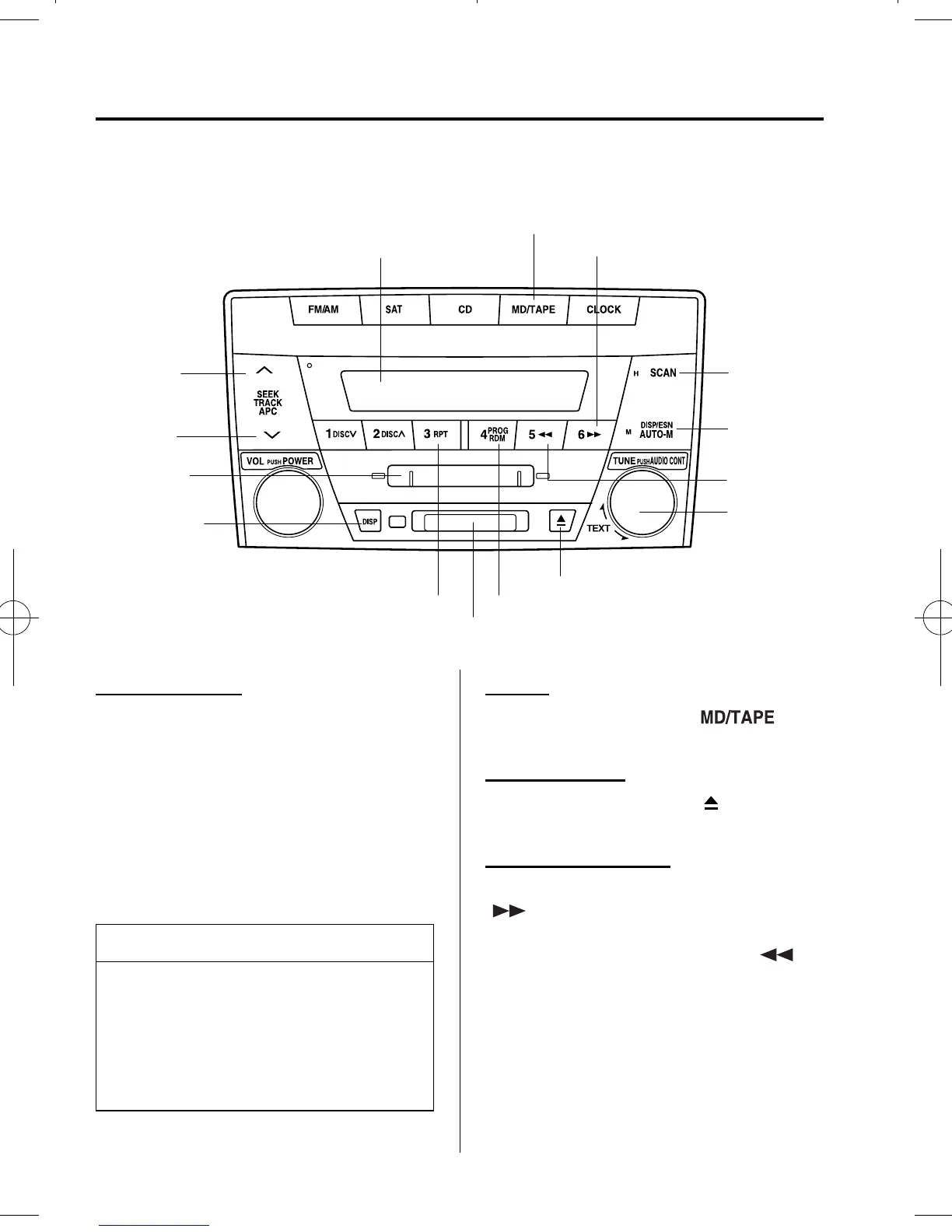
qOperating the Mini Disc (MD) Player
í
MD play button
Random buttonRepeat button
Fast-forward button
MD slot
MD eject button
MD dis
la
Main display
Display
feed dial
Display
button
Scan
button
Reverse
button
MD display
button
Track down
button
Track up
button
Inserting the MD
Insert the MD, label-side up with the
arrow pointed to the slot. The auto-
loading mecha nism will set the MD and
begin play. There will be a short lapse
before play begins while the player reads
the digital signals on the MD.
The track number and the elapsed play
back time for the current track will be
displayed on the display.
NOTE
When the clock is displayed, the
elapsed play back time will not be
displayed. To display the elapsed play
back time, turn the audio control dial to
the right. Turn the dial to the left to
return to the previous display.
Playing
Press the MD play button (
)to
start playing when a MD is in the unit.
Ejecting the MD
Press the MD eject button (
) to eject the
MD.
Fast-forward/Reverse
Press and hold the fast-forward button
(
) to advance through a track at high
speed.
Press and hold the reverse button (
)
to reverse through a track at high speed.
6-32
Interior Comfort
í
Some models.
Audio System
Mazda MPV_8U62-EC-05G_Edition1 Page210
Monday, July 4 2005 10:10 AM
Form No.8U62-EC-05G



 To Next Page