▼
Trac Sign Display Indication
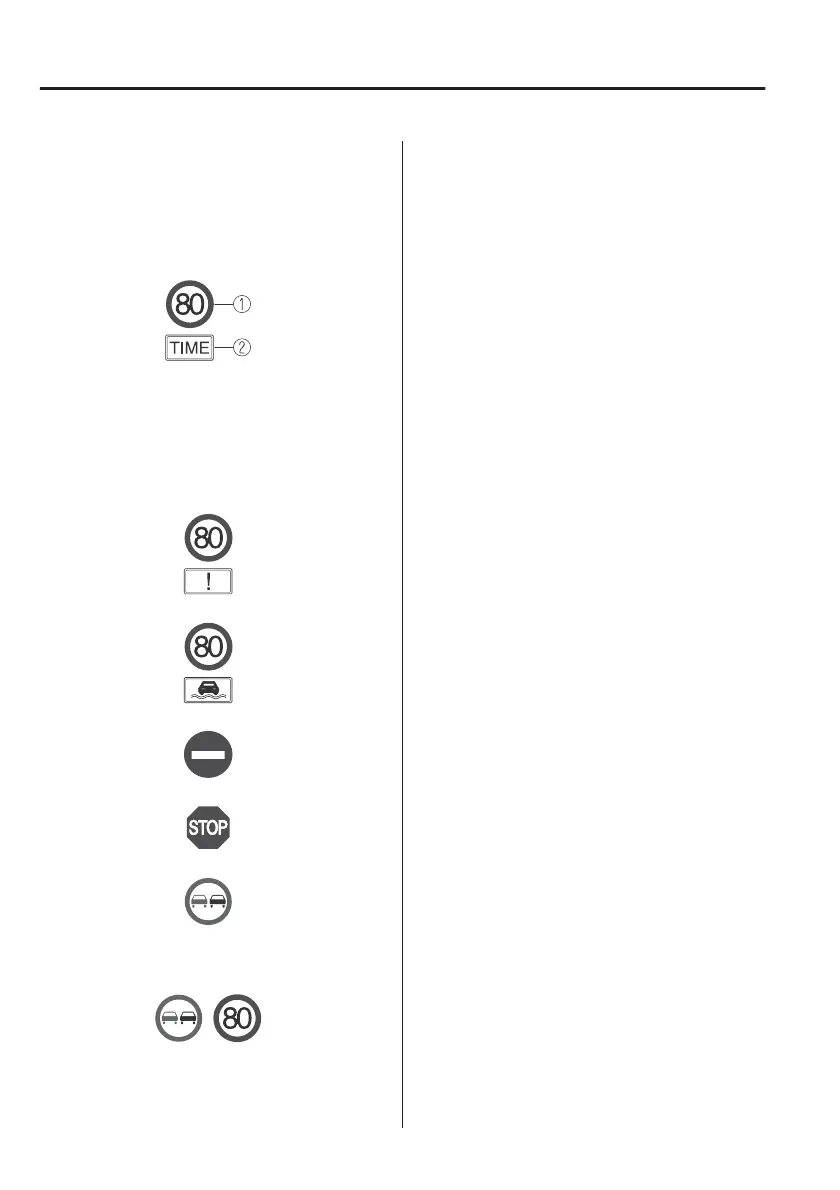
The following trac signs are displayed
on the active driving display/
instrument cluster.
Speed limit signs (including auxiliary
signs)
1. Speed limit signs
2. Auxiliary sign (example)
If the Forward Sensing Camera (FSC)
cannot classify an auxiliary sign (such
as time restrictions, turning
restrictions, end of section) correctly,
the following screen is displayed.
Inclement weather speed limit sign
*
Do not enter signs
Stop signs
Passing prohibited sign
*
The TSR can display a passing
prohibited sign and a speed limit sign
at the same time.
NOTE
Speed limit signs (including auxiliary
signs)
x
When the vehicle speed is about 1
km/h (0.6 mph) or faster, the speed
limit sign is displayed when any one
of the following conditions are met.
x
The Forward Sensing Camera (FSC)
recognises a speed limit sign as a
sign targeted for your vehicle and
the vehicle passes it.
x
The speed limit sign stored in the
navigation system is read.
x
Inclement weather speed limit signs
are displayed when all of the
following conditions are met.
x
The vehicle speed is about 1 km/h
(0.6 mph) or more.
x
The Forward Sensing Camera (FSC)
recognises an inclement weather
speed limit sign as a sign targeted
for your vehicle and the vehicle
passes it.
x
The inclement weather speed limit
sign is lower than the currently
displayed speed limit sign.
x
The windscreen wipers are
operated.
x
In the following cases, display of the
speed limit sign stops.
x
Each sensor determines that the
vehicle has changed direction of
travel. (The display of a speed limit
sign does not stop even if the
vehicle changes lanes while a
"ZONE" auxiliary sign is
displayed.)
x
The Forward Sensing Camera (FSC)
recognises a new speed limit sign
which diers from the previous
one (displays the new speed limit
sign).
When Driving
i-ACTIVSENSE
4-100
*Some models.



 To Next Page