x
There is a problem with the stop hold control function.
Setting the vehicle speed
1. Press the CTS switch to turn the system on.
2. Accelerate the vehicle until it reaches the desired speed using the accelerator
pedal and press the RES switch up (SET+) or down (SET) to set the speed.
NOTE
x
When the system is turned on, the CTS standby indication (white) turns on and the
CTS display indication is displayed on the multi-information display and the active
driving display.
x
When the vehicle speed is set, the set vehicle speed is displayed on the displays
and the CTS standby indication (white) changes to the CTS set indication (green)
x
The minimum speed setting is 30 km/h (19 mph).
x
When the CTS switch is pressed while the Mazda Radar Cruise Control with Stop
& Go function (MRCC with Stop & Go function) system is operating, the MRCC
with Stop & Go function switches to the CTS. In addition, when the MRCC switch
is pressed while the CTS is operating, the CTS switches to the MRCC with Stop &
Go function.
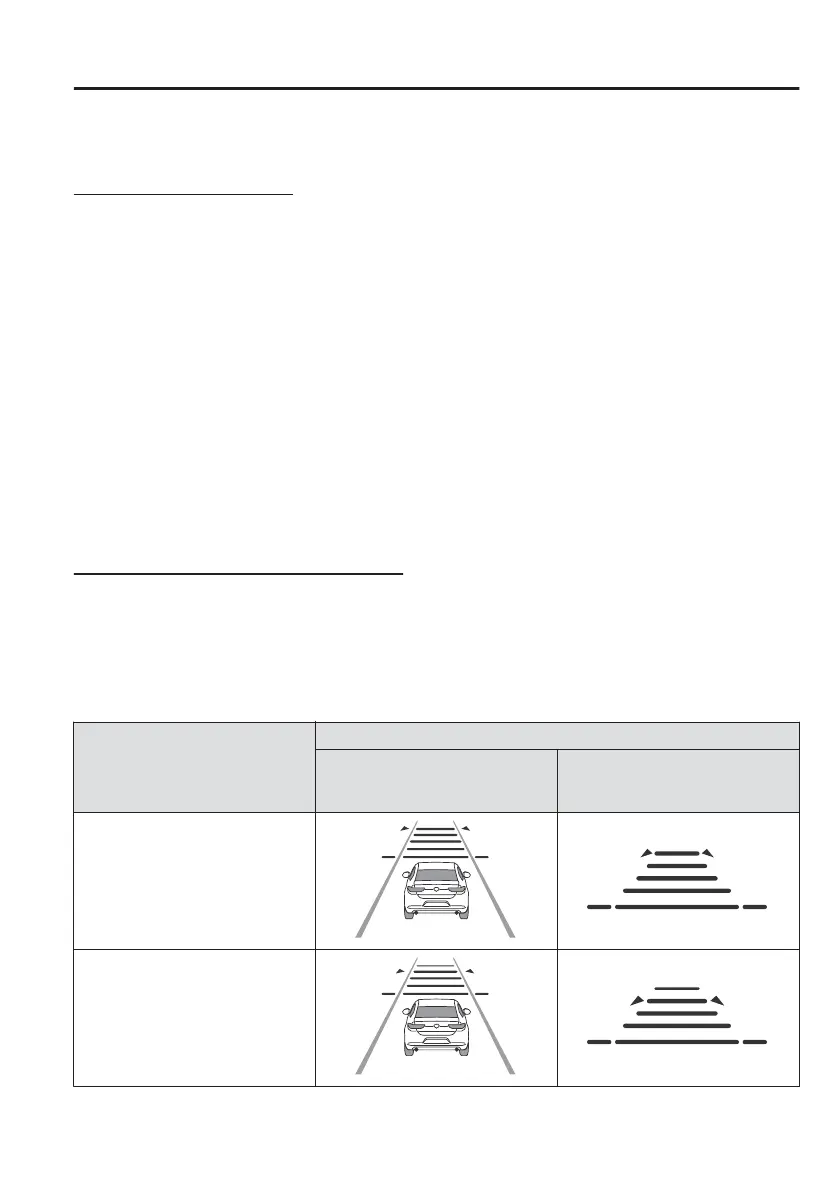
Setting the distance between vehicles
The distance between vehicles is set to a shorter distance by pressing the CANCEL
switch down, and to a longer distance by pressing the CANCEL switch up. The
distance between vehicles can be set to 4 levels: Long, medium, short, and
extremely short distance.
The distance between vehicles increases or decreases depending on the vehicle
speed.
Distance-between-vehicles
guideline
(at 80 km/h (50 mph) vehicle
speed)
Indication on display
Indication on multi-information
display
Indication on active driving dis-
play
*1
Long (about 50 m (164 ft))
Medium (about 40 m (131 ft))
When Driving
i-ACTIVSENSE
4-129



 To Next Page