▼
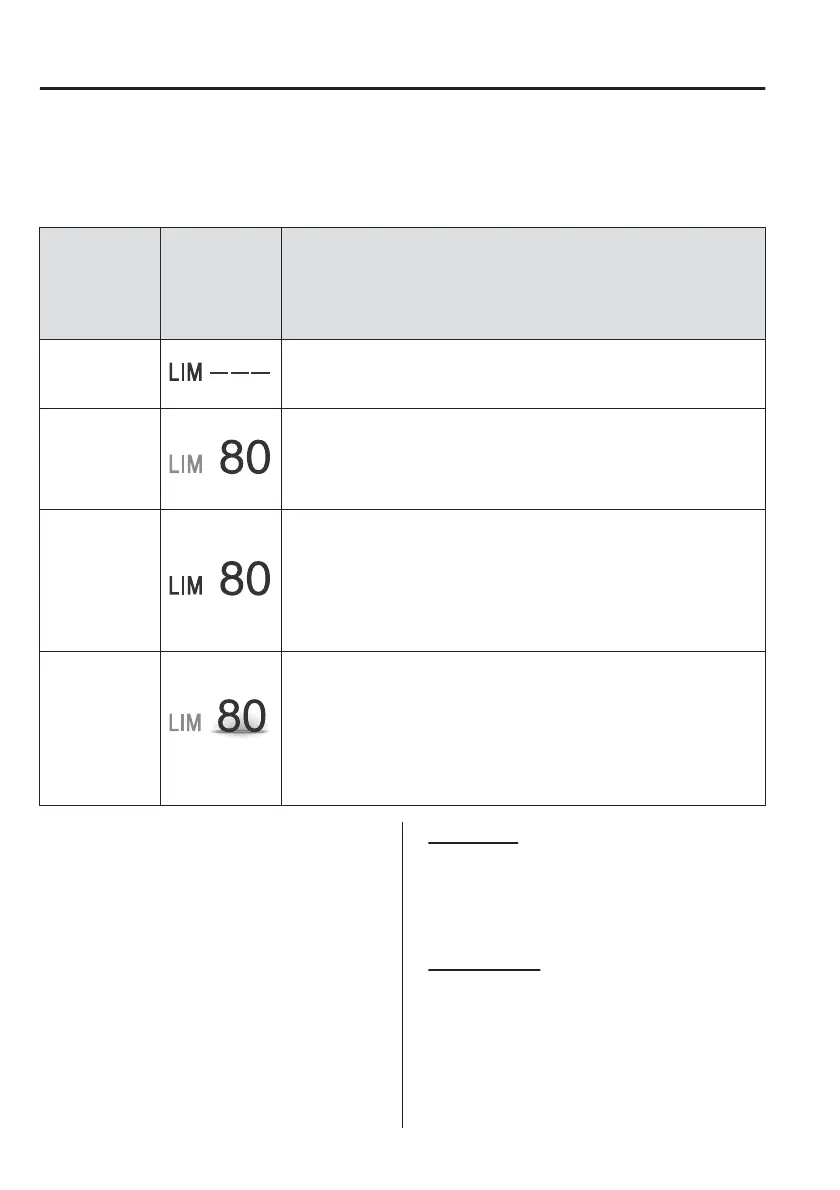
Intelligent Speed Assistance (ISA) Display
The setting status of the ISA is displayed in the active driving display or the display in
the instrument cluster.
Status
Indication on
multi-informa-
tion display/
active driving
display
Explanation
Stand-by dis-
play
Displays when the speed limiter switch is operated and the system
is turned on.
Turns o when the system is turned o.
Setting display
Displays when any of the following operations is done and the
speed is set.
x
SET
or SET+ switch is operated.
x
RES switch is operated (while the ISA set indication is displayed.)
Cancel display
Displays when any of the following operations is done and the sys-
tem is temporarily cancelled.
x
CANCEL switch is operated
x
Accelerator pedal is depressed fully
x
Any door is opened
x
The driver’s seat belt is unfastened
Warning display
If the vehicle speed exceeds the set speed by about 5 km/h (3
mph) or more, the ISA display
flashes.
The display flashes until the vehicle speed decreases to the set
speed or less.
A warning beep is activated at the same time as the warning dis-
play.
Refer to Speed Limiter Warning Beep on page 7-53.
▼
Activation/Deactivation
NOTE
When the power switch is switched
o,
the system status before it was
turned o is maintained.
For example, if the power switch is
switched o while the ISA is operating,
the system will be operable when the
power switch is switched ON the next
time.
Activation
Press the LIM switch to activation the
system. The ISA screen is displayed,
and the ISA standby indication displays
in white.
Deactivation
Press the LIM switch again to
deactivation the system. The ISA screen
is no longer displayed and the ISA
indication does not display.
When Driving
i-ACTIVSENSE
4-144



 To Next Page