▼
Switching to the Rear View Monitor Display
The system switches to the rear view monitor when the power switch is switched
ON and shifting the selector lever to the reverse (R) position.
NOTE
When the selector lever is shifted from reverse (R) position to another selector lever
position, the screen returns to the previous display.
▼
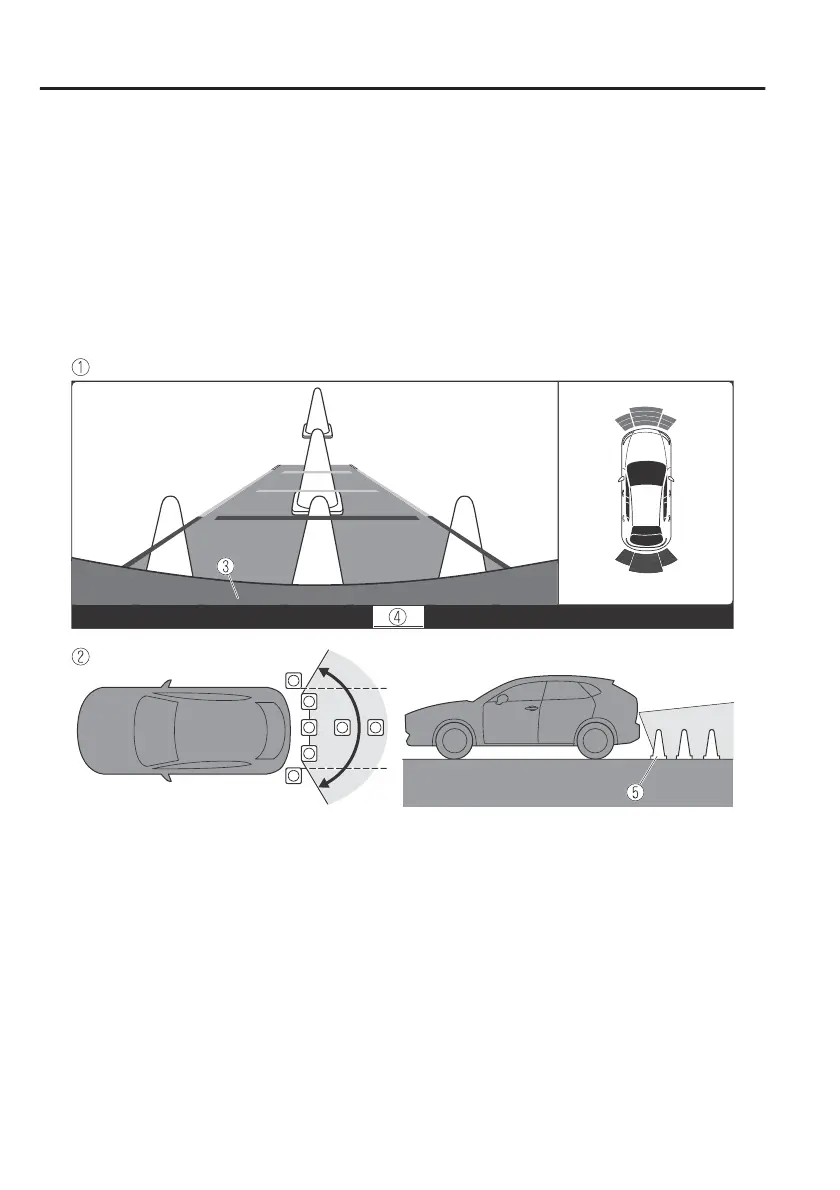
Displayable Range on the Screen
The images on the screen may be dierent from the actual conditions.
1. (Screen display)
2. (Actual view)
3. Bumper
4. “Check surroundings for safety.” message is displayed
5. Object
NOTE
x
The displayable range varies depending on the vehicle and road conditions.
x
If the camera lens is touched or there is any dirt on it, it could
aect
the screen
image. Wipe the lens using a soft cloth.
x
The displayable range is limited. Objects under the bumper or around the bumper
ends cannot be displayed.
x
The distance appearing in the displayed image is
dierent
from the actual distance
because the rear view parking camera is equipped with a specific lens.
When Driving
Rear View Monitor
4-200



 To Next Page