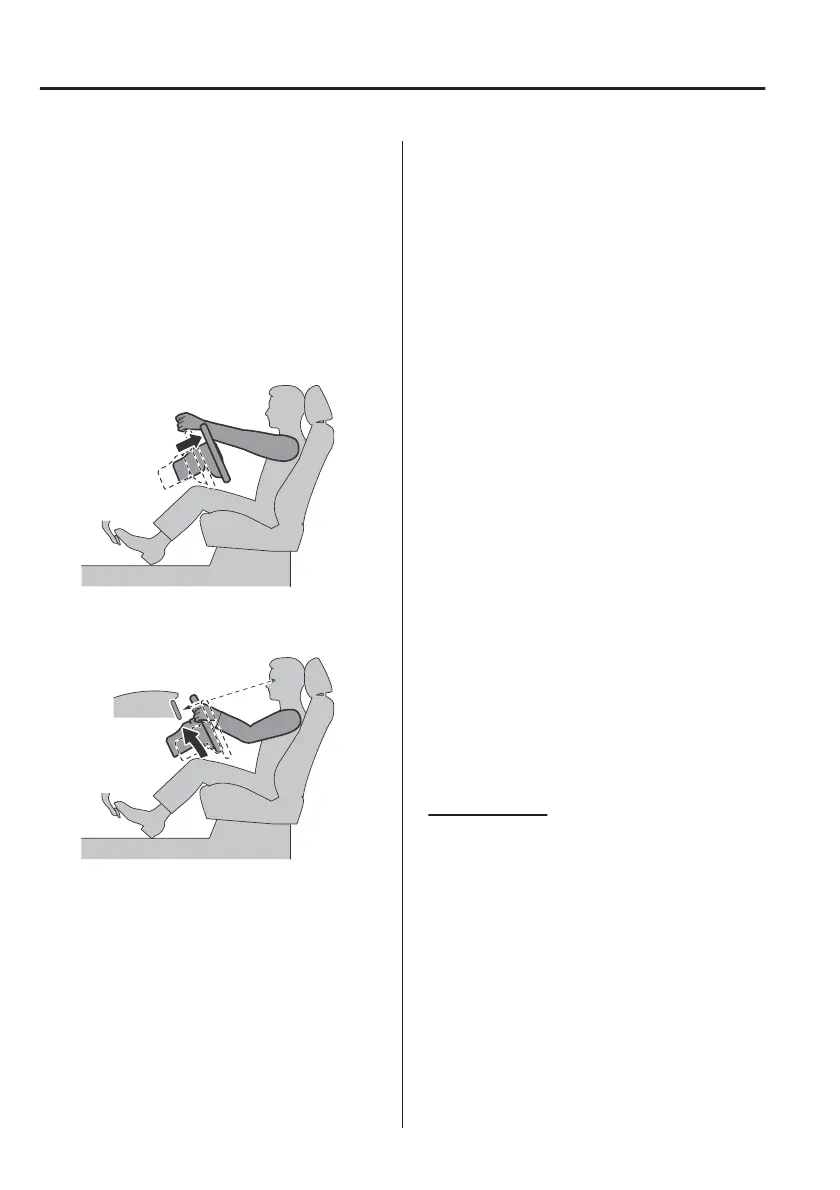
Adjusting the steering wheel position
Adjust the steering wheel to the
position where it can be operated
easily and the gauges can be viewed
easily.
1. With your back resting against the
seatback, extend both arms, place
them on the top of the steering
wheel, and pull the steering wheel
towards you to the position of your
wrists.
2. Adjust the steering wheel height so
that the gauges can be viewed
easily.
3. Raise the lever to securely lock the
steering wheel.
Adjusting the head restraint position
To prevent shock to the head and
neck, adjust the head restraints to their
correct positions.
Refer to Height Adjustment on page
2-19.
▼
Driving Position Memory (Power
Seat)
The desired driving position can be
called up after programming the
position.
The following driving positions can be
programmed.
x
Driver’s seat position (seat slide,
height adjustment, front edge of seat
bottom, seat recline)
Refer to Adjusting the Driver's Seat
on page 2-4.
x
Active driving display (display
position, brightness level, display
information)
Refer to Active Driving Display on
page 4-27.
x
Outside mirror angle
Refer to Outside Mirrors on page
3-51.
A driving position can be programmed
to the following parts.
x
Position memory switch
x
Transmitter used for vehicle
NOTE
x
Lumbar support adjustment cannot
be programmed.
Programming
1. Make sure the parking brake is on.
2. Make sure the selector lever is in
the P position.
3. Switch the power switch ON.
4. Adjust the following parts to the
desired conditions.
x
Driver's seat
x
Active driving display
x
Outside mirrors
Essential Safety Equipment
Seats
2-10



 To Next Page