DRIVER’S VIEW
Always check the Owner’s Manual for more operating information and safety features
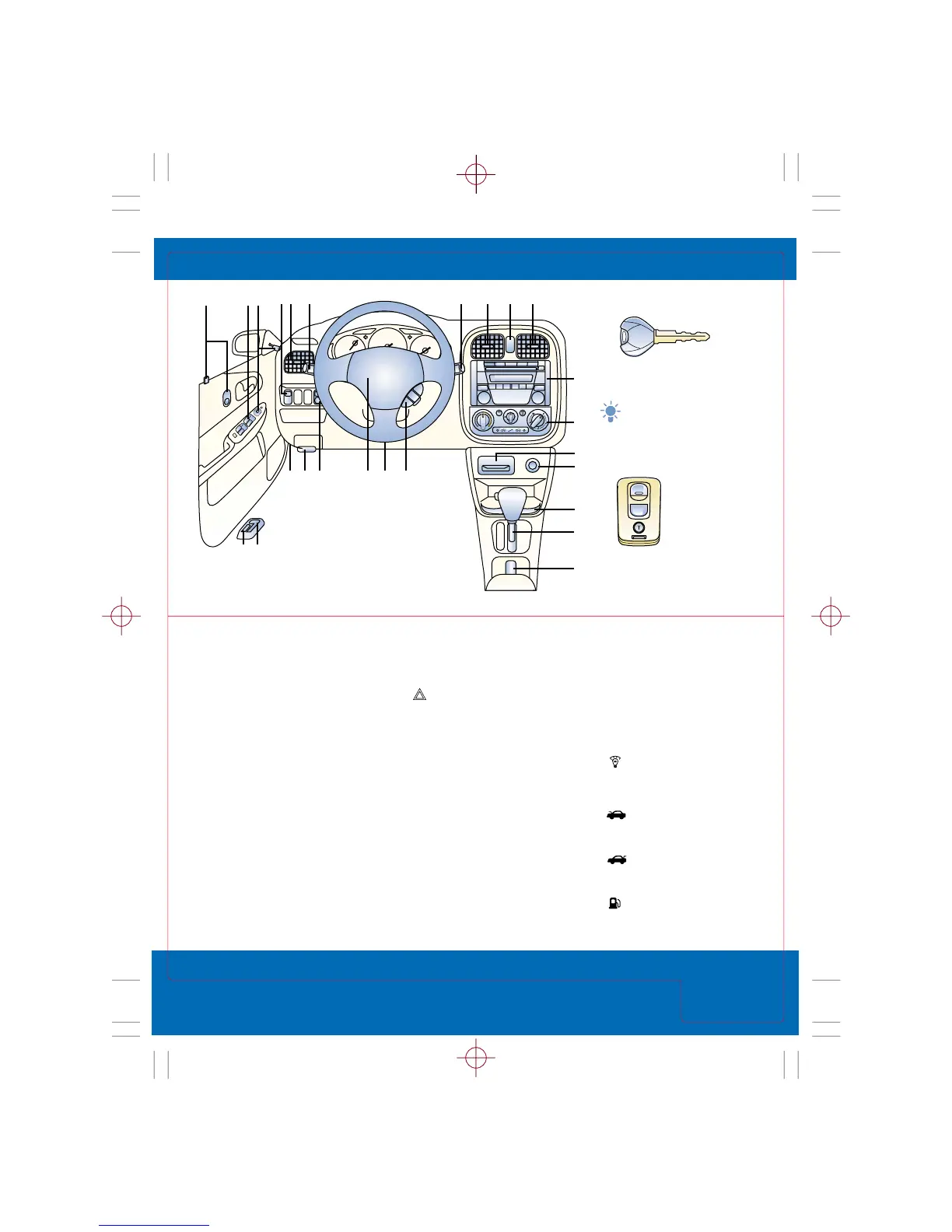
1. Door locks,
see Locks
2. Power window switches,
see Switches
3. Mirror controls,
see Locks/Mirrors
4. Fog light switch
Push to activate/deactivate;
functions only with headlight
low beams on
5. Air vents
To open/close: Rotate
thumbwheel up/down
To direct air up/down:
Move vent
To direct air side-to-side: Move
thumbwheel in center of vent
6. Turn signal/lighting
control lever,
see Driver Controls
7. Wiper/washer control
lever,
see Driver Controls
8. Hazard warning switch
Push to activate/deactivate
9. Audio system,
see Audio Systems
10. Climate control panel,
see Climate Controls
11. Ashtray
12. Cigarette lighter
13. Cup holders
14. Gearshift lever,
see Transaxle
15. Parking-brake lever
To engage: Pull up
To release: Pull up slightly,
while depressing button at
front of lever, lower parking
brake lever
16. Cruise control*,
see Switches
17. Tilt steering wheel lever
Pull lever down to unlock
column, adjust wheel position;
push lever up to lock
18. Horn/Air bag
To beep: Press
19. Instrument cluster
lighting
To brighten/dim: Turn
thumbwheel up/down
20. Hood release handle
Pull to open partially
21. Fuse panel
22. Remote trunk-lid
release (Protegé Sedan)
To open: Pull lever up
23. Fuel-filler lid release
To open: Pull lever up
Driver’s
View
Quick Tips Mazda Protegé/Protegé5 page 2
page 3
Revised September 23, 2002
Key
Operates ignition and
all locks
Tip: Use key number
plate to purchase
a new key; store in
safe place separate
from vehicle
Remote entry
system,
see
Locks/Mirrors







 To Next Page