CAR-NAVIGATION CONTROL SWITCH
CAR-NAVIGATION CONTROL SWITCH REMOVAL/INSTALLATION
1. Disconnect the negative battery cable.
2. Remove the upper panel. (See CONSOLE REMOVAL/INSTALLATION .)
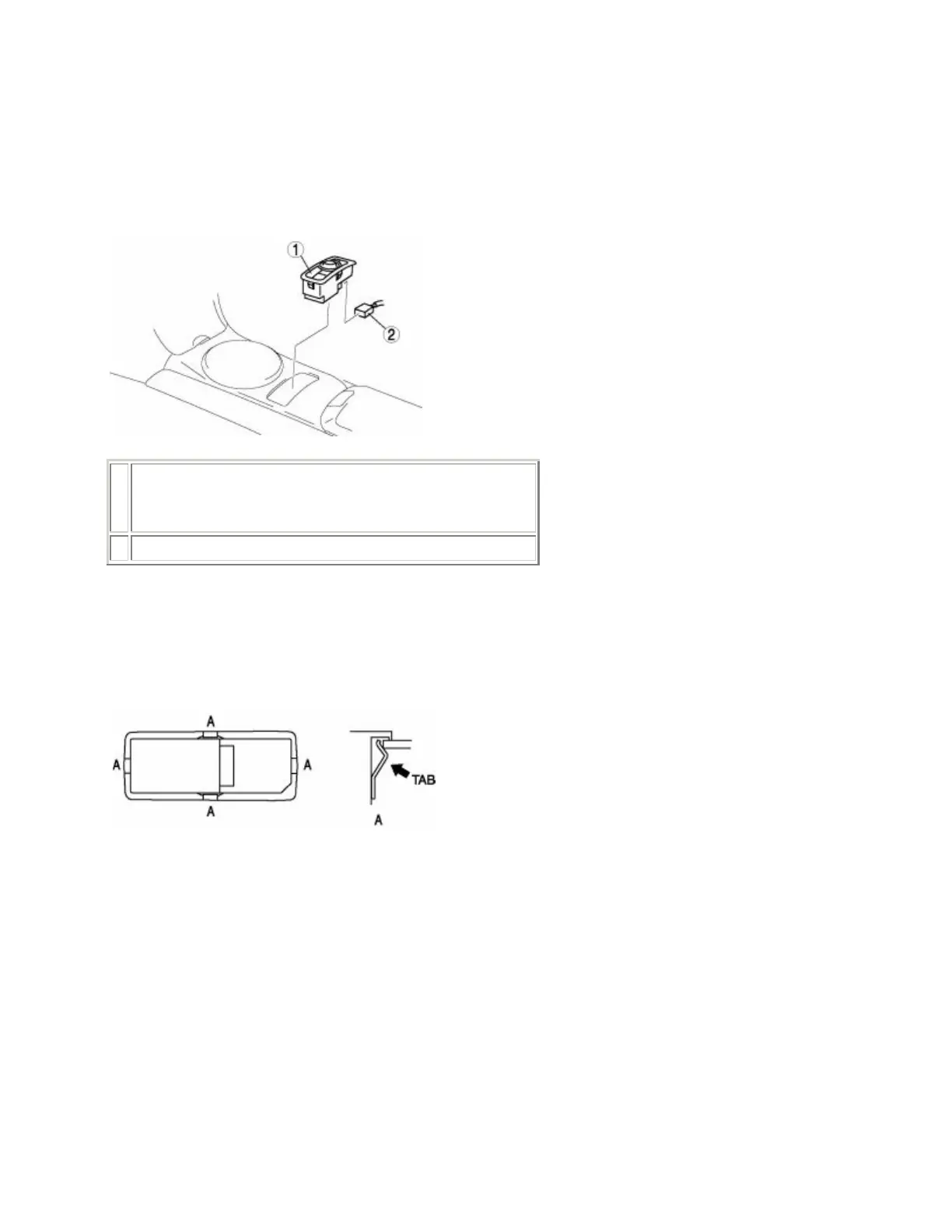
3. Remove in the order indicated in the table.
1
Car-navigation control switch
(See Car-Navigation Control Switch Removal Note .)
2 Connector
4. Install in the reverse order of removal.
Car-Navigation Control Switch Removal Note
1. Remove the car-navigation control switch while pressing tabs A as shown in the figure.
CAR-NAVIGATION CONTROL SWITCH INSPECTION
1. Operate the car-navigation control switch and verify that the car-navigation system operates normally.
• If the system does not operate normally, go to the next step.
2. Inspect the wiring harness between the LCD unit and the car-navigation control unit for an open circuit,
power short, or a short to ground.



 To Next Page