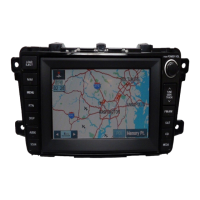
This document serves as a Quick Start Guide for the Mazda BT-50 GPS and Multimedia system, providing essential information on its connectivity and features to enhance the driving experience.
Function Description
The Mazda BT-50's in-dash system is a comprehensive multimedia and navigation unit designed to integrate various functions for convenience and entertainment. It includes a GPS navigation system, Bluetooth® connectivity for hands-free communication and audio streaming, and a wide range of multimedia playback options. The system supports various audio and video formats, including MP3, WMA, AAC, FLAC, AVI, MKV, and MP4, allowing users to enjoy their preferred content. It also offers connectivity with external storage devices like iPhones and iPods via USB, expanding the range of media sources. The dual-screen function is a notable feature, enabling users to view navigation and audio/visual modes simultaneously, allowing for music playback while following directions. The system also supports voice recognition for hands-free control of calls and other functions. Furthermore, it is compatible with Apple CarPlay® and Android® Auto, allowing users to control selected smartphone apps directly from the BT-50's color screen, including music, podcasts, and navigation functions from their phone.
Usage Features
Turning the System On/Off:
- Turning On: For first-time use, lightly press the power button. If the unit was turned off by removing the key, it will automatically turn on when the key is reinserted and turned to the accessory position. If the MENU hard key was used to turn it off, press any button to turn it on again.
- Turning Off: Turning the ignition key to "Off" will turn off the system. If the ignition is still on, hold the MENU hard key for more than 5 seconds to turn the system off.
- Upon turning on, the system returns to the last displayed screen.
- To access the main menu, press the MENU hard key located below the screen.
- Navigate by touching the icons in the menu to select the desired function.
Touch Screen Navigation:
- To move between screens, lightly swipe the display with your finger in the direction of the desired menu item.
Dual Screen Function:
- This feature displays Navigation and Audio/Visual modes side-by-side.
- To initiate dual-screen mode from the Audio/Visual display, swipe left or press the navigation arrow on the right.
- From the Navigation display, swipe right or press the musical note button on the left.
- Users can switch which side the displays appear on-screen using the dedicated button.
Pairing Your Phone (Bluetooth®):
- First-time Pairing:
- Press the MENU hard key.
- Touch "Setup."
- Select "Wireless" at the top of the screen.
- Touch the "Search" icon on one of the "No Device" lines.
- Touch "Audio," "Hands-free," or "Both" for the device you wish to connect from the search results list.
- A message will appear upon successful pairing, and the system will return to normal mode.
- Up to five phones can be paired to the system by following these steps for each.
Making and Receiving Calls:
- Making a Call: Touch "Phone" in the menu screen, then select a number from "Recents" or "Contacts" tabs, or enter a number via the "Keypad" tab, then touch "Call."
- Answering a Call: An incoming call will display a notification screen, and the audio will switch to a ring sound. Answer by pressing the phone button on the steering wheel or touching the notification screen.
- Ending a Call: Long-press the phone button on the steering wheel or touch "End Call" on the screen.
- Switching Voice Output: Touch the speaker icon to switch between car speakers and the mobile phone speaker.
- Adjusting Speech Volume: During a call, touch "[-]" or "[+]" to adjust caller and microphone volume.
Radio and Music:
- DAB+ Digital Radio: Provides exceptional sound quality and clear reception, including news and weather updates. To listen, select "DAB+" as the audio source, open the mode selection menu, and tap the tuning symbol to seek channels.
- Bluetooth® Music: If your phone supports Bluetooth® audio streaming, you can play audio through the car speakers. Ensure your phone's Bluetooth® is turned on. Press the MENU hard key, swipe right, and press "Bluetooth Audio." Access music or audio apps on your smartphone and control tracks via the display.
Apple CarPlay® and Android® Auto:
- Getting Access to Apple CarPlay®:
- Plug your iPhone into the CarPlay port using a Lightning to USB cable.
- Press the MENU button on the screen.
- Touch "Apple CarPlay®."
- Apple CarPlay® is activated. Touch the desired app icon on the BT-50 screen or use Siri by pressing the VOICE button.
- Activating Android® Auto:
- Download the Android® Auto app from the Google Play store.
- Plug your smartphone into the BT-50's USB connector and follow prompts to connect.
- Press the MENU button on the screen.
- Touch "Android® Auto."
- Android® Auto is activated. Touch the desired app icon on the BT-50 screen.
- Note: Compatibility may vary by device; consult your Mazda Dealer.
Connectivity (Plug-in Sources):
- Playing from a Plug-in Source:
- Connect the source (e.g., USB drive, HDMI, AUX) to the input port above the display.
- Access the "Source" (USB, HDMI, or AUX) by pressing the MENU hard key or swiping up from the bottom of the display.
- Control audio or visual playback via the display.
- iPod/iPhone Connection: Requires a separately sold Lightning to USB cable. When connected by cable, iPod controls are disabled.
Voice Recognition Function:
-
- Press the VOICE button or long-press the "M" button on the steering wheel.
-
- Say aloud the contact's name or number as it appears in your phone's stored contacts.
-
- To exit Voice control mode, touch "X" or press the VOICE button.
Navigation:
- Getting Started: Press the "NAV" button to open the navigation screen.
- Audio Integration: Press the music button or swipe from the left of the navigation screen to show split-screen music/navigation. When there are no voice prompts, music plays normally. During navigation voice prompts, the system will lower music volume for guidance.
- Note: Navigation is available on XTR & GT models with an 8-inch screen only.
Maintenance Features
Safety Precautions:
- Traffic Laws: Always be mindful of local traffic laws and regulations while using Bluetooth® or other operational options.
- Professional Installation: For safety and correct operation, the product must be installed by a professional.
- No Disassembly/Repair: Do not disassemble or repair the system yourself to avoid accidents or damage.
- TFT Display Care: The screen uses a precision electronic structure; do not hit the TFT display to avoid damage.
- User Manual: To use the product correctly and safely, refer to the BT-50 Infotainment System User's Manual for detailed information.

 Need help?
 General

 To Next Page