2-- 4
© 2012 Mobile Climate Control T-299 Rev. 08/2012
When in parameter, if no key is pressed for 5
seconds, the display will go back to default mode
showing temperature set point.
2 Modification Of Null Band Parameter P01
Press and hold + and - key simultaneously for 5
seconds to access parameters programming mode.
P01 shows up on the display screen for 1 second and
the current value of P01 will be shown. While viewing
the current value, press + or - key to change th e value
of the parameter.
3NullBand
Thenulldifferentialcantakethevaluesof2,4,or6°
F, default to 2° F.SeeFigure2-6
4SetPointRange
The valid set point is from 60° Fto80° F.
Cooling
Heating
Null Band
Set Point +
1/2 Null Band
Set Point --
1/2 Null Band
Set Point
Figure 2-6 Null Band
1
2
3
4
5
6
7 8
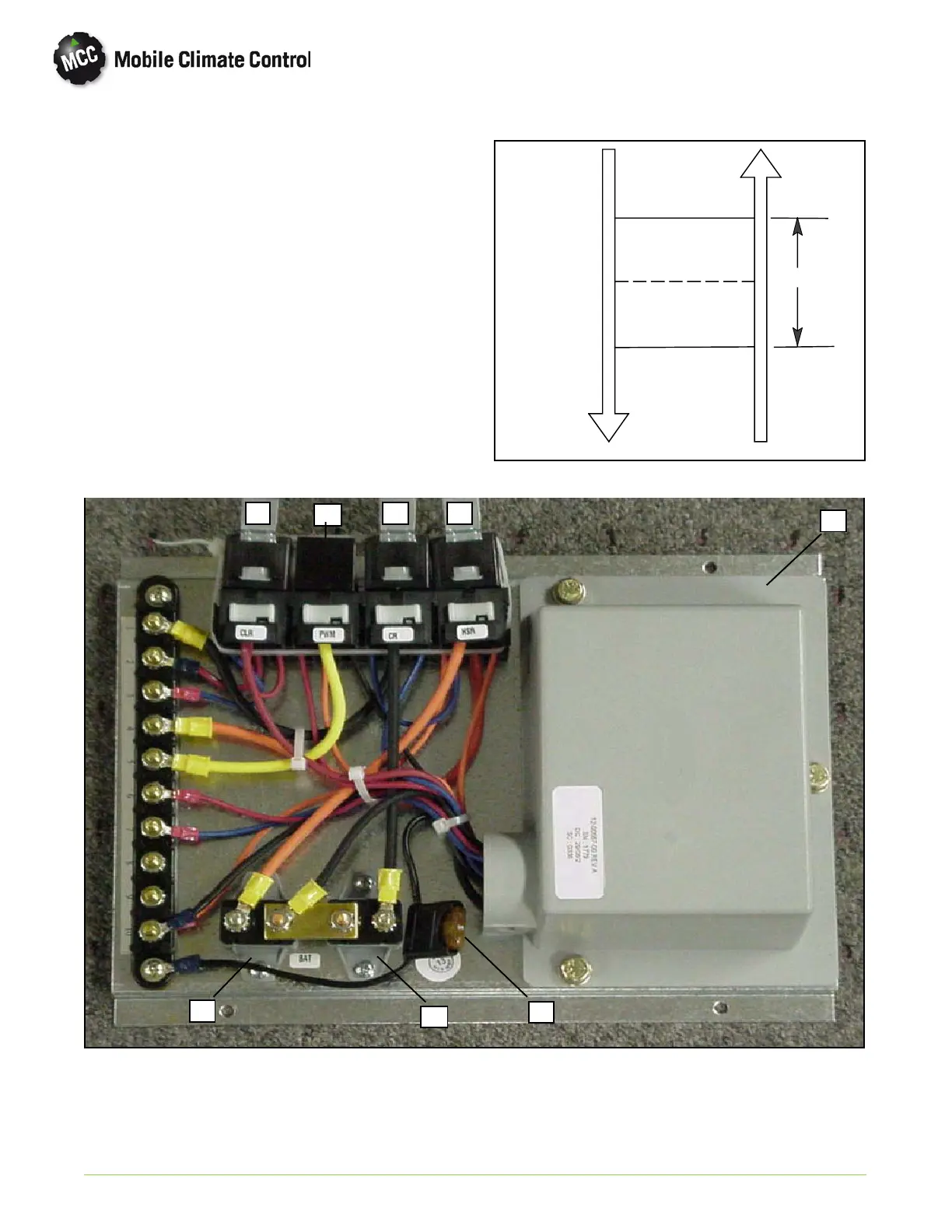
1 Logic Module (Speed Control)
2Fuse(5Amp
3 Circuit Breaker (Condenser)
4 Circuit Breaker (High Speed)
5Clutchrelay
6 Relay Filter - PWM (Pulse Width Modulation)
7 Condenser Relay
8 High Speed Relay
Figure 2-7 Total Control Electrical Control Panel (Typical)


 To Next Page