•
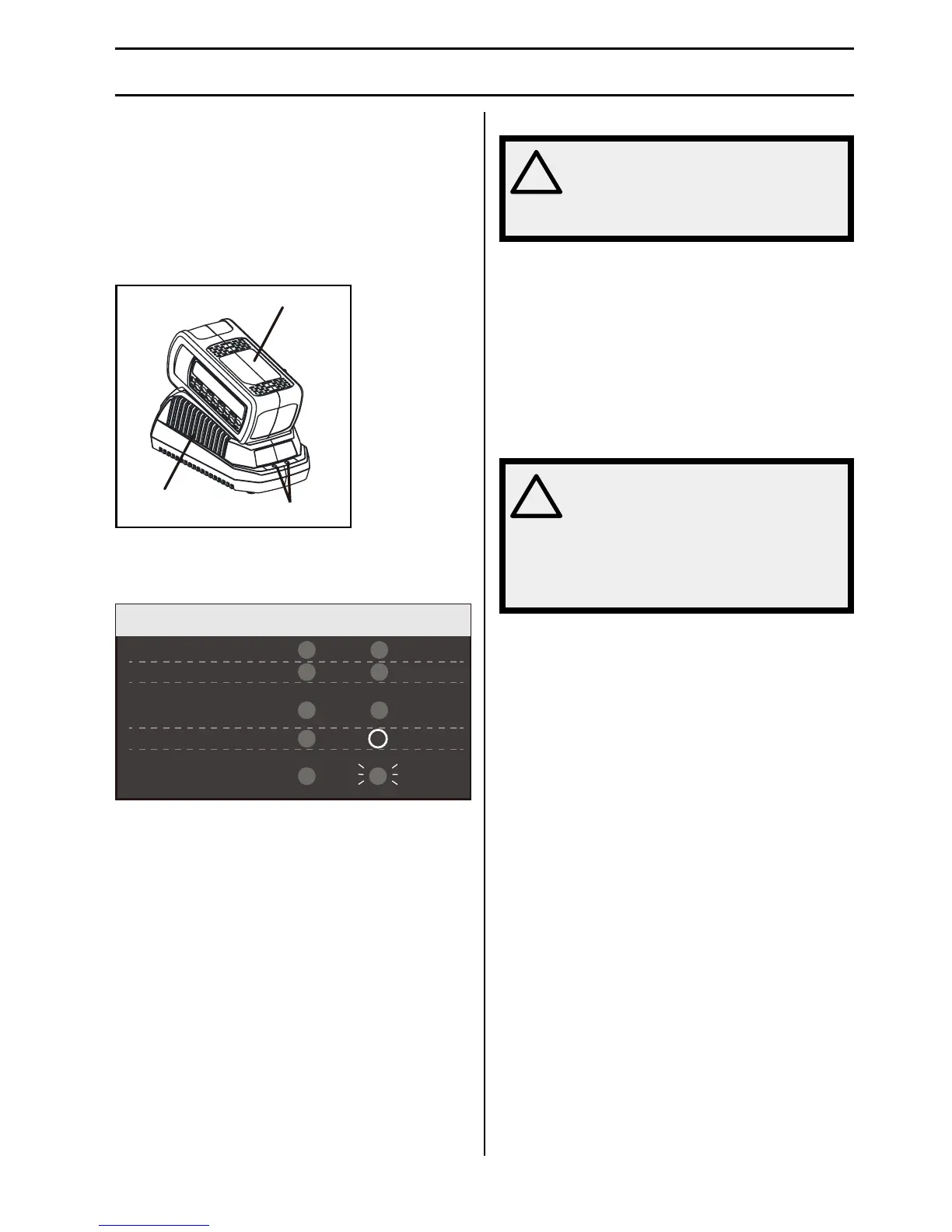
This is a diagnostic charger. The Charger LED Lights
(3) will illuminate in specic order to communicate
the current battery status. They are as follows:
CHARGING PROCEDURE (LED INDICATOR)
BATTERY IS CHARGING:
FULLY CHARGED:
BATTERY IS TOO WARM:
DEFECTIVE BATTERY:
NO BATTERY PRESENT:
RED
RED
RED
RED
RED
(REMOVE FOR APPROX. 30
MINUTES TO ALLOW TO COOL)
(REMOVE AND REPLACE WITH
NEW BATTERY IF THIS OCCURS)
RED
OFF
RED
BLINKING
GREEN
ORANGE
False Defect Note:
When the battery is inserted into the charger, and
the status LED ashes, remove the battery from the
charger for 1 minute, then reinsert. If the status LED
indicates normal then the battery pack is good. If the
status LED is still blinking, remove the battery pack and
unplug the charger. Wait 1 minute and plug the charger
back in and reinsert the battery pack. If the status
LED indicates normal than the battery pack is good. If
the status LED is still blinking then the battery pack is
defective and needs to be replaced.
NOTE: When the red indicator ickers, pull out the
battery from the charger and insert again within 2
hours. If the indictor shows charging, that means
the battery is good. After 2 hours, please pull out the
battery and also pull out the AC power plug of the
charger for 1 minute, and then insert the AC power plug
and the battery again. If the indictor shows charging,
that means the battery is good. If not, the battery needs
to be changed.
WARNING! Changes or modications
to this unit not expressly approved by
the party responsible for compliance
could void the user’s authority to
operate the equipment.
Checking the Charger
If the battery pack does not charge properly:
•
Check the current at the power outlet with another
tool. Make sure that the outlet is not turned off.
•
Check that the charger contacts have not been
shorted by debris or foreign material.
•
If the surrounding air temperature is not normal room
temperature, move the charger and battery pack to a
location where the temperature is between 6 ˚C and
40˚C.
WARNING! If the battery is inserted
into the charger when warm or hot,
the CHARGING LED indicator light
on the charger may switch on and
illuminate ORANGE. If this occurs
allow the battery to cool outside of
the charger from approximately 30
minutes.


 To Next Page
 Loading...