The MCE Laserguide Mini is a laser receiver designed for construction and excavation applications, available in two models: R.45.TC and R.45.TC.PRO. Both models feature tilt compensation, while the R.45.TC.PRO additionally offers Bluetooth and CAN communication capabilities. The device is manufactured by MOBA Mobile Automation Australia Pty Ltd.
Function Description:
The Laserguide Mini acts as a laser receiver, detecting laser beams emitted by a laser instrument to provide height information for excavation and grading tasks. Its primary function is to assist operators in achieving precise depth and grade, particularly in dynamic environments where the machine's dipper arm may be tilted. The tilt compensation feature automatically adjusts the center band position to account for the sensor's tilt, ensuring accurate readings even when the receiver is not perfectly vertical. The R.45.TC.PRO model's communication features allow it to integrate with MCE display panels (DB.UNI.PRO) or Android-based applications (MCE.R45APP) for enhanced control and data visualization.
Important Technical Specifications:
| Feature |
R.45.TC |
R.45.TC.PRO |
| Receiver Area Length |
190mm |
190mm |
| Receiving Range (Radius)* |
500 m |
500 m |
| Centre Band Resolution |
+/- 4 mm |
+/- 4 mm |
| Compensation Range |
Up to 31 degrees |
Up to 31 degrees |
| Battery Type |
1 D size Alkaline |
4 C size Alkaline |
| Operating Time (buzzer off)* |
45 hours |
70 hours |
| Water-proof/Dust-proof |
Yes |
Yes |
| Dimensions |
325 X 125 X 60 |
290 X 125 X 60 |
| Weight |
1.8kg |
1.8kg |
| Bluetooth communication |
No |
Yes |
| CAN communication |
No |
Yes |
| *Conditions dependent. |
|
|
Usage Features:
- Powering Up: The device is turned on/off using the On/Off switch (10). A small red power-on LED (5) indicates the operating mode: flashing for tilt compensation on, solid for tilt compensation off. Upon power-up, the sensor performs an LED test sequence and briefly displays the current accuracy selection.
- Mounting and Setting Up:
- With Tilt Compensation: For tilt compensation, the sensor is mounted on the dipper arm such that the 'MT REF' line mark on the magnetic bracket is at a distance L from the ground (L = HI + C, where HI is laser instrument height and C is desired excavation depth). The dipper arm should be vertical, bucket leveled, and the sensor body parallel to the dipper arm. The Setup Length (L - B, where B is bucket height) must be measured and stored. The setup length should be between 0.25m and 2.5m for optimal compensation.
- Without Tilt Compensation: If tilt compensation is not used, distance L is measured from the ground to the center green LED cluster. Setup length measurement and storage are not required.
- Tilt Compensation On/Off and Setup Length Selection: The Reference Dial (9) is used to switch tilt compensation on/off and to dial in the measured setup length (in meters). Turning the dial anti-clockwise until it clicks switches compensation off (power-on LED solid). Turning it clockwise from 'Off' and setting it to the setup length switches compensation on (power-on LED flashing). The dialled value is stored during the zeroing process.
- Zeroing: After mounting and setting the setup length (for tilt compensation), the device needs to be "zeroed" to store the setup position. This is done by pressing and holding the accuracy and on/off switches simultaneously on the receiver, or the "IS" button on the remote. A successful zeroing is indicated by a brief green LED flash and buzzer sound. A failed attempt (red and amber LED flashes) may occur if the sensor is angled too far from vertical or if compensation is off.
- Accuracy (Centre Band) Settings: The Laserguide Mini offers three accuracy settings: Fine (+/- 4mm), Normal (+/- 8mm), and Wide (+/- 12mm). These are indicated by different LED cluster patterns (Green for Fine, Red & Orange for Normal, Red, Orange & Green for Wide). The setting can be changed by pressing and holding the accuracy switch on the receiver or the dedicated button on the remote.
- Buzzer Control: The buzzer can be turned on or off by pressing and holding the On/Off switch until a single beep (on) or double beep (off) is heard. This can also be done via the remote.
- LED Brightness: LED brightness can be adjusted by pressing and holding the accuracy switch and then pressing and releasing the on/off switch repeatedly while the accuracy switch is held. There are three brightness settings. The remote also has a dedicated button for brightness adjustment.
- Low Battery Warning: A fast-flashing power-on LED indicates low battery. If a laser beam is detected, the indication LEDs will flash slower, and the buzzer will turn off to conserve power.
- Remote Control: A remote control (A.MCE.150) provides full control over the sensor, including buzzer on/off, accuracy setting, LED brightness, zeroing, and sleep mode.
- Bluetooth Communication (R.45.TC.PRO only): The R.45.TC.PRO can communicate with Android devices via the MCE.R45APP or with the DB.UNI.PRO display panel. Setup involves pairing the device via Bluetooth (password 1234) and then opening the MCE.R45APP. A small red LED on the housing flashes quickly when not connected and slowly when a Bluetooth connection is established.
- CAN Communication (R.45.TC.PRO only): The R.45.TC.PRO can connect to an MCE display panel (DB.UNI.PRO) or MOBA Xsite excavator systems via a CAN cable. Once connected and powered on, the display panel automatically communicates height information. For Xsite systems, normal calibration procedures and specific mounting instructions from MCE Lasers are required, along with measuring X, Y, and Z offsets.
Maintenance Features:
- Battery Recharging: The internal battery pack (for internal battery models only) should be fully recharged before each use.
- Warranty: MOBA Australia provides a twelve-month warranty on materials and workmanship for equipment of its manufacture. This covers sensors, transmitters, electronic levels, receivers, masts, control boxes, displays, and accessories. Components not manufactured by MOBA Australia carry their original manufacturer's warranty. Warranty service requires a properly filled warranty registration card on file. Negligence, abnormal use, accidents, or repairs by unauthorized personnel void the warranty.
- Safety Information: The manual emphasizes reading the machine's operating manual, exercising caution on construction sites, not installing/adjusting the Laserguide while the machine is running, ensuring the unit does not protrude into traffic or limit operator visibility, using eye protection during welding/cutting/grinding, and protecting oneself when working near hydraulic lines. It warns against welding near hydraulic lines or operating equipment, and against exposing internal batteries to intense heat. Mounting bracket welds must be strong and secure. External power supply must be 12-24 Volts DC, and hands should be dry when handling battery terminals or power cables.

 Need help?
 General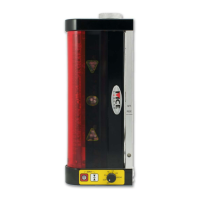

 To Next Page