EasyManua.ls Logo

McKesson LUMEON 3069 - User Manual

McKesson LUMEON 3069
15 pages
Print Icon
To Next Page IconTo Next Page
Loading...
PSS World Medical, Inc.
4345 Southpoint Blvd.
Jacksonville, FL 32216
Select Medical Products
Artwork Template
Doc. # T-GS-003
Rev. 1
Eective Date: 10-08-2007
Author: Meghan Little
PMS Colors
Wave
Logo
Text
Artwork Approvals
Drawn By
Checked By
Information
Label
Description
Scale; Dimensions
Revisions
Rev.
Description
Date
K
PMS 110 Yellow
Meghan Little
3069_Masterpage
Tympanic Thermometers
1:1 Proportion, As Provided
Final
Final Draft
09-03-09
PMS 110 Yellow, K
I N F R A R E D T Y M PA N I C
E L E C T R O N I C T H E R M O M E T E R
OPERATION MANUAL
FOR USE WITH REORDER # 3069
Comments or Questions about Lumeon Products? 800-777-4908
Manufactured for PSS World Medical, Inc.
4345 Southpoint Blvd., Jacksonville, FL 32216
Made in the USA • www.myselectonline.com
# WN27183473
º
F
C
º
Question and Answer IconNeed help?

Do you have a question about the McKesson LUMEON 3069 and is the answer not in the manual?

Summary

Introduction

Initial Set Up

Unpacking the thermometer and examining it for structural integrity.

General Information

Product Features

Details on the thermometer's capabilities, including fast acquisition, measurement range, and display features.

Important Precautions

Icon Identification

Functional Button Icons

Icons representing functional buttons like Eject, °C/°F, Timer, and Scan.

Safety and Disposal Icons

Icons related to waste disposal, electrical safety, medical classification, and hazards.

Instructions for Use

Peak Select System

Explanation of the patented Peak Select System for accurate temperature readings.

Equivalence Modes

Details on how the thermometer adjusts readings for oral, axillary, core, and rectal equivalents.

Probe Covers Usage

Instructions on using and installing single-use disposable probe covers.

Temperature Measurement Procedure

Step-by-step guide for taking a temperature measurement.

Temperature Recall

How to recall the last measured temperature.

Temperature Display Toggle

Method to switch between Celsius and Fahrenheit display modes.

Sleep Mode

Explanation of the automatic sleep mode for battery conservation.

Pulse Timer Mode

How to use the built-in pulse timer function.

Display Icons and Alarms

Interpretation of various icons and alarm conditions on the thermometer display.

Biotech Mode

Functionality for selecting operational modes and verifying software version.

Software Version Display

How to view the installed software version of the device.

Preventative Maintenance

Cleaning

Battery Replacement

Troubleshooting

Specifications

Calibrated Accuracy Limits

Details on the accuracy limits based on ambient and target temperatures.

Displayed Temperature Measurement Range

Temperature ranges provided based on different site modes (Ear, Oral, Axillary, Core, Rectal).

Ambient and Storage Temperature Ranges

Operating and storage temperature specifications for the device.

Clinical Repeatability and Response Time

Information on the device's repeatability and response time.

Power, Battery Life, Size, and Weight

Specifications for power source, battery life, physical dimensions, and weight.

Regulatory and Safety Standards

Customer Service

Parts Listing

List of available parts and their order part numbers for the thermometer and probe covers.

Warranty

Overview

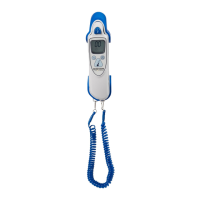
The Lumeon Infrared Tympanic Electronic Thermometer is a clinical instrument designed for fast, accurate, and convenient measurement of patient temperatures. This device measures temperature from the ear canal and offers various equivalence modes to display temperatures as if they were taken orally, axillary, core, or rectally, making it versatile for different clinical needs.

Function Description:

The core function of the Lumeon thermometer is to measure tympanic temperature using infrared technology. It employs a patented Peak Select System, which enhances accuracy by taking multiple readings (up to 100) and automatically selecting the most accurate temperature for display, thereby reducing technique errors. This differs from other systems that may use fewer readings. The thermometer is designed to be used with disposable, single-use probe covers, which serve as an infection control barrier and ensure accurate heat transmission from the patient to the device.

The device offers several equivalence modes:

  • Ear (EAR) mode: Displays the absolute tympanic temperature without adjustment.
  • Oral (ORL) mode: Adjusts the tympanic temperature to display an oral equivalent (Ear Mode + 0.60°C).
  • Axillary (AX) mode: Adjusts the tympanic temperature to display an axillary equivalent (Ear Mode + 0.04°C). This mode is recommended for neonates as it aligns with current standards for this population.
  • Core (CORE) mode: Adjusts the tympanic temperature to display a core temperature equivalent (Ear Mode + 1.04°C).
  • Rectal (REC) mode: Adjusts the tympanic temperature to display a rectal temperature equivalent (Ear Mode + 1.16°C).

The thermometer provides both audible and visual indications when temperature acquisition is complete. It features a temperature measurement range of 33.0°C to 42.0°C (91.4°F to 107.6°F).

Usage Features:

The Lumeon thermometer is designed for ease of use and convenience in a clinical setting.

  • Fast Temperature Acquisition: It acquires temperature very quickly, meeting CEN and ASTM standards.
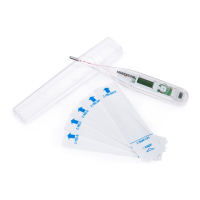
  • Probe Cover System: It uses disposable probe covers that are specifically designed for this thermometer to ensure accuracy and prevent cross-contamination. The base unit protects the thermometer tip and stores probe covers for easy access. After use, probe covers are ejected by pressing a dedicated button and disposed of as infectious biological waste.
  • Temperature Display Toggle: Once a temperature is displayed, the user can press and hold the °C/°F button to switch between Celsius and Fahrenheit scales.
  • Temperature Recall: After a temperature is acquired, the thermometer enters an "off" mode after about 10 seconds. The last measured temperature can be recalled by pressing and releasing the scan button or by pressing and holding the °C/°F button.
  • Sleep Mode: To conserve battery life, the thermometer enters sleep mode after 30-40 seconds of non-use. It can be reactivated by ejecting an attached probe cover or installing a new one.
  • Pulse Timer Mode: The device includes a pulse timer function that runs from 0 to 60 seconds, providing single beeps at 15 seconds, dual beeps at 30 seconds, triple beeps at 45 seconds, and four beeps at 60 seconds, which can be useful for manual pulse rate measurements.
  • LCD Display with Icons and Alarms: The thermometer features an easy-to-read LCD display that communicates operational status, temperature readings, and various alarm conditions (e.g., patient temperature above/below specified range, ambient temperature above/below specified range, low battery, dead battery, and system errors) through icons and audible signals.
  • Ambidextrous Design: The unit is designed to be comfortable for both left- and right-handed users.
  • Improved Probe Design: The probe design is optimized for ease of use, particularly in pediatric populations.
  • Biotech Mode: This mode allows selection of operational modes and verification of the installed software version. Settings in biotech mode are stored in nonvolatile memory and retained even after battery changes. This mode is accessed by pressing and holding the timer and °C/°F buttons for four seconds.

Maintenance Features:

The Lumeon thermometer is designed for straightforward maintenance to ensure longevity and accuracy.

  • Cleaning: The thermometer housing can be wiped clean with a damp cloth using common cleaning agents. Water temperature should not exceed 55°C (130°F). It should not be soaked, rinsed, or submerged. The probe tip, especially the lens, can be cleaned with a lint-free swab or lens wipe to remove debris and fingerprints, which are crucial for proper operation. Certain harsh disinfectants (like Spray-Nine, Phisohex, Hibiclens, Vesta-Syde) should be avoided as they may damage the case. Occasional use of diluted hypochlorite mixture, isopropyl alcohol, Cidex, ManuKlenz, VIROX, or CaviWipes is acceptable, but prolonged use of these chemicals should be avoided. A cloth or sponge is recommended for cleaning; abrasive pads or cleaners should not be used. The thermometer is non-sterile and should not be sterilized using ethylene oxide gas, heat, autoclave, or other harsh methods. Sufficient drying time is required before use after cleaning.
  • Battery Replacement: The thermometer indicates low battery with an icon on the LCD. Approximately 100 temperatures can still be taken after the low battery icon appears before the dead battery icon is displayed, at which point the unit will not function until batteries are replaced. Battery replacement involves unscrewing the battery door, noting the polarity, and installing fresh AAA alkaline batteries.
  • Functional Checks: PSS World Medical, Inc. recommends functional checks at 12-month intervals, or more frequently under harsh use or environmental conditions, or if the unit has been dropped or abused. These checks should follow procedures outlined in the Infrared Tympanic Electronic Thermometer Checker Operation Manual.
  • Troubleshooting: The manual provides a troubleshooting guide for common issues such as unusually high/low temperature readings, low/dead battery indicators, blank display, and system errors. For system error "4," the device needs to equilibrate to room temperature for 20 minutes. For other system errors, resetting the thermometer by installing a probe cover is suggested. If issues persist, contacting customer service or the Biomedical Engineering department is recommended.

McKesson LUMEON 3069 Specifications

General IconGeneral
TypeDigital
Response Time10 seconds
DisplayLCD
BatteryLR41
Auto Shut-OffYes
Water ResistantYes
UsageOral, Axillary, Rectal
Temperature ScaleFahrenheit, Celsius