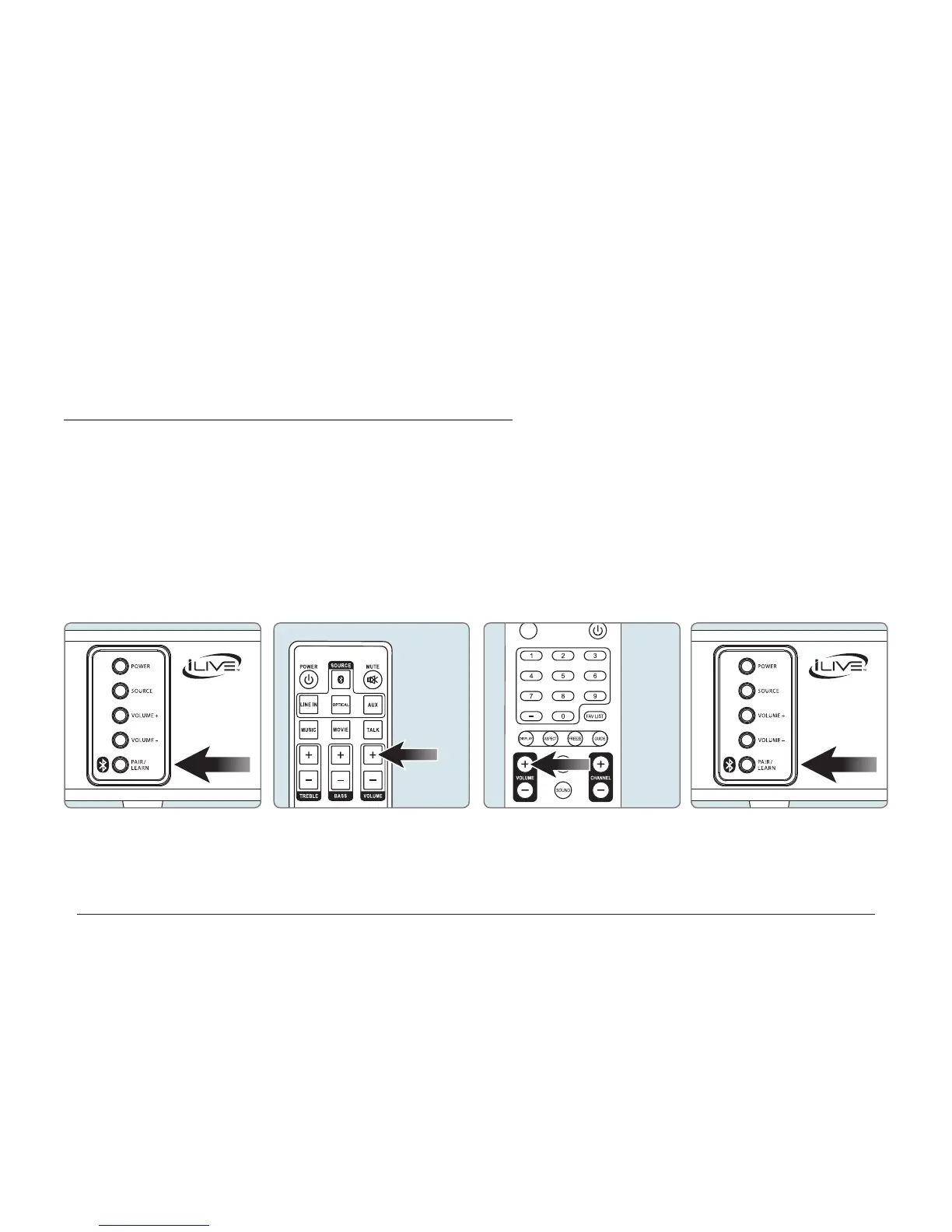
The Learn Feature
Teach your sound bar to recognize commands from a single remote
What is the learning feature?
The learning feature captures remote commands from your
television remote, and teaches your bar speaker to operate when
these commands are pressed. Power, volume and mute are a few
examples of commands that the bar speaker can learn.
Why use the learning feature?
Teaching the bar speaker remote commands will reduce the number
of remotes needed, save time searching for remote codes, and
improve the ease of operation.
ITB174
Remote
Sample
Remote
1. With the power O, press the Learn
button on the unit.
2. Press the button you desire to be
learned on the included remote.
For example: Volume+
3. Press the corresponding button on
your remote.
4. Press the Learn button on the unit.
The programmed button on your
remote will now be able to control
your sound bar.
Using the Learn Feature



 To Previous Page