Page 7
Emergency operation
Important: DO NOT pull off the red anti-tamper cover unless you are
activating the PLB in an emergency. Make sure the PLB is firmly
anchored to lifejacket, clothing, or person (eg with a strap) before
activating.
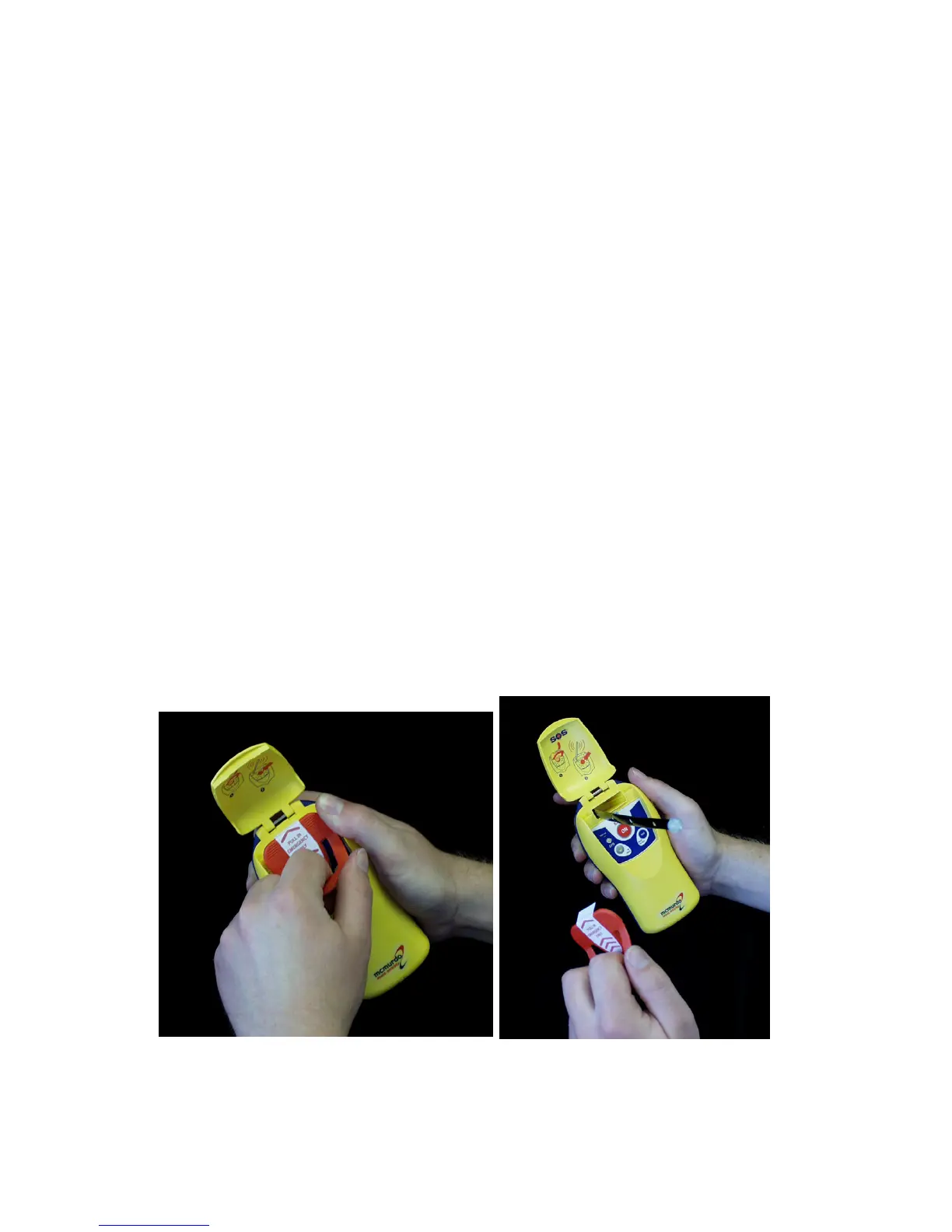
Raise the flip-up lid to expose the red anti-tamper cover. Once opened,
the flip-up lid can be pulled off the PLB and discarded if necessary. Grasp
the handle part of the red anti-tamper cover, and pull sharply away from
the PLB body. This uncovers the START/ON button. The antenna will
spring into an upright position as soon as the anti-tamper cover is
removed.
Locate and press the large START/ON button located in the centre of the
PLB switch panel. THE START/ON BUTTON MUST BE HELD DOWN
FOR ABOUT 1 SECOND.
The indicator lights will show the status of the PLB. When the indicator
lights are flashing, the PLB is transmitting. A full table of the status
indications is given in the section “Indicators”. The PLB will continue to
transmit for a minimum of 24 hours.
Important: Transmissions do not start until the PLB has been active for 2
minutes. This is to allow time to switch the unit off in the event of
accidental activation, preventing a false alert being sent to the search and
rescue services. During this period the red indicator light comes on
continuously on both the Fastfind and Fastfind Plus models.
Pulling anti-tamper cover from PLB Antenna erected



 To Next Page