Need help?
Do you have a question about the mcmurdo SMARTFIND GMDSS NAVTEX and is the answer not in the manual?
Standard disclaimer regarding the accuracy and changes in publication content.
Covers electrical safety, operational environment, handling, and unauthorized opening of the unit.
Includes advice on NAVTEX usage, reception reliability, and compass safe distances.
Suggests connecting a UTC data source for optimal system operation.
Steps to connect, power on, set time, and configure the antenna for basic operation.
Explains the product's design to meet IMO and IEC standards and its three receiver channels.
Defines NAVTEX, its frequencies, message types, and transmission schedules.
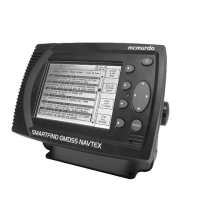
Identifies and describes the main display, softkeys, tracker pad, and indicator LED.
Explains icons displayed in the status bar, indicating alarms, antenna status, and receiver activity.
Details the procedure for switching on the device and the initial startup screen.
Describes how the system receives signals, displays new messages, and alerts the user.
Explains how message categories trigger alarms and the NMEA 'ALR' sentence transmission.
Outlines methods for finding and viewing messages via index, summary, and full text displays.
Shows message identifiers, marks for unread/locked messages, and grouping by time.
Displays first two lines of messages, sortable by time, station, or message type.
Allows viewing full message text and locking messages for long-term retention.
Features like separate frequency pages and filtering to simplify message viewing.
Procedure to enter and exit setup mode by holding the ENTER key for 3 seconds.
Explains header components like serial number, message category, and transmitting station.
Guides users on setting up filters to exclude unwanted stations or message categories.
Details receiver options, antenna status, signal strength, and monitor source for fault finding.
Verifying antenna position and signal strength for proper reception.
Using receive icons, signal strength bars, and monitor windows to diagnose issues.
Settings for display model, serial number, operating mode, time, and LED functions.
Configuring baud rates, print delay, printer settings, and output for COM ports.
Lists alarm numbers and texts, and how alarms trigger relays and front panel indicators.
Continuous monitoring of signals and IEC 61162-2 compatible serial interface for connectivity.
Settings for printing messages 'On Receipt' or 'On Demand'.
Configuring day and night modes, contrast, and brightness for the LCD screen.
Diagrams illustrating minimum and expanded system configurations.
Instructions for mounting the display unit using a U-bracket, including drilling details.
Details for drilling holes and rear view of the trunnion bracket assembly.
Guidance on mounting the unit through a flat panel using a flush mounting kit.
Details required connections for power, earth, antenna, and peripheral equipment.
Specifics on 12V/24V DC power, circuit breakers, and ship's earth connection.
Information on connecting signal cables via RS422 and supported NMEA sentences.
Explains the need for termination resistors on RS422 signal lines.
Details the connection of the display cable to the COM port on the NAVTEX unit.
Lists pin assignments for the 15-pin power/COM1/alarm connector.
Guidance on connecting to NMEA 0183 compatible equipment.
Describes the configurable alarm relay and its maximum operational ratings.
Instructions for connecting the recommended Seiko DPU-414 printer.
Requirements for antennas, covering frequencies and impedance matching.
Key points for mounting antennas clear of obstructions and other antennas.
Specific steps for installing the tri-channel NAVTEX antenna, including bracket use.
Illustrates the connection of the coax cable and securing the antenna.
Routing antenna cable, installing TNC connectors, and extending coaxial cable.
Procedure to test the tri-channel active antenna installation.
Guidance for passive antenna installations, including disabling antenna power.
Lists optional accessories and details external receiver capability.
Routine checks for antenna connectors and cleaning the display unit.
Initial checks for antenna mounting, coverage, and station/category selection.
Detailed steps to check antenna performance for electrical damage using a DVM.
Comprehensive technical details including display, controls, connectivity, and power.
Table listing scheduled transmission times (UTC) for various NAVTEX stations.
Information on WEEE Directive compliance and responsible disposal of electronic equipment.
Details the 24-month warranty, exclusions, and claim procedures.
Statement of compliance with the Marine Equipment Directive (MED).
Table for recording software version updates and changes.
 General
| Display | LCD |
|---|---|
| Operating Temperature | -15°C to +55°C |
| Interface | NMEA 0183 |
| Frequencies | 490 kHz, 518 kHz |
| Receiver Type | NAVTEX Receiver |
| Standard | IMO, GMDSS |
| Power Supply | 12V DC |

 To Next Page