18
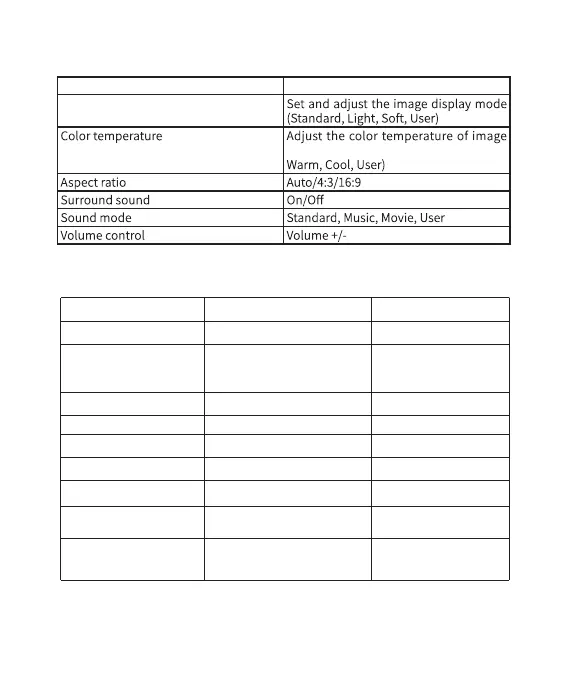
Main Items for Adjustment
Item Description
Image mode
display to different setting (Normal,
*Troubleshooting
Problem Possible cause Solution
T h e p ower i ndi c ato r
doesn’t light up.
The power plug is not
properly inserted.
Insert the power plug
into an electrical outlet
properly.
Failed to turn on the
projector by pressi ng
remote controller.
controller has run out of
battery.
If so, please replace it with
light directly shining upon
the infrared receiving
window on the projector.
If so, please draw your
curtains or move the light
source away.
The projected image is
not clear.
You didn’t turn the focus
wheel to ac hiev e th e
Turn the focus wheel to a
proper position to achieve
the cleare st fo cu si ng
*Troubleshooting
The power indicator doesn’t light up.
Failed to turn on the projector by
pressing the On/Off button on the remote
controller.
The projected image is not clear.
The projected image has a white screen.
The automatic keystone correction
function doesn’t work.
There is no sound when playing the
Dolby sound effect.
The mobile phone cannot connect to
Eshare.
Copyrighted contents from Netflix
cannot be screencast and played by
mobile phone (for both iOS and Android).
You cannot perform Up / Down / Left / Right
operations on the interface of Netflix or
Amazon prime video via the remote
controller.
The power plug is not properly inserted.
The remote controller has run out of
battery.
There is strong light directly shining upon
the infrared receiving window on the projector.
You didn’t turn the focus wheel to achieve the
clearest focusing effect.
It is caused by electrostatic interference.
The automatic keystone correction function is
off in the settings.
The device doesn’t support Dolby sound effect.
Your phone is in a weak Wi-Fi signal coverage.
There may be a connection problem if the
Wi-Fi signal is weak.
Due to Netflix copyrights, the third-party device
doesn’t support to play.
The remote controller doesn’t support to
swipe the interface of Netflix or Amazon prime
video.
Insert the power plug into an electrical
outlet properly.
Please replace it with 2xAAA batteries.
Please draw your curtains or move the
light source away.
Turn the focus wheel to a proper position
to achieve the clearest focusing effect.
Press and hold the On/Off button for 5
seconds to make it normal.
Turn the automatic keystone correction
function on in the settings.
Make sure the Wi-Fi signal is strong and
try to connect to Eshare again.
You can screencast videos of other video
platforms.
You need to swipe or click to enter the
interface via the Mouse function of
Eshare.
Problem Possible cause Solution


 To Next Page
 Loading...