The GM50H MK3 Engine Meter is a light and low-price oriented module designed for monitoring various engine parameters. It comes in two models: GM50H MK3 and GM50HR MK3. The GM50H MK3 monitors and displays engine RPM, oil pressure, coolant temperature, oil temperature, battery voltage, and accumulation time, with an added alarm function. The GM50HR MK3 includes all the functions of the GM50H MK3 and adds an RS485 Port to support MODBUS Protocol for remote data monitoring.
Function Description:
The device displays real-time engine data on a 5-screen high-light digital tube. Users can adjust and set parameters via buttons on the front face to meet different requirements. It features various protections and alarm functions.
Parameters Displayed:
- Engine speed (RPM)
- Engine oil pressure (kPa)
- Engine coolant temperature (°C)
- Engine oil temperature (°C)
- Engine battery voltage (Volts)
- Total running time (Hours)
Protection Functions:
- Over speed alarm
- Low oil pressure alarm
- High coolant temperature alarm
- High oil temperature alarm
- Sensor open alarm
- Battery under voltage warning
Important Technical Specifications:
- Working Voltage: DC8V-36V Continuous
- Power Consumption:
- Standby: 24V: MAX 1W
- Working: 24V: MAX 1.5W
- AC Voltage Input: 1P2W 50VAC-280VAC (45-70Hz)
- Rotate Speed Sensor Frequency: 50-10000Hz (AC3-65V)
- MAX Accumulating Time: 99999.9 Hours (Minimum storage time: 6 minutes)
- Relay Output: 5AMP Non-contact normal open & normal close output
- Working Condition Temperature: -25-65°C
- Storage Condition Temperature: -40-85°C
- Protection Level: IP54 (when coolant-proof rubber gasket is added between meter and its panel)
- Insulation Strength: Apply AC2.2kV voltage between high voltage terminal and low voltage terminal; leakage current not more than 3mA within 1 minute.
- Overall Dimension: 100mm100mm77mm
- Panel Cutout: 91mm*91mm
- Weight: 0.15Kg
Usage Features:
- Microcomputer: Equipped with a 32-bit high-performance single-chip microcomputer.
- Display: 5-screen high-light digital tube for parameter demonstration.
- RPM Input: Input frequency is available to check RPM.
- Sensor Curves: Variety of sensor curve parameters are set inside, and sensor curves can be self-defined by buttons.
- Analog Inputs: Three analog input channels for sensors, with the oil pressure sensor compatible with voltage signal input.
- Parameter Adjustment: Parameters can be set and adjusted via buttons on the front face.
- RS485 Port (GM50HR MK3 only): Enables remote data monitoring using Modbus Protocol.
- Alarm Relay: High current alarm relay with one normally open and one normally closed output for user convenience.
- Installation: European-style terminals for convenient installation and detachment. Standard coolant-proof rubber gasket ensures IP54 protection.
- Button Functions:
- PROG (Setting): Press for 4 seconds to enter parameter setting mode. In parameter browsing, press to enter modification interface.
- + (Value Inc): Under display mode, moves page up. Under edition mode, moves digit or increases numbers. In display mode, changes coolant temperature and oil temperature pages.
- - (Value Dec): Under display mode, moves page down. Under edition mode, moves digit or decreases numbers. In display mode, changes coolant temperature and oil temperature pages.
- PROG + (Custom Sensor Curve): Press together for more than 4 seconds to enter sensor parameter setting interface.
- PROG - (Check Software Version): Press together to check the software version.
- + - (LED Test): Press together to test all LED lights (all lighted when pressed, all off when loosened).
- PROG + - (Restore Default): Press together to set all parameters to defaults.
Maintenance Features:
- Installation: Installation must be carried out by professionals. Read the entire instruction manual before installing and operating.
- Power Connection: Maintain a good power supply connection. Do not share battery positive and negative connection lines with a floating charger.
- Battery Disconnection: Do not disconnect the battery during engine operation to prevent damage to the meter.
- Withstanding Voltage Test: If conducted after installation, unplug all meter terminal connections to prevent high voltage damage.
- Relay Expansion: For extended relays, add a continuous current diode (for DC coils) or a resistance-capacitance loop (for AC coils) to prevent interference.
- Troubleshooting: The manual provides a detailed fault-finding guide for symptoms like "Meter no response with power," "Speed display error," "Oil pressure display error," "Coolant temperature display error," "Engine shutdown," "Low oil pressure alarm," "High coolant temperature alarm," "Shutdown Alarm in running," "The meter does not alarm," and "RS485 cannot communicate normally." Solutions include checking DC voltage, fuses, sensor connections, wiring, ground connections, sensor type parameters, alarm values, and communication settings.

 Need help?
 General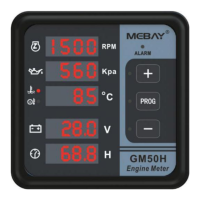

 To Next Page