3
Using the lock
Specifications
1
2
Parts Illustrations
Item
Specifications
Remarks
Battery
(Use new, non-rechargeable
Alkaline batteries only.)
AA alkaline battery x4
(Operation voltage: 4.6~6.0V)
Last up to one year
(10 times open/close per day)
Aluminum Alloy + ABS
User Pin Code
20 groups
1 group
Master Pin Code
Door Thickness
35-50mm
Material
Parts
Specifications
Front Body
Back Body
69(W) x 169(H) x 29.5(D) mm
74.5(W) x 201(H) x 45.5(D) mm
Operating
temperature
-25
o
C~+70
o
C
Operating
humidity
20
~95%RH
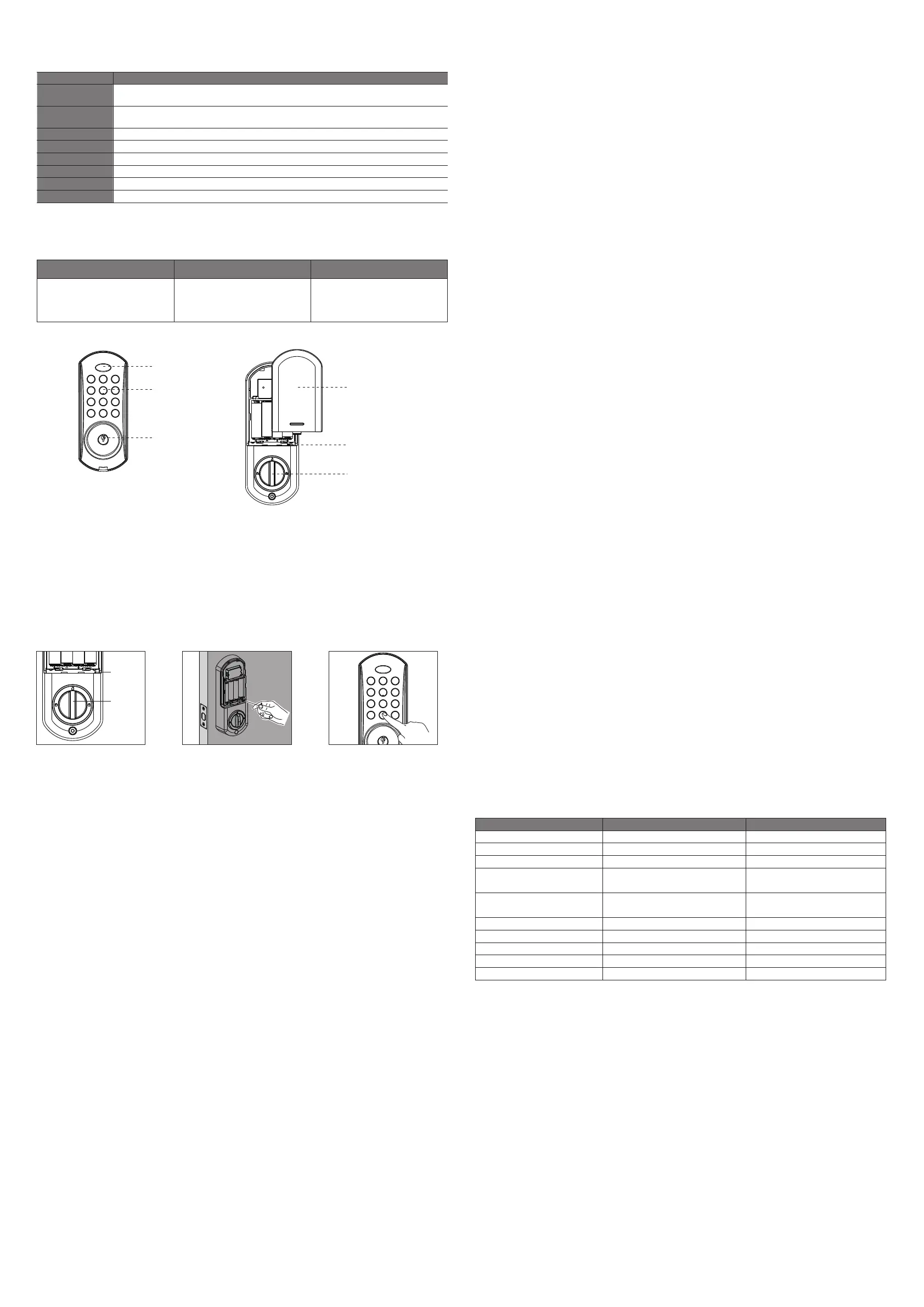
Front Body Back Body
LED Indication
Keypad
Cylinder
Battery Cover
Reset Button
Thumb Turn
123
456
789
* 0 #
RES
Reset
Button
Thumb
Turn
123
456
789
* 0 #
4
Light and Sound Indication
Sound indications
Reset
Status
Light indications
3 beeps Green LED flash 3 times
Unlock 1 beep Green LED flashes 1 time
Lock
2 beeps Red LED flashes 2 times
Add pin code successfully/
Enter menu/ Function on
1 beep Green LED
Deleted pin code successfully/
Function Off
2 beeps Green LED
Wrong operation alarm “Du Du, Du Du” Red LED
Illegal operation alarm
“Du Du Du......”
Red LED
Lock tongue alarm
“Du Du Du” Red LED
Low battery
8 beeps
Red LED flashes 8 times
Pin codes are full
“Du Du Du”
Red LED
1. Reset the lock
1. Ensure that the thumb turn on the back of the door is vertival and in an unlocked position
2. Press the reset button with a small stick at the button of the battery pack, there will be a long
beep and the keypad will be on for 4 seconds.
3. Enter "0#", you will hear three beeps and the indicator will flash 3 times. The lock is now locked
and is reset.
2. Register Master Pin Code
1. Press any key to activate the lock, you will hear 3 beeps and the indicator will flash green for 4
seconds.
2. Enter your PIN code (6~12) digits + "#" when the green LED is flashing.
3. Repeat entering the key code in + "#"
4. After an extended beep alongside the indicator showing green, the new master code has now
been registered.
3. Changing the Master Pin Code
1. Enter into the keypad * + 01 + #.
2. Enter the old master PIN code.
3. Enter the new master PIN code (6~12 digits) + #.
4. Repeat entering in the new master PIN code + #.
5. After a long beep alongside the indicator showing green, the Master PIN code has been
changed.
4. Registering User PIN Code
1. Enter * + 11 + #.
2. Enter Master PIN code + #.
3. Enter User PIN code (6~12 digits) + #.
4. Repeat entering User PIN code + #.
5. After a long beep alongside the indicator showing green, the new User PIN code has been
registered.
5. Deleting all User PIN Codes
1. Enter on the keypad * + 21 + #.
2. Enter the Master PIN code + #.
3. Repeat entering the Master PIN code + #.
4. After 3 beeps alongside the indicator showing green, all User PIN codes have now been deleted.
6. Reset to Factory Setting (Unavailable in Safe Mode)
1. Enter * + 9 + #.
2. Enter the Master PIN code + #.
3. After 2 beeps alongside the indicator showing green, all operation modes have been set to
default factory settings.
7. Turning Sound ON / OFF (Unavailable in Safe Mode)
1. Enter * + 90 + #.
2. Enter the Master PIN code + #.
3. If there is 1 beep alongside the indicator showing green, the sound is now off.
4. If there is 2 beeps alongside the indicator showing green, the sound is now on.
8. Manual / Automatic Locking Mode (Unavailable in Safe Mode)
1. Enter * + 91 + #.
2. Enter the Master PIN code + #.
3. If there is 2 beeps alongside the indicator showing green, the lock is now in manual mode.
4. If there is 3 beeps alongside the indicator showing green, the lock is now in automatic mode.
9. Turning Safe Mode ON / OFF
NOTE: Two different User PIN codes are required to unlock the lock when Safe Mode is active.
1. Enter * + 92 + #.
2. Enter the Master PIN code + #.
3. If there is 2 beeps alongside the indicator showing green, Safe Mode has been activated.
4. If there is 3 beeps alongside the indicator showing green, Safe Mode has been deactivated.
10. Unlocking the Door from the Outside in Safe Mode
Unlocking the door with the Master PIN code:
1. Enter the Master PIN code + #.
2. Confirm the door opens.
Unlocking the door with User PIN code:
1. Enter User PIN code + #.
2. Enter another User PIN code + #.
3. Confirm the door opens.
11. Unlocking the Door from the Outside in Normal Mode
Unlocking the door with the Master PIN code:
1. Enter the Master PIN code + #.
2. Confirm the door opens.
Unlocking the door with User PIN code:
1. Enter User PIN code + #.
2. Confirm the door opens.
12. Locking the Door from the Outside
Locking the door in Manual Mode:
1. Enter #.
2. Confirm the door is closed and locked.
Locking the door in Automatic Mode:
1. Enter # or wait 15 seconds.
2. Confirm the door is closed and locked.
13. Locking the Door from the Inside
Locking the door in Manual Mode:
1. Turn the knob to the locked position.
2, Confirm the door is closed and locked
Locking the door in Automatic Mode:
1. Turn the knob to the locked position or wait 15 seconds.
2. Confirm the door is closed and locked.


 To Previous Page
 Loading...