4
5.
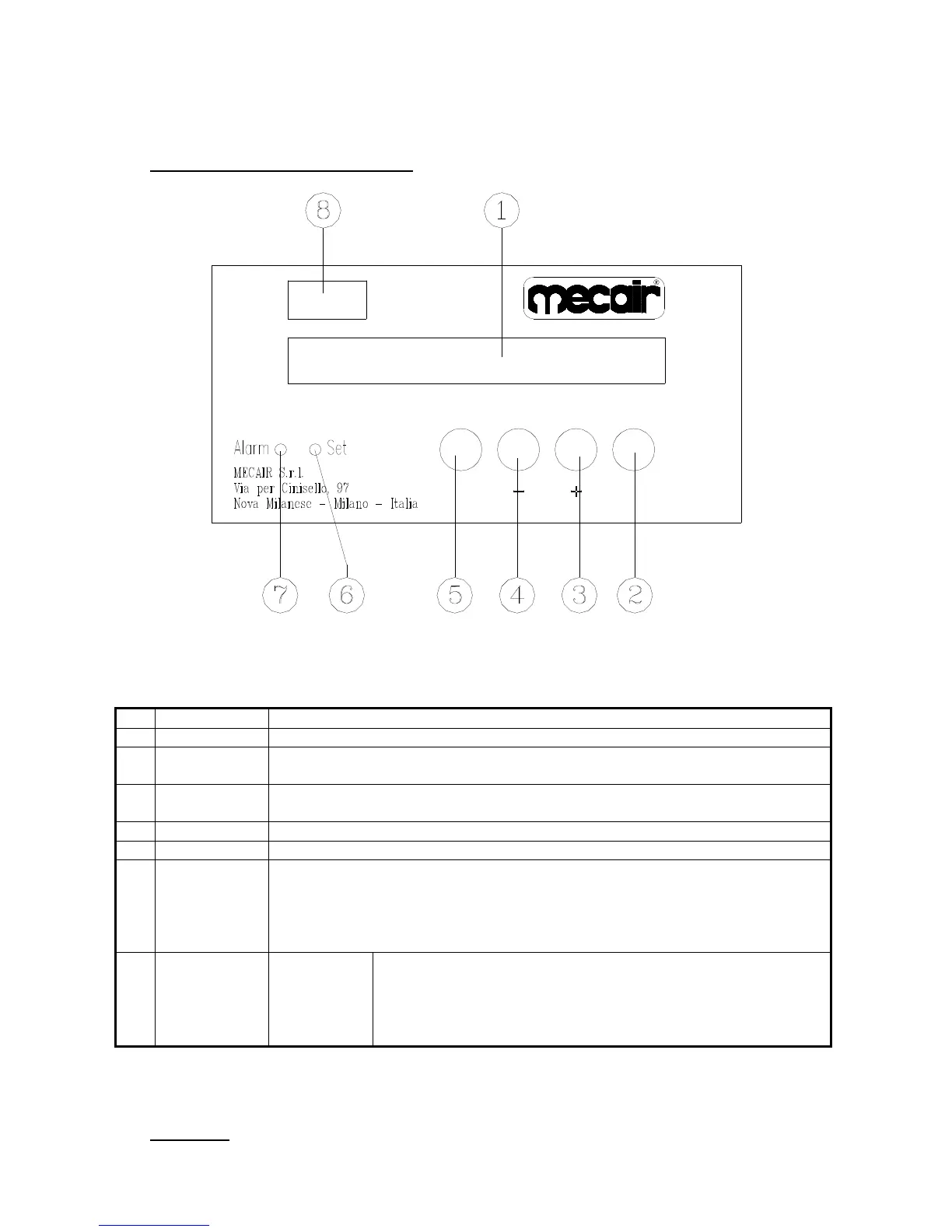
BOARD PANELS AND CONTROLS
1 Display Displays Delta-P value, the setting and the messages
2 Enter key Allows to enter the menu items, and to confirm data after modifications
3 + key
Increases the datum to be modified or changes options in the menu items. Displays
the alarm messages
4 - key Decreases the datum to be modified or
changes options in the menu items. Cancels
the alarm messages
5 Esc key Allows to exit the menu pages
6 Set Led Switches on when the set value “Set” is exceeded
7 Alarm Led Switches on in case of alarm.
Possible alarms are:
the set “Alarm” value is exceeded
sensor failure
invalid configuration data
8 Model DP Super 5 languages
5 units
Min-max Delta-P Set
1 alarm set
Hour counter
6.
START UP
Connect the instrument to the power supply.
ENTERESC



 To Next Page