36. Cannot be detected by the computer? Why? And how to solve it?
Several factors can prevent Windows from recognizing your portable device. If Windows doesn't
recognize your portable music player, it could be a corrupt or missing device driver. In this case,
resolve the problem by reinstalling or updating the driver. Sometimes connection problems that
aren't driver-related can be fixed by upgrading the portable's firmware, particularly on older
devices with known issues.
Please check the description below to identify problems.
Normal checkups
1) Make sure that the drive is properly plugged in to your computer.
2) Try different USB port of the computer. If you’re using a desktop, we suggest you to try the
rear USB port.
3) Try another USB Cable.
4) Reboot the PC.
5) Connect the mp3 player to the PC while holding the play/pause button.
These steps should allow the player to be read by the USB port correctly and will show the player
in "My Computer" as a new drive letter.
Still not working?
Try updating the USB drivers.
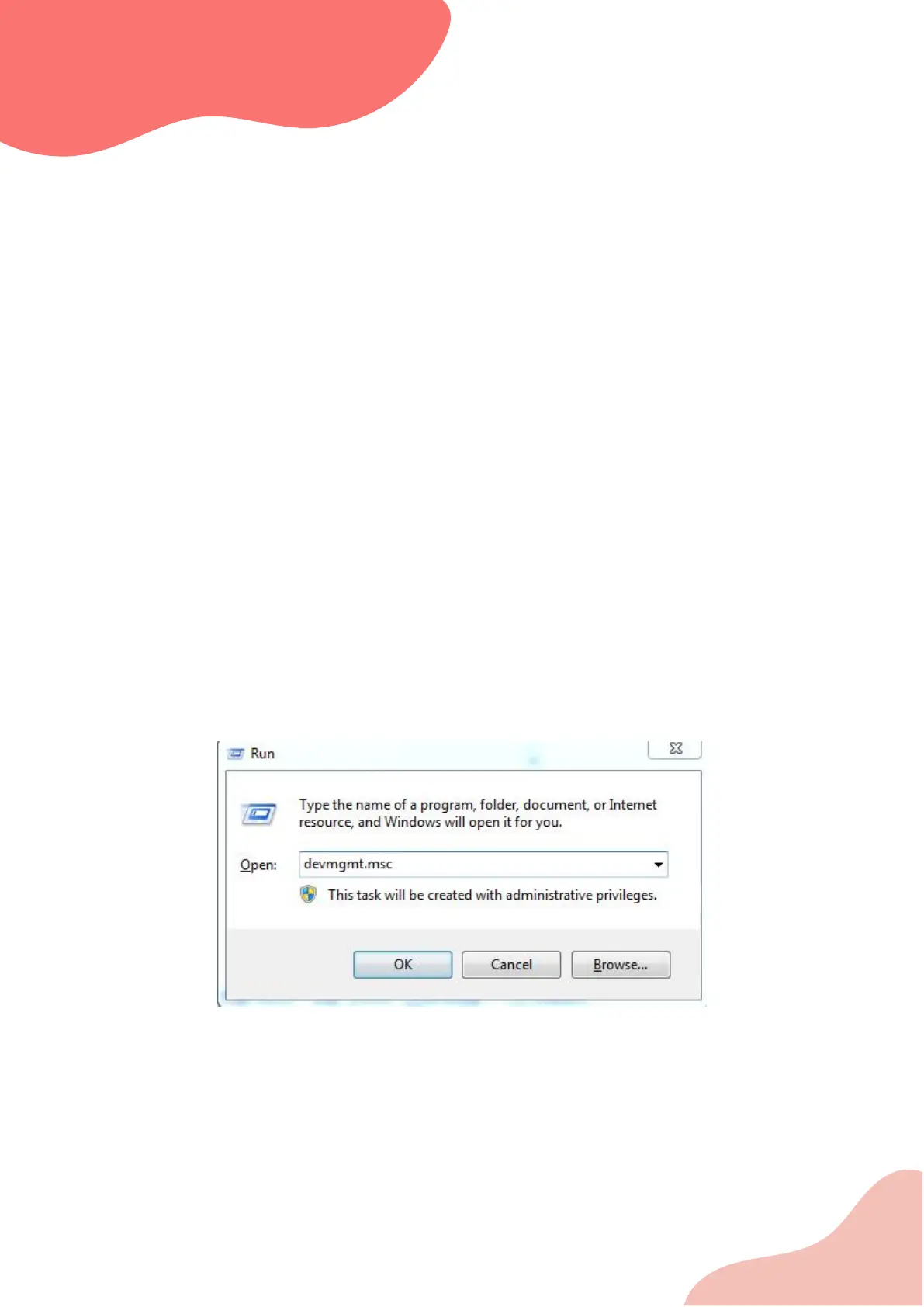
Press Windows key + R. This will open Run. Alternatively, you can go to Start and search for ‘Run’.
In Run dialog box, type ‘devmgmt.msc’ and hit enter.
Go to ‘Universal Serial Bus controller’ and expand it.


 To Next Page