14
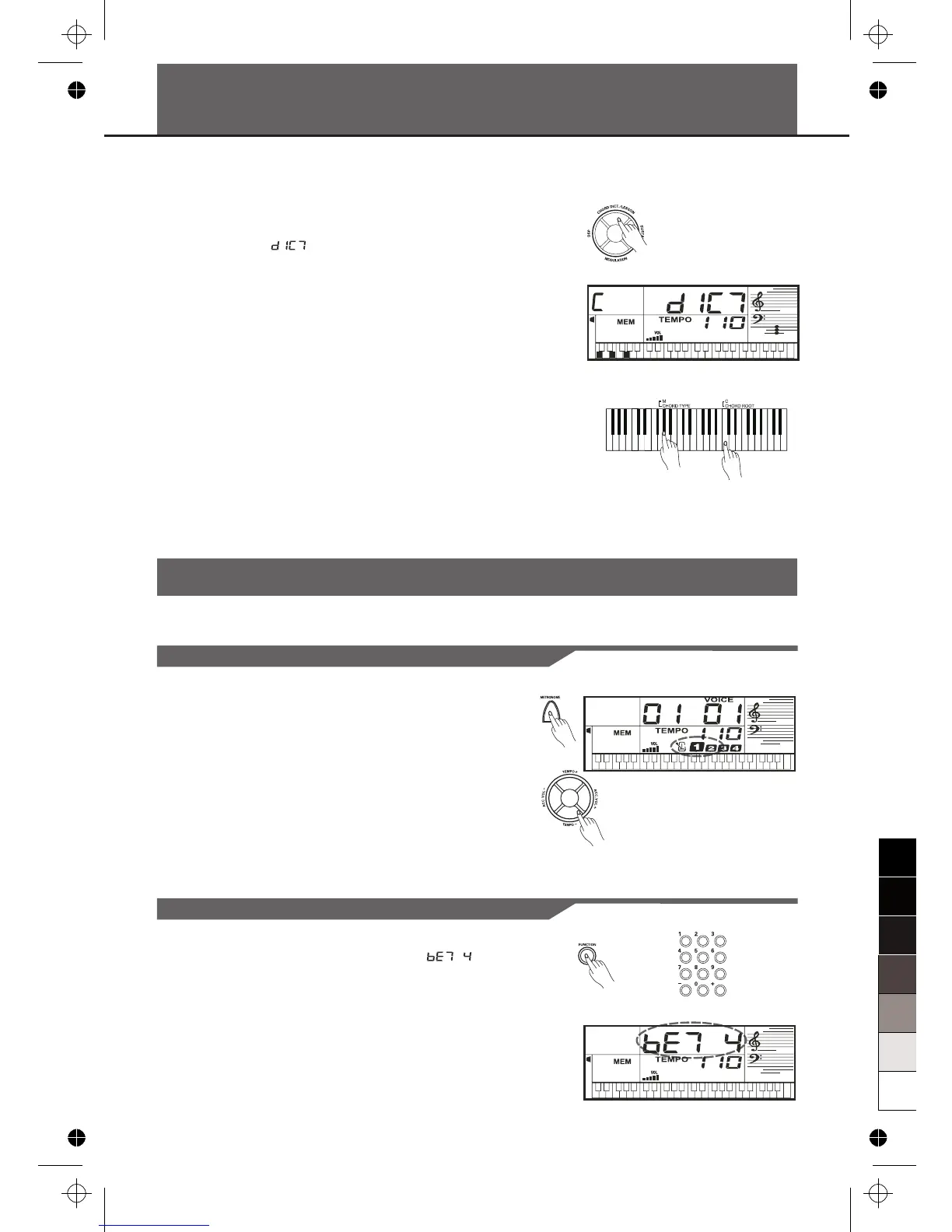
Chord dictionary is essentially a built-in “chord book” that
help you to check the Chord notes.
1.
LCD displays “ ”, the Chord Type and Chord
Notes.
#
2. In this mode, the key above G 3 are used to assign the
Chord Type, the keys above C5 are used to assign the
Chord Root. When the Chord Type and Chord Root are
confirmed, the LCD will display the Chord and its
keyboard position.
3. Play the chords on the keyboard according to the
display. If you press the correct notes, you will hear a
prompt applause sound.
4. Press the [CHORD DICT.] button again to exit this
mode.
Press the [CHORD DICT.] button to enter this mode, the
Chord Dictionary
Metronome
Turning on the Metronome
Selecting the Beat
1. Press the [METRONOME] button to turn on the
metronome.
2. Press the [METRONOME] button again to turn off the
metronome.
3. Press the [TEMPO+] / [TEMPO-] button to change the
tempo of the
m
etronome
.
1. Press the [FUNCTION] button until “ ”
displays.
2. Press the [+] or [-] button to change the beat value: 0,
2, 3, 4, 5, 6, 7, 8, 9. The default value is 4.



 To Next Page