4
7. Autofi re function
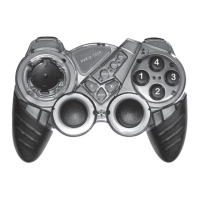
Gamepad has also fully automatic fi re function for eve-
ry button. To enable this function press simultaneously
action button and AUTO button (ex. 4 + AUTO). To dis-
able autofi re feature for specifi c button press simulta-
neously action button an AUTO button.
Macros - GAME CONFIGURATOR SOFTWARE
5
Click program icon in Gamepad Macro group to run
software.
Create macro:
1. Click New
2. Enter new macro name
3. Click OK
Troubleshoting
1. PATHFINDER MT1502 is properly plugged into the
USB port but does not work.
Please remove PATHFINDER MT1502 and all other
game drivers from the system and install software drive
once again. Sometimes there is a confl ict between for-
eign drivers.
2. Not every game requires all functioning buttons (12
buttons) on your PATHFINDER MT1502. If you fi nd
some buttons no working inside the game, please
check the game setting again.
3. The function of the gamepad buttons may vary in
diff erent games. Before proceed with game setting,
whatever through the PATHFINDER MT1502 or
from the OPTION inside the game, always read your
game manual carefully to approach the best game
setting.
4. Gamepad buttons confi guration depends from
game type. Please read game manual for game de-
vices support.
If game not need mouse function go to 7 point.
4. Mark mouse checkbox Mouse set ☑.
5. Choose Mouse buttons functions for gamepad but-
tons.
6. Repeat actions to add other buttons functions.
If You want to add keyboard functions to gamepad but-
tons, be sure that mouse setting has been removed.
7. Click on button icon to open macro window.
8. Click Record.
9. Keep pressing keys combination on keyboard (max
6 keys combination for one gamepad button)
10. Click OK to fi nish macro recording.
11. To record more macros repeat steps 7-10. To save
macro click Save.
12. Click OK to fi nish.


 To Next Page
 Loading...