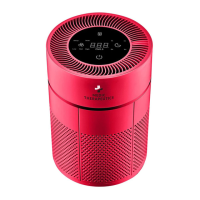
This document describes the Medic Therapeutics Large Room Air Purifier with HEPA H13 Filter, providing details on its function, technical specifications, usage, and maintenance.
Function Description
The Medic Therapeutics Large Room Air Purifier is designed for high-efficiency air purification in large rooms. It utilizes a 4-in-1 air cleaning system to remove various airborne pollutants. The system includes a pre-filter, a High Efficiency Particulate Air (HEPA) H13 filter, modified activated carbon, and an air ionizer. This comprehensive filtration process targets PM 2.5, smoke, pollen, other particulate pollutants, formaldehyde (HCHO), benzene (C6H6), VOCs (Volatile Organic Compounds), and other odorous pollutants. The air ionizer disperses negative ions to actively seek out and remove particles and bacteria from the air, contributing to a fresher environment. The device features a laser sensor for real-time display of PM2.5 values, allowing users to monitor air quality. It offers multiple operation modes, including Auto and Sleep Mode, and allows for manual adjustment of fan speed. A filter replacement reminder ensures optimal performance.
Important Technical Specifications
- CADR particulate: 400m³/h
- CCM particulate: P4 (the highest level)
- CCM formaldehyde: F4 (the highest level)
- Coverage area: 25-50m²
- Noise level: 27-65dB
- Color: White/customized
- Voltage: 110V 50/60Hz
- Power: 40W
- Product size: 322322605mm
- Carton packaged size: 375375625mm
- N.W/G.W: 10kg/11kg
- Filter Type: 4-in-1 system (Pre-filter, High Efficiency Particulate Air (HEPA) H13 Filter, Modified Activated Carbon, Air Ionizer)
- PM2.5 Definition: Fine dust particles with a diameter of 2.5 micrometers or less.
- Air Quality Color Indicator Ring (PM2.5): Green (0-75), Orange (76-150), Red (150+)
Usage Features
The air purifier is designed for user-friendly operation with a touch button control panel.
- Power On/Off: Connect to power for standby. Press the power button to turn on (auto mode) or off (standby). For complete shutdown, remove the power plug.
- Negative Ion Function: Activated by default, can be toggled On/Off via a dedicated button.
- Timer Setting: Allows users to set the device to power off after 1hr, 2hr, 4hr, or 8hr.
- Sleep Mode: When activated, the control panel lights turn off, and the appliance operates at its minimum speed for quiet operation.
- Auto Mode/Manual Mode: The device starts in Auto Mode, adjusting fan speed based on air quality. Users can switch to Manual Mode to adjust fan speed (1-4 gears) as needed, and then switch back to Auto Mode.
- Fan Speed: Features a 4-gear wind speed design.
- Display Status: The display shows real-time PM2.5 values in µg/m³ and TVOC (Total Volatile Organic Compounds). An indicator ring changes color (Green, Orange, Red) to reflect air quality based on PM2.5 levels.
- Filter Replacement Reminder: An icon on the display indicates when the filter needs to be replaced.
- Installation of Filters: Filters are pre-installed but require removal of packaging films before first use. The process involves placing fingers on the handle, moving upward to remove the filter cover, taking out new filters with plastic film, re-installing the filters, and re-installing the covers. Ensure the filter handle faces you.
- Safety Precautions: Do not use with solid-state speed control devices. Connect to appropriate voltage. Avoid pulling, bending, or damaging the power cord. Do not use if the power cord/plug/socket is damaged. Do not place weights on the power cord. Avoid touching the power plug with wet hands. Remove plastic layer from filters before use. Do not drop or insert objects into openings. Do not clog air inlet or outlet. Keep away from hot objects, fire, flammable chemicals, propane, gas, natural gas, bug spray. Avoid unstable locations, extreme temperatures, or damp areas. Not suitable for disabled persons, those with perceptual disturbances, dysgnosia users, or children. Unplug when moving.
Maintenance Features
Regular cleaning and filter replacement are crucial for maintaining the device's efficiency and longevity.
- Cleaning the Body: Unplug the machine. Use a soft cloth to remove stains. For stubborn stains, use a moderate amount of neutral detergent. Avoid scratching the casing with hard objects.
- Filter Cleaning and Replacement:
- The built-in program reminds users when to replace the filter. However, actual replacement time may vary based on the pollution level of the environment.
- The composite filter should be replaced approximately every 10 to 12 months under normal household conditions (e.g., 4-6 cigarettes per day absorption). This cycle may be shortened in highly polluted environments or with heavy use.
- The surface dust of the composite filter can be cleaned with a vacuum cleaner every 2 months to extend its life expectancy.
- Do not clean and reuse the composite filter. Do not clean the device with corrosive chemical cleansers, ethyl alcohol, or organic solvents.
- Always power off and clean, then wipe off the plug when cleaning the device.
- Dispose of the filter as non-combustible refuse.
- Sensor Maintenance: If PM2.5 values do not reduce, the sensor cover may have accumulated dust and needs cleaning.
- Storage: Store in dry places, away from flammable and combustible areas, using the protective cover.
Included in Packaging:
- Air Purifier: 1 Item
- Composite filter: 2 Pieces (assembled in the appliance)
- Power line: 1 Piece (in accessories box)
- Instruction Manual: 1 Copy (in accessories box)


 To Next Page
 General