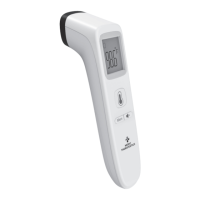
This document describes the Medic Therapeutics Touchless Thermometer, an infrared device designed for accurate, safe, and fast temperature measurements. It is intended for household use and measures human body temperatures, with the forehead mode indicated for people of all ages.
Function Description
The Touchless Thermometer measures body temperature based on the infrared energy emitted from the forehead. An infrared temperature sensor collects this energy, which is then focused by a lens and converted into a temperature reading by thermopiles and measurement circuits. The device provides quick measurements, typically less than 1 second, and offers multi-functional capabilities, allowing it to measure forehead, room, liquids, and object temperatures. It features a non-contact design for hygienic use.
Important Technical Specifications
- Product Name: Infrared thermometer
- Power Supply: DC1.5Vx2 (2 x AAA batteries)
- Measurement Range:
- Forehead: 32.0°C-42.9°C (89.6°F-109.2°F)
- Object: 0°C-100°C (32°F-212°F)
- Accuracy (Laboratory):
- Forehead mode: ±0.2°C/±0.4°F
- Object mode: ±1.0°C/1.8°F
- Display Resolution: 0.1°C/°F
- Measuring Distance: 0-3cm
- Automatic Shutdown: 10s±1s
- Memory: 35 groups of measured temperature data
- Operational Conditions:
- Temperature: 10°C-40°C (50°F-104°F)
- Humidity: 15-95%RH, non-condensing
- Atmospheric pressure: 86-106 kPa
- Battery Life: Can be used for more than 3000 times
- Weight & Dimension: 66.8g (without battery), 36x42x153.5mm
- Applied Part Type: Type BF
- Ingress Protection (IP) Rating: IP22 (Protected against solid foreign objects of 12.5 mm Ø and greater; if kept at a 15-degree angle, it can prevent water drops).
Usage Features
The thermometer is designed for ease of use with a one-button design.
- Power On/Measurement: Press the "Measure" button to power on. For forehead temperature, aim at the forehead from a distance of 0-3cm and press the "Measure" button again. The device will beep once measurement is complete and display the temperature.
- Room/Object Temperature: To switch to room/object temperature mode, ensure the thermometer is powered off, then press the "Mem" button for 3 seconds. Aim at the object from 1-3cm and press the "Measure" button.
- Temperature Display: The LCD screen displays the temperature value, mode (forehead or object), Fahrenheit/Celsius degrees, battery level, memory recall indicator, and mute/un-mute indicator.
- Fever Alarm: The device features a fever alarm function with color-coded backlights:
- Green light (12 seconds, one long beep): 89.6°F - 99.2°F (32°C - 37.3°C)
- Orange light (12 seconds, 3 short beeps, flickering LCD): 99.3°F - 100.3°F (37.4°C - 37.9°C) - indicates light fever.
- Red light (12 seconds, 5 short beeps, flickering LCD): 100.4°F - 109.2°F (38°C - 42.9°C) - indicates high fever.
- Mute/Un-mute Mode: Short press the "Mute-unmute" button (less than 1 second) to switch between mute and un-mute.
- Memory Recall: When powered on, short press the "Mem" button to enter memory mode. Press again to check the 35 sets of stored temperature readings. If no value is stored, it will display "---M".
- °C/°F Conversion: Long press the "Mute-unmute" button for 5 seconds when the thermometer is on to switch between Celsius and Fahrenheit.
- Temperature Compensation Adjustment: When the thermometer is on, press both the "Mute-unmute" and "Mem" buttons for 2-3 seconds to enter compensation mode. Use the "Mem" button to adjust the temperature from ±0.0 to ±2.0. This adjustment will be automatically added to all future temperature readings.
- Auto Shut-down: The unit automatically shuts down after 10 seconds of inactivity. It can also be manually turned off by long pressing the "Measure" button for 6 seconds.
Maintenance Features
- Battery Replacement: Slide off the battery cover and insert two AAA batteries. It is recommended to remove batteries if the thermometer will not be used for more than two months. Note that replacing batteries will reset all memory records and settings to default.
- Cleaning: Use an alcohol swab or cotton swab moistened with 95% alcohol to clean the thermometer casing and the measuring probe. Ensure the alcohol has completely dried before taking a new measurement. Avoid abrasive cleaning agents, thinners, benzene, or immersing the instrument in water or other cleaning liquids. Take care not to scratch the LCD screen.
- Storage: Keep the thermometer away from direct sun exposure, in a dust-free, dry, well-ventilated place at a temperature between 50°F (10°C) - 104°F (40°C). Avoid high humidity environments (>95% RH).
- Troubleshooting: The manual provides a comprehensive error and troubleshooting guide for issues such as failure to power on, incorrect readings (too low or too high), and display errors (e.g., "Er1" for ambient temperature out of range, "ErC" for memory error, "Hi" for temperature above 109.2°F, "Lo" for temperature below 89.6°F, and low battery indicators). Solutions include replacing batteries, ensuring correct battery polarity, cleaning the lens, maintaining proper measuring distance, and allowing the individual and thermometer to acclimate to room conditions.
Important Warnings and Precautions
- Keep out of reach of children under 12 years.
- Do not immerse the thermometer in water or other liquids.
- Use only for intended purposes.
- Avoid direct sun exposure, dust, and high humidity.
- Do not use if damaged; contact the dealer for repairs.
- Protect from severe impact, shock, and twisting of the instrument or sensor.
- Consult a doctor for symptoms of illness, even without fever.
- Temperature readings should not be the sole basis for diagnosing illness, especially for individuals on medication or with compromised immune systems.
- Seek professional advice for temperature elevation, particularly for the elderly, frail, those with weakened immune systems, neonates, infants, bedridden patients, or transplant patients.
- Not intended for pre-term or small-for-gestational age babies, or to interpret hypothermic temperatures.
- Do not allow children to take temperatures unattended.
- Not a substitute for consultation with a physician or pediatrician.
- Clean the thermometer probe after each use.
- Do not use on newborns for continuous temperature monitoring.
- Do not take a measurement while or immediately after nursing a baby.
- Patients should not drink, eat, or be physically active before/while taking the measurement.
- Ensure the eyebrow area is clean for accurate readings.
- Always check if the lens is clean.
- Ensure the user and thermometer are in the same room prior to measurement.
- Wait at least 10 seconds between measurements.
- Self-diagnosis or self-treatment based on results is dangerous; consult a doctor.
- Holding the thermometer for too long can cause it to warm up, leading to incorrect readings.
- Patients and the thermometer should be in a steady-state room condition.
- Remove dirt, hair, or sweat from the forehead area and wait 10 minutes after cleaning before measurement.
- Wiping the forehead with a warm or cool cloth may impact readings; wait 10 minutes.
- For specific situations (newborns, children under three with compromised immune systems, or users learning the device), take 3-5 temperatures in the same location and use the highest reading.


 To Next Page
 General