EasyManua.ls Logo

Medicare Medistrom Pilot-24 Lite - User Manual

Medicare Medistrom Pilot-24 Lite
4 pages
Print Icon
To Next Page IconTo Next Page
Loading...
Medicare Health & Living Ltd.
1 1
Medistrom Pilot-24 Lite
Battery and Backup Power Supply
User Manual
THIS PACKAGE INCLUDES:
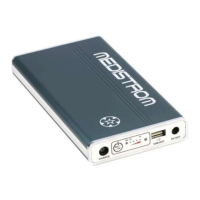
Pilot-24 Lite
Apex ICH / Resvent iBreeze kit for Pilot-24 Lite
Battery Carry Sleeve
Intended Use
Pilot-24 Lite is manufactured with genuine LG industrial grade rechargeable
lithium ion cells. The Pilot-24 Lite can be used as a backup power source to
prevent interruption to PAP therapy in the case of a power outage. Pilot-24 Lite
can serve as a portable PAP battery during travel by air, land, or sea when the
mains power source is not available.
Pilot-24 Lite has a USB port (output: 5V 2.5A) which can be used to charge cell
phones, tablets and other commonly used handheld devices rated for receiving
the above USB power output.
Control Panel
1. Charge Port
Plug the compatible AC adapter into this port (use the short
charging adapter cable if required). Ensure that the AC adapter is
plugged into the mains power outlet. Once the battery is charging
the 4 green Charge Level Indicator Lights will turn on.
2. Multi-Function Button
Pressing the button once will show the battery’s charge level (if the
battery is in Standby Mode: refer to Stand-by Mode on page 3).
Holding the button for 3 seconds will turn the LED Flashlight On and
Off.
3. Blue “ON” Indicator Light
The light will shine solid blue once the battery is connected and is
sending power to a compatible PAP device.
4. Green Charge Level Indicator Lights
When the battery is being charged, the lights will blink, and then
shine solid green showing the level of charge going from Lo to Hi.
Refer to page no. 2 for a guide to charge levels.
Question and Answer IconNeed help?

Do you have a question about the Medicare Medistrom Pilot-24 Lite and is the answer not in the manual?

Summary

Control Panel Overview

Charge Port

Connects the AC adapter for charging the battery. Indicator lights show charging status.

Multi-Function Button

Used to check battery level and turn the LED flashlight on/off.

Blue ON Indicator Light

Shines solid blue when the battery is connected and sending power to a PAP device.

Green Charge Level Indicator Lights

Indicates battery charge level by blinking or shining solid green.

Battery Features and Operation

Intended Use

Describes the product's purpose as a PAP therapy backup and portable power source.

LED Flashlight

Turned on/off by holding the Multi-Function Button. Auto-off after 10 minutes if not connected.

USB and DC Output Ports

USB port for handheld devices; DC Out port for PAP devices.

Recharging the Battery

Process of charging the battery using AC adapter and indicator lights for charge status.

Connecting to Devices and Safety

Connecting to AC Power Adapter

Procedure for connecting the battery to its AC power adapter for recharging.

Connecting to PAP Device

Instructions for connecting the battery to a PAP device using the DC Out cable.

Stand-by Mode

The battery enters standby mode after 10 minutes of inactivity to conserve power.

Safety Usage Information

Crucial warnings regarding temperature, humidity, handling, and usage precautions.

Specifications and Travel

Product Specifications

Detailed technical specifications including capacity, cell type, input/output ratings, and lifespan.

Travelling with Pilot-12;24 Lite

Guidelines for airline travel, including battery capacity limits and optimal usage tips.

Medicare Medistrom Pilot-24 Lite Specifications

Battery IconBattery
capacity95Wh
cell typeLG Industrial grade genuine rechargeable lithium ion cells
life spanOver 500 full charge/discharge cycles
Power IconPower
rated input24V, 60W(NORMAL) 90W(MAX)
rated outputDC 24V, 3.5A
USB out5V, 2.5A
Weight and Dimensions IconWeight and Dimensions
dimensions17cm x 9cm x 2cm
weight1.3lbs
caseAluminium