8 9
Steam generator maintenance
Removal of calcium deposits in the boiler
FUNCTIONS MAINTENANCE
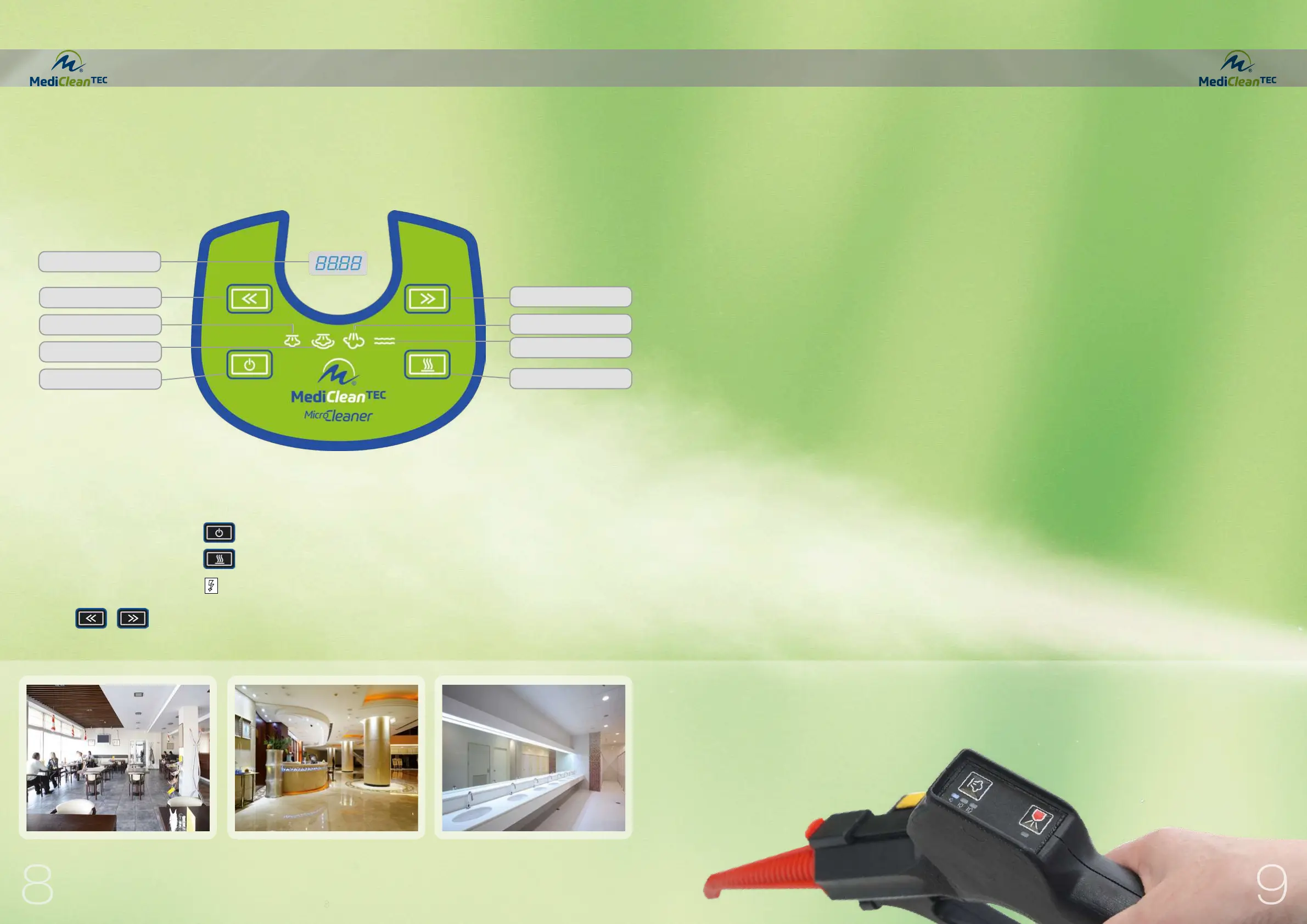
Keypad functions
CAUTION: WE RECOMMEND CLEANING THE BOI-
LER ONLY AFTER THE APPLIANCE HAS COOLED
DOWN, i.e. IF IT WAS SWITCHED OFF AT LEAST 5
HOURS BEFOREHAND (WITH THE PLUG DISCON-
NECTED).
The True Temp Technology makes it possible to use
distilled or osmosis water in the Medicleantec (contrary
to many other commonly available steam cleaners). It
is therefore not necessary to decalcify the appliance. If
you use calcium-free water and the maintenance dis-
play indicates “CALC”, you can simply switch off this
display (see *1).
The appliance is equipped with a maintenance alert
system which activates if “CALC” is displayed alterna-
ting with the temperature. You can continue to work if
this appears. Then disconnect the plug and allow the
appliance to cool down for at least 5 hours. Follow the
aforementioned steps to ensure that no steam or pres-
sure is present in the boiler interior.
1 Switch off the appliance. (Disconnect plug)
2 Fill water reservoir (1) with water.
3 Place a suitable small tub underneath the appliance
or position it on top of the kitchen sink and remove
the discharge cover (04) from under the appliance.
Allow all the water and calcium deposits to drain
from the boiler. Shake the appliance a little to com-
pletely remove all the calcium deposits.
4 Replace the discharge cover (04) and refill the appli-
ance with water (1).
5 Then switch on the appliance and allow the pump to
run for approx. 2 to 3 minutes until the water from
the bottom tank fills the boiler completely (until the
pump stops making noise). The appliance is now
ready to use again!
The boiler button/heater (06B) must remain off
during the entire decalcification process. Do not
turn the machine upside down or calcium may
enter into the valves!
If you are using water with a high calcium con-
tent, it is recommended to refill the appliance
with water and repeat the aforementioned steps.
*1 RESETTING THE MAINTENANCE INTERVALS CALC
Switch on the appliance by pressing buttons (2) and (06A), then press and hold button (06A) for
approx. 10 seconds. “CALC” will not appear until the next time maintenance is due.
Hour counter
This appliance is equipped with two hour counters. In
order to read the number of hours, switch off the appli-
ance using button (06A) and then activate button (06F
and 06G). Pressing this button will alternatively show
the hours for counter 1 and/or 2.
The two buttons located on the front keypad and the main switch located at the back of the appliance are
used in the different operating modes.
The buttons are called as follows:
06A) Appliance On switch hereinafter only 06A
06B) Boiler On switch hereinafter only 06B
2) Main power switch hereinafter only 2
Display change:
> Counter1>Counter2>Pressure>Temperature
Low water 06E
Multi-function display
Display change 06F
Minimum steam activation 06C
Medium steam activation 06C
On button 06A
Display change 06G
Steam ready 06D
Boiler button 06B


 To Next Page
 Loading...