Views
15
Safety
Handling
Components Aid Appendix
1 - Webcam ................................................................................ ( p. 54)
2 - TFT Display ............................................................................. ( p. 34)
3 - Stereo Speaker
4 - Power ON/OFF ...................................................................... ( p. 27)
5 - Keyboard ............................................................................... ( p. 38)
6 - Device Indicators ................................................................... ( p. 17)
7 - Touchpad buttons .................................................................. ( p 39)
8 - Touchpad .............................................................................. ( p. 39)
9 - Multimedia buttons ............................................................... ( p. 18)
10 - Microphone ........................................................................... ( p. 48)
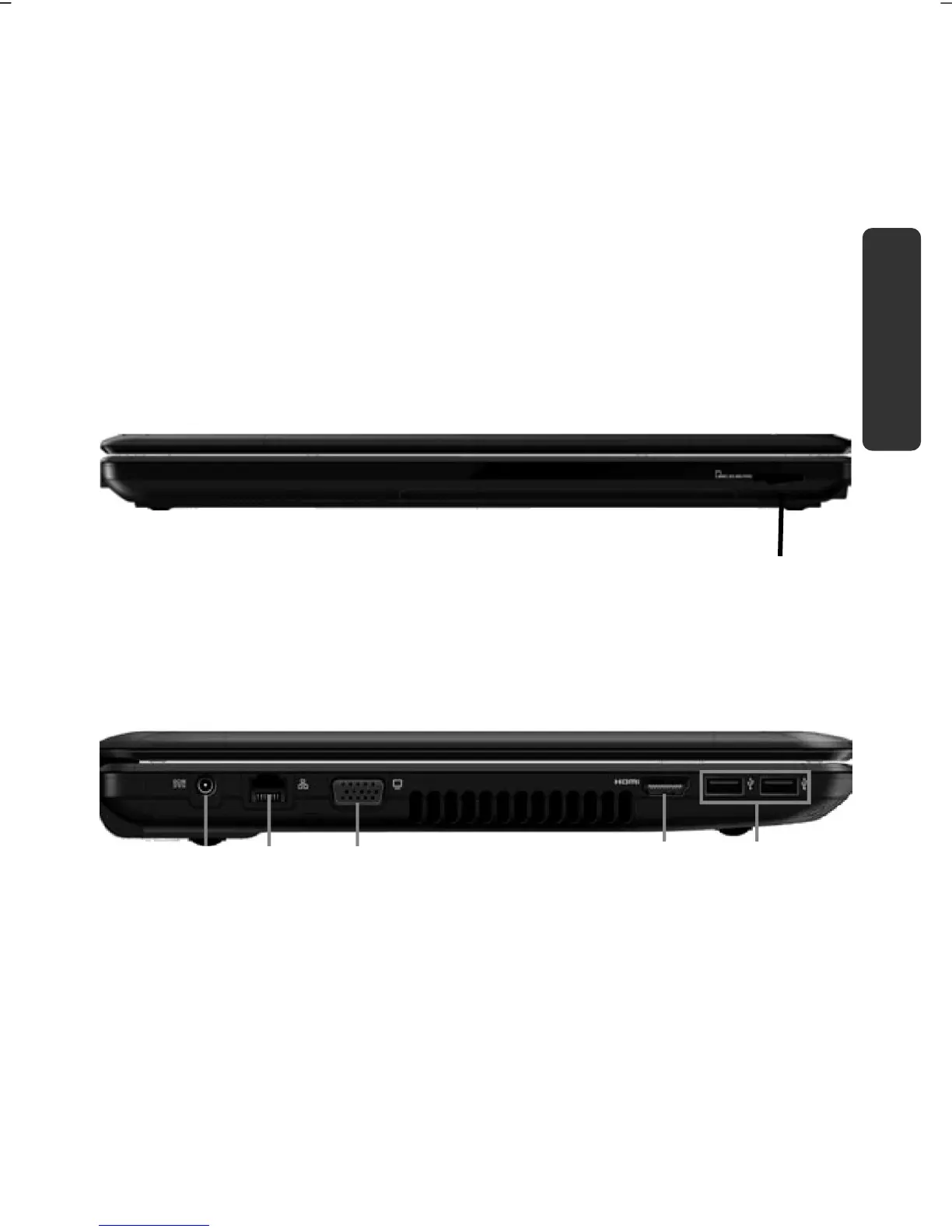
Front view
(Diagram the same)
11 - Multimedia Card Reader ....................................................... ( p. 52)
Left Side
(Diagram the same)
12 - Power Socket ....................................................................... ( p. 28)
13 - LAN Port (RJ-45) .................................................................... ( p. 49)
14 - External monitor port VGA ..................................................... ( p. 35)
15 - HDMI Connector .................................................................... ( p. 36)
16 - USB 3.0 Port .......................................................................... ( p. 54)
11
12
15
13 14
16














 To Next Page