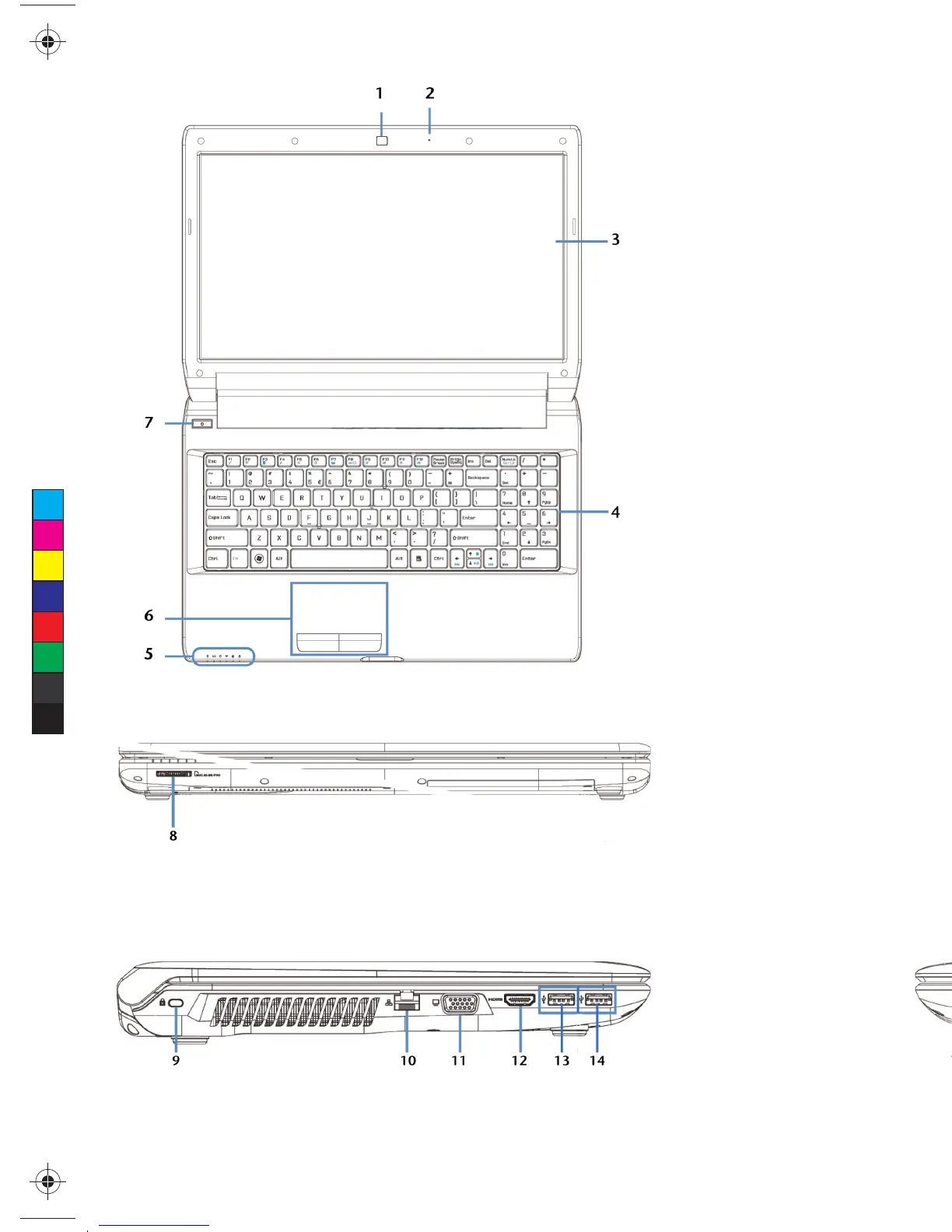
Open Notebook
Left Side
Right Side
Front View
Descriptions
1 - Webcam
2 - Microphone
3 - TFT Display
4 - Keyboard
5 - Device Indicators
6 - Touchpad
7 - Power ON/OFF
8 - Multimedia Card Reader
9 - Kensington
®
Lock
10 - LAN Port (RJ-45)
11 - External monitor port VGA
12 - HDMI Connector
13 - USB Port 3.0 with charging
function for mobile phones*
14 - USB Port 3.0
15 - Audio Out**/
Digital Audio Out*
(S/P-DIF, optical)
16 - Microphone**
17 - USB Port 2.0
18 - Optical Drive
19 - Disc Eject Button
20 - Emergency Ejection
21 - Power Socket
* See the instruction manual for more information
** Ports with dual function. Configuration is set with the
included software.
C
M
Y
CM
MY
CY
CMY
K
MD 99050 E6228 A35YA EN Final MSN 4004 1961 Cover inside.ai 1 12.04.2012 10:13:33MD 99050 E6228 A35YA EN Final MSN 4004 1961 Cover inside.ai 1 12.04.2012 10:13:33















 To Next Page