GB
37
For reference, the device saves the data from two therapies every day (e.g. in
the morning and afternoon).
Enter the date/time
The device counts the therapy days with a simple clock. To set this clock:
1. Activate the device with the button “ ”.
2. Hold the button “Set” for approximately 5 seconds until a short signal
sounds. The display will now show the therapy day, the display will
show the hour of the internal clock.
3. With the control set the therapy day (1 to 30).
4. With the control set the hour of the day (0 to 23).
5. Briefl y press the button “ ”.
The internal clock has been set.
Read the memory
1. Activate the device with the button “ ”.
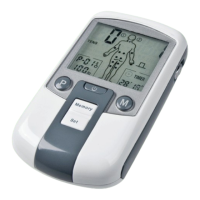
2. Press and hold the button “Memory” for approximately 5 seconds until a
brief signal sounds. If no data has been saved, the notice “ZERO” will briefl y
appear on the display and the function is ended.
3. Otherwise the following displays will become visible:
• the therapy day, beginning with 1
• the number of the therapy session for the day (1 or 2)
• the pulse form
• the therapy duration
•
the program number
• the therapy mode
4. Briefl y press the button “P” to read the current intensities. The displays
and will now show the average current intensities for the two channels
(identifi able by the channel numbers next to the numbers).
5. Briefl y press the button “P” again in order to show the therapy day again.
6. With the control , increase or decrease the therapy day.
7. With the control , switch between the therapy sessions 1 and 2.
8. To delete all saved therapy sessions, push and hold the button “M” for
approximately 5 seconds until a brief signal sounds. The status “CLR” will
briefl y appear on the display and the data will be deleted.
9. To end the function, briefl y press the button “ ”.
Data memory
Application


 To Next Page