
 Need help?
Do you have a question about the MEDIZS Smart RK11 and is the answer not in the manual?
Explains symbols used on the instrument and their meanings, covering electrical and safety indicators.
Details the EU representative and compliance mark for the instrument, showing adherence to directives.
Provides general safety guidelines and warnings for using the instrument, including potential hazards.
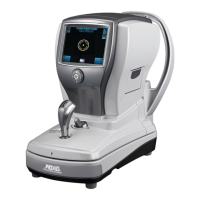
Details the components on the front side of the instrument with a labeled diagram.
Identifies components on the back of the instrument, including headrest and measurement window.
Lists and describes the ports and controls located on the bottom of the instrument.
Explains the function of each button and the operation wheel for controlling the instrument.
Instructions on how to unfix the stage of the instrument before use or movement.
Steps to power on the instrument for practice sessions with the model eye.
How to correctly position the model eye on the chinrest for accurate practice.
Procedure to unlock the instrument's stage, allowing for movement.
How to select the desired measurement mode using the operation buttons.
Guide to adjusting height and focus on the model eye for accurate measurements.
Detailed steps for performing manual and automatic measurements using the model eye.
Instructions on how to print measurement results obtained during practice.
Performing refractometry using the REF mode, detailing screen indicators and controls.
Measuring corneal curvature using the KER mode, including operation and result display.
Performing simultaneous refractometry and keratometry with RK mode.
Measuring corneal periphery curvature using the PK mode, including measurement points.
Measuring the base curve of contact lenses using CLBC mode, including setup.
Measuring IOL patients or those with cataracts for reduced error.
Measuring iris or pupil diameter in millimeters using SIZE mode.
Viewing saved measurement results on the LCD screen, including navigation.
Setting various options like measuring, printing, and system parameters.
How to set a custom message to be printed at the bottom of results.
Details on how to find instrument model, serial number, and software version.
Troubleshooting common error messages and causes before contacting service.
Guidelines for cleaning the instrument to maintain its condition.
Procedures to follow when relocating the instrument safely.
Instructions for replacing printing paper and chin rest paper.
Required information to provide when contacting for repair or service.
Guidance on the proper and environmentally friendly disposal of the instrument.
Technical specifications for refractometry measurements.
Technical specifications for keratometry measurements.
Details of the instrument's hardware components and capabilities.
Environmental conditions for operation and storage.
Identifies all parts and accessories included with the instrument.
 General
| Brand | MEDIZS |
|---|---|
| Model | Smart RK11 |
| Category | Medical Equipment |
| Language | English |

 To Next Page