This document provides a comprehensive overview of the Med-link Pulse Oximeter, models AM801, AM801R, AM805, AM806, and AM806B, a reusable medical device intended for spot checking of physiological parameters.
Function Description
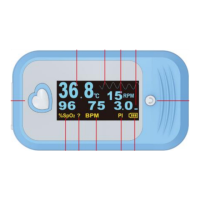
The Med-link Pulse Oximeter is designed to measure and display functional arterial oxygen saturation (SpO2), pulse rate (BPM), temperature, and respiration rate (RPM). It utilizes a dual light source (red LED and infrared red LED) and a photo detector to differentiate HbO2 from HbR, translating absorbed light ratios into SpO2 measurements. The device also estimates respiration rate by processing physiological variations detected by the SpO2 sensor. Temperature measurement is based on a thermistor principle, where resistance changes linearly with temperature.
Intended Use: The device is intended for use in hospitals, physician's offices, clinical settings, and home care environments for adults and pediatrics who are well or poorly perfused (for SpO2 and pulse rate) and adults who are well perfused (for respiration rate). Application sites include fingers.
Contraindications: The device is not suitable for patients with blood microcirculation disorders, excessive blood staining, disorders of important hemoglobin indicators, or severe arrhythmia.
Important Technical Specifications
- SpO2 Range: 30% to 100%
- SpO2 Resolution: 1%
- SpO2 Accuracy (under good & low perfusion): ±2% for 90-100% range; ±3% for 70-89% range; unspecified for <70%.
- Low Perfusion Index: ≤0.3%
- Pulse Rate Range: 30 to 300 bpm
- Pulse Rate Resolution: 1 bpm
- Pulse Accuracy (under good & low perfusion): ±3 bpm
- Respiration Rate Range: 4-70 RPM
- Respiration Rate Resolution: 1 RPM
- Respiration Rate Accuracy: ±1 RPM (mean error); 2 RPM (ARMS)
- LED Wavelengths: Red: approximately 660nm; Infrared: approximately 905nm
- Optical Output Power: Less than 15mW
- Temperature Range, Accuracy: 77° to 113°F (25°C to 45°C): ±0.1°C
- Temperature Display Resolution: ±0.1°C
- Shortest Measurement Time Recommended (Temperature): 5 min
- Measuring Site (Temperature): Skin surface
- Reference Body Site (Temperature): Oral cavity and axilla
- Batteries: 1.5V (AAA) alkaline battery X2 (IEC Type LR03)
- Adaptable Range: 2.6V~3.6V
- Power Consumption: Less than 55mA (SpO2 only), less than 40mA (Temp only), less than 60mA (SpO2 and Temp).
- Data Update Period: 8s
- Reminder Response Time: <2s
- Operating Environment: Temperature 41°~104°F (5℃~40℃), humidity ≤80%
- Transportation and Storage Environment: Temperature 14°~104°F (-10℃~40℃), humidity ≤80%
- Hyperbaric Pressure (storage, transportation and operating): 86kPa~106kPa
- Medical Device Classification: Class II a by EU Directive 93/42/EEC
- Protection against liquids: IPX2 (Protected against vertically falling water drops when enclosure tilted up to 15°)
- Weight: 31.5g (Not including batteries)
- Size: 613430.5mm
- Bluetooth: 2.4G, GFSK, FHSS, 0dbm Radiant power.
- Compliance: Internally powered equipment, Type BF Applied part, Continuous mode of operation. Surface material is non-harmful/non-toxic.
Usage Features
- Getting Started:
- Insert two new AAA alkaline batteries, ensuring correct polarity.
- Open the clip and insert a finger (middle or index finger preferred) with the fingernail upturned, ensuring the sensor LED is above the fingernail.
- Turn on the oximeter by pressing the Menu button.
- Information on SpO2, pulse rate, and respiration rate is displayed directly on the screen.
- Temperature Measurement: Plug the temperature probe connector into the instrument's USB female connector, then place the probe on the patient's skin surface or esophageal/rectal area to collect temperature signals.
- Display Modes: The device offers eight display modes for SpO2 and pulse rate.
- Screen Turn Switch: Press the Screen turn switch to cycle through display orientations.
- Menu Settings: Long press the Menu button to enter the settings interface, which includes "Setup 1", "Setup 2", and "Sounds Setup". Parameters such as high/low SpO2 limits, high/low BPM limits, high/low temperature limits, and pulse beep volume can be adjusted.
- Power On/Off: Press the Menu/Power button to turn on. To power off, navigate to "power off" in the menu and long press the button. The device also automatically powers off after 8 seconds of no signal input.
- Low Perfusion Test: The oximeter's performance under low perfusion conditions can be verified using an SpO2 simulator to compare displayed values against preset SpO2 and pulse rate values at different perfusion levels (e.g., 0.1%).
- Safety Precautions:
- Avoid using in environments with flammable anesthetics, oxygen, or nitrous oxide.
- Do not spray, pour, or spill liquids on the device.
- Change reusable sensor sites at least every 4 hours, or more frequently if skin integrity changes.
- Check patient application sites frequently at elevated ambient temperatures to prevent burns.
- Be aware that environmental light may cause the monitor to display data after sensor removal; this data should not be used for clinical diagnosis.
- Portable and mobile RF communications equipment can affect performance.
- Do not modify the equipment without authorization.
- Do not reuse disposable probes to prevent cross-infection.
- The device is not an apnea monitor and should not be used for arrhythmia analysis, especially with severe arrhythmia, as it may lead to inaccurate values or loss of displayed information.
- Ensure proper finger placement to avoid inaccurate measurements.
- Avoid excessive ambient light, strenuous action, or electrosurgical interference, as these can affect accuracy.
- Do not use enamel or other makeup on the fingernail.
- The device is not intended for treatment.
Maintenance Features
- Cleaning and Disinfecting:
- Switch off the oximeter before cleaning.
- Clean the surface with a soft cloth dampened with a commercial, non-abrasive cleaner or a 70% isopropyl alcohol solution.
- Gently clean the LED and photo-sensor with a moist cloth or cotton ball and alcohol.
- This general cleaning process is not for infection prevention; contact a specialist for contagious infection processes.
- Do not immerse the device in liquid.
- High-pressure sterilization is not permitted.
- Calibration:
- Use an SpO2 simulator (e.g., Fluke Biomedical index 2) to calibrate the SpO2 measurement function. Calibration must be performed by qualified personnel only.
- SpO2 accuracy can be validated through human studies against arterial blood sample reference measured with a CO-oximeter, complying with EN ISO80601-2-61.
- Repairing and Maintenance:
- Change batteries when the low-voltage indicator appears.
- Clean the device surface before use; wipe with alcohol and air dry or use a dry clean fabric.
- Remove batteries if the oximeter will not be used for a long time.
- Store in an environment with ambient temperature between -10°C and 40°C and relative humidity not higher than 80%.
- The device needs to be calibrated once a year or according to hospital calibrating programs. Calibration can be performed by a state-appointed agent or the manufacturer.
- Only qualified service engineers should perform necessary maintenance. Users are not permitted to maintain it themselves.
- Keep the device in a dry environment, as humidity may reduce its lifespan or cause damage.
Troubleshooting: The manual provides a troubleshooting guide for common issues such as abnormal display, no display, no reading, auto-off failure, and inaccurate temperature measurement, along with possible causes and recommended solutions.
Electromagnetic Environment: The device complies with IEC 60601-1-2 and MDD 93/42/EEC limits for medical devices. It is intended for use in electromagnetic environments where radiated RF disturbances are controlled. Users should maintain a minimum distance from portable and mobile RF communications equipment. The device is not designed for use in environments where the pulse can be obscured by electromagnetic interference.
FCC Warning: Any unauthorized changes or modifications may void the user's authority to operate the equipment. The device complies with FCC Rules Part 15 and must accept any interference received. Users are advised to reorient or relocate the receiving antenna, increase separation between equipment and receiver, or connect the equipment to a different circuit if interference occurs.


 To Next Page
 General