FUNCTIONALITY & CONTROLS
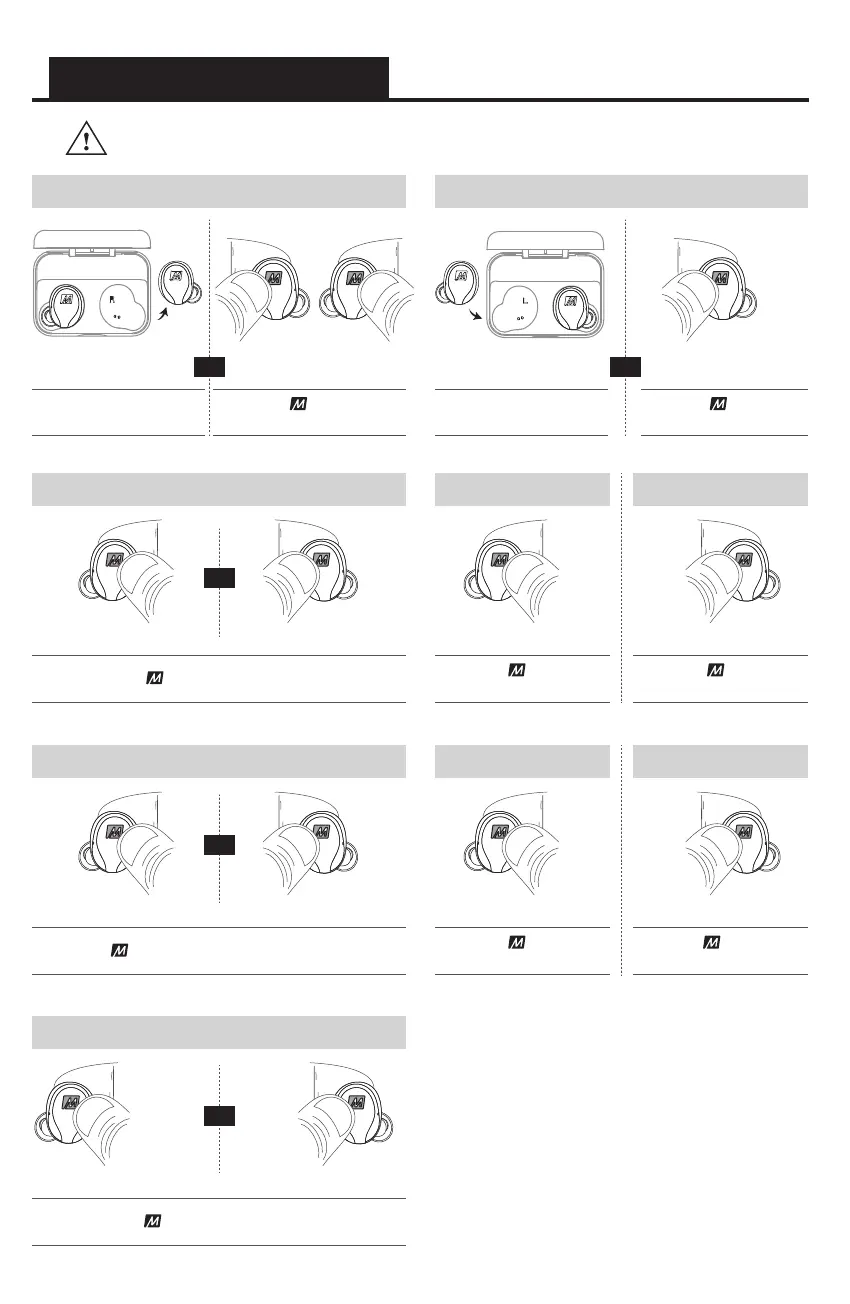
Power On
Play / Pause / Answer Call / End Call
HOLD button on
each earpiece for 3 secs
PRESS button on either earpiece
remove
from case
Power Off
HOLD button on
right earpiece for 5 secs
place in
case
LEFT RIGHT
Increase Volume
PRESS button
2x on right earpiece
RIGHT
RIGHT
Siri
®
/ Google Assistant
™
/ Voice Control
HOLD button for 2 secs on either earpiece
RIGHTLEFT
2x
LEFT
Previous Track
PRESS button
3x on left earpiece
3x
OR OR
OR
OR
Controls are disabled when earpieces are inside charging case.
LEFT
Decrease Volume
PRESS button
2x on left earpiece
2x
Next Track
PRESS button
3x on right earpiece
RIGHT
3x
LEFTRIGHT
Reject Call
PRESS button 2x on either earpiece
RIGHTLEFT
2x 2x
OR



 To Next Page