The device described in the manual is the MEElectronics Sport-Fi Sports Earphones with Memory Wire.
Function Description
The Sport-Fi earphones are designed for active use, featuring an over-the-ear fit with a flexible "memory wire" section to ensure a comfortable and secure fit during various activities. They are intended to provide good sound quality with a focus on bass response, while also reducing outside noise through a proper ear canal seal. Certain models (M3P, M6P, and S6P) include an inline remote and microphone for phone call management and, in the case of M6P and S6P, volume control.
Important Technical Specifications
While specific technical specifications like frequency response, impedance, or driver size are not detailed in the provided pages, the manual highlights key design features that contribute to its functionality:
- Memory Wire: A flexible section near the earpieces that can be molded around the ear to achieve a conforming and secure fit. This wire retains its approximate shape after initial use for easier subsequent installation.
- Eartips: Multiple sets of eartips are included to ensure the best fit and sound. The correct eartip allows the earphone to fit flush, seals the ear canal to reduce noise, and provides good bass response.
- Cable Cinch: A sliding cinch on the cable allows users to tighten the earphones in place for a more secure fit, minimizing cable movement.
- Shirt Clip: Included to further control cable movement during activities.
- Inline Remote and Microphone (M3P, M6P, S6P only): Enables basic phone call operations (answer/end calls) for iPhone® and most Android™ phones.
- Volume Control (M6P, S6P only): A universal volume control slider on the remote allows users to adjust the volume.
Usage Features
The manual provides detailed instructions for configuring and using the Sport-Fi earphones:
Initial Configuration:
- Eartip Selection: Users are advised to try all included eartips to find the best fit. A proper fit is indicated by the earphone sitting flush, sealing the ear canal, reducing outside noise, and providing good bass. If sound is "tinny" or bass is lacking, a different eartip should be tried. Eartips must be installed securely.
- Memory Wire Adjustment:
- Identify the right ("R") and left ("L") earpieces, as they are not interchangeable.
- Straighten the memory wire before placing each earpiece in the corresponding ear.
- Adjust each earpiece until it fits flush in the ear and the eartip seals.
- While holding the earpiece in place, bend the memory wire around the ear to achieve a conforming fit.
- Gently pull the cable with one hand while squeezing the memory wire behind the ear with the other hand until the fit is tight and secure.
- Cable Management:
- Slide the cable cinch up to tighten the earphones in place for the most secure fit.
- Use the included shirt clip to control cable movement during activities.
- When worn correctly, the earphone sits flush in the ear, and the cable is secure behind the ear.
Subsequent Use:
- After the first use, the memory wire retains its approximate shape, simplifying future installation.
- To put the earphones on, pull the earpieces over from behind the ear, placing the memory wire over the ear.
- Insert the earpieces into the ears and adjust until a seal is achieved.
- Squeeze the memory wire behind the ear until the fit is tight and secure. Continue to use the cable cinch and shirt clip for cable movement control.
- Important Note for Workouts: If removing and reinserting earphones during a workout, avoid getting sweat in the nozzle, as this can temporarily reduce or eliminate sound.
Microphone & Remote Use (M3P, M6P, S6P only):
- Basic Remote Operation: A single press on the remote button will answer an incoming call or end a call in progress.
- Additional Functions: More remote functions are available for Apple and Android devices; users are directed to
meelec.com/phone for compatibility and functionality details.
Volume Control (M6P, S6P only):
- These models feature a universal volume control slider on the remote.
- To achieve maximum volume, the slider should be moved to the "+" position.
Maintenance Features
The manual provides instructions for care and cleaning to ensure longevity and proper function:
- Handling: Always grasp the plastic part of the plug or earpieces when removing the earphones from ears or unplugging them; do not pull on the cable.
- Cleaning:
- Clean the earphones with a small amount of hydrogen peroxide on a cotton swab, swabbing only the outside of the earphone.
- Eartips can be removed and rinsed under running water or in hydrogen peroxide.
- Allow both earphones and eartips to dry completely before resuming use.
Warnings:
- Hearing Safety: Using headphones at high to moderate volumes for extended periods can result in permanent hearing damage. Users are advised to turn the volume on their device all the way down before connecting headphones, then gradually increase to a comfortable listening level.
- Situational Awareness: Do not use the earphones while driving, cycling, operating machinery, or performing other activities that require hearing surrounding sounds.
Troubleshooting:
- Users are directed to
meelec.com/troubleshooting for solutions to common issues.
Warranty:
- MEElectronics earphones purchased from authorized retailers are covered by a 1-year manufacturer warranty. Warranty information is available at
meelec.com/warranty.

 Need help?
 General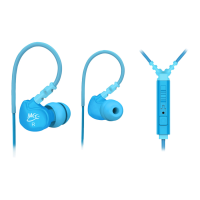

 To Next Page