1.1 Purpose and Scope 4
1.2 List of Abbreviations 4
1.3 Description of the Equipment 4
1.4 Megaray Standard Kit 5
1.5 Megaray Portable Searchlight System 6
1.6 Battery Vest 7
1.7 Battery Charger 9
1.8 Carry Strap 10
1.9 Picatinny Rail 11
Figure 1 List of Abbreviations 4
Figure 2 Megaray Standard Kit 5
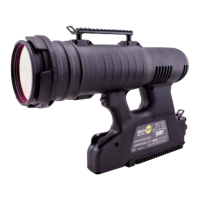
Figure 3 Megaray Light Unit 6
Figure 4 Battery Side Panel 7
Figure 5 Battery Power Indicator LEDS 7
Figure 6 Battery Vest 8
Figure 7 Power Cable 8
Figure 8 Battery Charger 9
Figure 9 Attachment for Carry Strap Hook 10
Figure 10 Picatinny Rail Used to Mount a Night Vision Device or Similar 11
Figure 11 Connecting the Power Cable to the Megaray from the Battery Vest 12
Figure 12 External Power Cable Being Connected to Searchlight 13
Figure 13 Megaray ON/OFF Switch 14
Figure 14 Megaray Light Unit Label 14
Figure 15 Light Mode Switch 15
Figure 16 Adjusting Beam Divergence 16
Figure 17
Beam Diameter at a Given Distance
17
Figure 18 Threaded Hole in the Heat Sink 18
Figure 19 Optional Accessories 19
Figure 20 IR Filters 20
Figure 21 Chart of IR Filter Curves 20
Figure 22 Installing IR Filter or Clear Spreading Lens on Lens Housing 20
Figure 23 Hard Carry Case 21
Figure 24 Protective Cut-out Foam-liner inside Hard Carry Case 22
Figure 25 Troubleshooting Table 23
Figure 26 Specifications 25


 To Next Page