This document describes the Meidong KY-2020 Soundbar, an audio output device designed for both wireless and wired connections.
Function Description
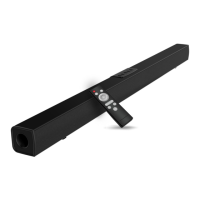
The Meidong KY-2020 Soundbar serves as a 2.0 channel speaker system, capable of streaming music via Bluetooth and playing music from a smartphone or tablet. It can be connected to various audio sources including TVs, TV boxes, Blu-ray/DVD players, and DVB devices. The soundbar offers multiple input options such as AUX, RCA, and Bluetooth, allowing for flexible connectivity with different devices.
Important Technical Specifications
- Sound System: 2.0CH
- Output: 15W*2
- Total Power Usage: 30W
- Frequency Response: 90~20000Hz
- S/N Ratio: 80db
- Impedance: 8Ohm
- Bluetooth Version: 4.2
- Dimensions: 36" Soundbar
Usage Features
Installation and Setup:
The soundbar can be placed on a horizontal surface or mounted on a wall using the provided wall mount brackets. For wall mounting, it's crucial to ensure the wall construction (solid concrete or bricks) can support the soundbar's weight and that appropriate screws are used. An electronic stud finder is recommended to check the wall type before drilling.
Powering On:
To power on, connect the "power adaptor" to an electrical outlet. Long-pressing the power button on the soundbar or remote control will initiate Bluetooth mode, indicated by a flashing blue LED.
Source Selection:
The soundbar supports multiple audio sources: AUX, RCA, and Bluetooth. Users can switch between these sources by pressing the "M" button on the soundbar or the remote control. The LED indicator will change color to reflect the selected mode:
- Bluetooth: Flashing Blue (Ready to pair), Solid Blue (Paired)
- RCA: Solid Green (RCA Mode)
- AUX: Solid White (Line in Mode)
Bluetooth Connection:
- Turn on the soundbar and switch to Bluetooth mode (LED flashes blue).
- Activate Bluetooth on your device (smartphone, tablet) and search for "meidong" in the list of available devices.
- Tap to connect. The Bluetooth indicator will turn solid BLUE upon successful connection.
- If a password is required (e.g., when connecting via an adapter), enter "0000".
Wired Connections:
- AUX Connection (3.5mm audio cable): Connect one end of the 3.5mm audio cable to the headphone or AUX-out socket of your audio player and the other end to the AUX IN socket on the soundbar.
- RCA Connections:
- 3.5mm to RCA audio cable: Connect the 3.5mm end to the audio output sockets of the audio player and the RCA L/R ends to the RCA IN L/R sockets on the soundbar.
- RCA to RCA audio cable: Connect one end of the RCA cable to the audio output sockets of the audio player and the other end to the RCA IN L/R sockets on the soundbar.
- Note: If your TV lacks Bluetooth/AUX/RCA connections, an RCA cable can be used to connect to a TV box. For further assistance, contact support.
Remote Control Functions:
The remote control provides comprehensive control over the soundbar:
- Power: Standby/On (Long press)
- Mode Switch (M): Selects function (Bluetooth, Line in, RCA) (Short press)
- Play/Pause (▷II): (Short press)
- Volume Up (+): (Short press)
- Volume Down (-): (Short press)
- Previous (K):
- Next (▷I):
- Mute:
- Sound Effects: MUSIC, MOVIE, NEWS buttons.
Audio Output Adjustment:
The audio output is influenced by the settings of the connected source device. Users may need to adjust the source device's settings to optimize audio output.
Maintenance Features
Troubleshooting:
The manual provides a troubleshooting guide for common issues:
- Appliance does not work: Check power plug connection. Refer to "Get power and started" section.
- No sound: Increase volume, press MUTE, ensure source device volume is correct and playing, verify correct source selection ("Basic functions" section).
- Poor audio quality: Try different source devices, check cable connections. For Bluetooth, bring the device closer, ensure no obstacles, and refer to "Bluetooth function" section. For cable connections, ensure plugs are fully inserted and refer to "AUX Connections" and "RCA Connections" sections.
- Remote control does not work: Check battery insertion/replacement, bring remote closer to soundbar, ensure no obstacles, aim directly at the infrared receiver.
- Appliance does not react to pressed buttons (electrostatic discharge): Disconnect from power supply, then reconnect.
- Bluetooth device cannot be connected: Bring device closer, switch device/soundbar off/on and repeat pairing, ensure soundbar isn't connected to another Bluetooth device, verify "meidong" is selected. If issues persist, remove soundbar from "paired devices" list, turn soundbar off/on, and re-pair. If still unsuccessful, try another Bluetooth device or consult a dealer for repair.
Warranty:
The Meidong KY-2020 Soundbar comes with an 18-month product and labor warranty from the original purchase date. For manufacturing defects, contact support@meidongaudio.com to initiate a warranty claim. Returns require seller authorization.
FCC Warning:
The device complies with FCC Rules Part 15. It must accept any interference received and not cause harmful interference. Any unauthorized modifications may void user authority to operate the equipment. If the equipment causes harmful interference to radio or TV reception, users are advised to reorient/relocate the receiving antenna, increase separation between equipment and receiver, connect to a different circuit, or consult a dealer/technician. To maintain FCC RF Exposure compliance, the equipment should be installed and operated with a minimum distance of 20cm between the radiator and the user's body, using only the supplied antenna.
Feedback and Support:
Meidong encourages customer reviews on amazon.com/review/review-your-purchases#. They offer a 12-month warranty and friendly customer service. For any problems, users can contact support@meidongaudio.com. Users can also find them on social media (@Meidong electronics) and their website (www.meidongaudio.com). Product registration is available for extended protection.


 To Next Page
 General