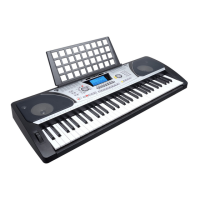
This document serves as a user manual for the MK 2117L electronic keyboard, providing instructions in both Polish and English. It covers safety guidelines, device maintenance, construction and operation, and information regarding the disposal of electrical and electronic equipment.
Function Description
The MK 2117L is an electronic keyboard designed for musical performance and learning. It features a luminous keyboard for guided training, a wide range of timbres and rhythms, recording capabilities, and various effect controls. The device can be powered by six 1.5V "AA" batteries (not included) or a dedicated DC 9V power adapter. It includes audio input/output ports for connecting external devices like headphones, microphones, mobile phones, MP3 players, or computers.
Usage Features
- Power On/Off: The keyboard lights up on both sides, and the LED display shows the current tempo "120" upon activation.
- Luminous Keyboard: This feature provides light hints during playing, training, and demo song playback. It is enabled by default and can be toggled using the [KEY LIGHTING] button.
- Volume Control:
- Master Volume: Adjustable with [MASTER VOL +] and [MASTER VOL -] buttons. Pressing both simultaneously resets to default. It also controls accompaniment volume.
- Accompaniment Volume: Adjustable with [ACCOM VOL +] and [ACCOM VOL -] buttons. Pressing both simultaneously resets to default.
- Timbre Selection: Offers 255 timbres (000 to 254). The timbre selection function is automatically enabled upon startup. In other modes, press [TIMBRE] to activate, and "tnE" will appear on the display. Timbres can be selected using number buttons or "+"/"-" buttons.
- Keyboard Percussion: Provides 61 percussion instruments. Press [KEYBOARD PERCUSSION] to convert keys to percussion keys. Press again to disable.
- Demonstration Songs: Includes 50 demo songs (000 to 049).
- [Demo one]: Plays the current demo song repeatedly. Press again to stop and play the next song.
- [Demo all]: Plays all demo songs successively.
- Timbre can be changed during demo song playback.
- Rhythm Selection: Offers 255 rhythms (000 to 254), with "000" as default. Press [Rhythm] to enable, and "rhy" will appear on the display. Rhythms can be selected using number buttons or "+"/"-" buttons.
- Rhythm Control:
- Activation: Press [START/STOP] to start accompaniment rhythm.
- SYNC: After "Syn" is shown, play any key in the chord key zone (1st-19th key from left) to activate the accompaniment rhythm.
- Fill-in: Press [FILL-IN] during accompaniment rhythm for a temporary rhythm play. Holding [FILL-IN] continues the temporary rhythm.
- Stop Rhythm: Press [START/STOP] during accompaniment rhythm to stop it.
- Metronome: Features four tempos (1/4, 2/4, 3/4, 4/4). Press [Metronome] continuously to select tempos. Press again to stop.
- Tempo Adjustment: Use [TEMPO +] or [TEMPO -] to increase or decrease rhythm speed. Pressing both simultaneously resets to default.
- Auto Bass Chord:
- Single Chord: When rhythm is active, press [SINGLE]. "Sin" appears on screen. Play a single chord in the chord zone. Press [SINGLE] again to disable ("OFF" appears).
- Fingered Chord: When rhythm is active, press [FINGERED]. "Fin" appears on screen. Play a figured chord in the chord zone. Press [FINGERED] again to disable ("OFF" appears).
- Status Memory: Allows saving and recalling tone, rhythm, tempo, and other parameters for quick changes during playing. The keyboard has 3 status memories.
- Storage: Set parameters, then press [Status Memory] and one of [Memory 1] to [Memory 3].
- Recall: Press any of [Memory 1] to [Memory 3].
- Saved contents are lost upon power failure.
- Effect Control:
- Transposing Function: Allows playing music of other tunes with C-tune fingering. [Transpose -] decreases tone by half-tone; [Transpose +] increases tone by half-tone. Pressing both simultaneously resets to C-tune "00". Levels can be adjusted from "P-6" to "P06".
- Sustain Function: Press [Sustain] to activate sustain effect ("SUS" appears). Press again to disable.
- Vibrato Function: Press [Vibrato] to activate vibrato effect ("Vib" appears). Press again to disable.
- Keyboard Splitting Function: Press [SPLIT] to enable ("on" appears). The left 24 keys split from the rest. The left zone increases by one octave, maintaining original tone, while the right zone decreases by one octave to match pitch. Tones for the right zone can be set independently. Press [SPLIT] again to disable.
- Recording and Rhythm Programming:
- Recording: Press [REC] to enable ("rEC" appears). All playing notes are recorded. Recording stops automatically when storage is full ("FUL" appears).
- Playback: Press [PLAY] to play recorded notes ("PLy" appears). After playback, it returns to recording mode.
- Disable Recording: Press [START/STOP] or [REC] again to disable recording and clear all recorded notes.
- Rhythm Programming: Press [PROG] to enable ("Prg" appears), activating keyboard percussion. Create custom rhythms by playing percussion keys. Max 32 percussions can be recorded ("FUL" appears when full).
- Playback Programmed Rhythm: Press [PLAY]. Press again to stop and re-enable programming.
- Disable Rhythm Programming: Press [START/STOP] or [PROG] again to disable and clear recorded rhythms.
- Luminous Key Three-Step Intelligent Training:
- Training 1 - ONE-KEY: Press [ONE-KEY]. Select a song using number buttons or "+/-". Keyboard lights guide notes. Allows mistakes, keyboard plays correct notes, and screen shows correct notes. Repeat song after completion. Press [START/STOP] or [ONE-KEY] to disable.
- Training 2 - FOLLOW: Press [FOLLOW]. Select a song. Keys light up according to melody notes. Keyboard waits for correct note before proceeding. Keyboard plays only correct notes. Press [START/STOP] or [FOLLOW] to disable.
- Training 3 - ENSEMBLE: Press [ENSEMBLE]. Select a song. Keyboard screens keynote and plays with you. Lights guide melody notes. Play notes according to duration. If a note is not played within 3 seconds, keyboard plays it automatically. Repeat song after completion. Press [START/STOP] or [ENSEMBLE] to disable.
Important Technical Specifications
- Power Supply: Six 1.5V "AA" batteries (not included) or dedicated DC 9V power adapter.
- Timbres: 255 (000-254).
- Rhythms: 255 (000-254).
- Demo Songs: 50 (000-049).
- Keyboard Percussions: 61.
- Metronome Tempos: 1/4, 2/4, 3/4, 4/4.
- Connectivity:
- AUDIO INPUT (stereo)
- MIC INPUT
- PHONES/OUTPUT (stereo)
- DC 9V Power Supply Input
Maintenance Features
- Qualified Personnel: Only qualified personnel should use the device. Damage from improper use or attempted self-repair is not covered by warranty. Repairs must be performed by an authorized service center.
- Liquid Contact: Prevent contact with oil, grease, or similar liquids.
- Cleaning: Regular cleaning with a soft, dry cloth ensures long-term use and proper operation.
- Battery Handling: Replace discharged or bad batteries immediately. Remove batteries if the product is not used for a long time.
- Power Cord: Use only the dedicated DC 9V power supply. Disconnect by pulling the plug, not the cord. Do not use if the power cord is damaged.
- Environment: Use indoors in a well-ventilated room, away from moisture and direct sunlight. Do not store or use near fire sources or high temperatures.
- Malfunction: Disconnect from power supply immediately if a malfunction occurs.
The manual emphasizes the importance of proper disposal and recycling of used electrical and electronic equipment (WEEE) in accordance with EU and national regulations. Households play a crucial role in contributing to reuse and recovery. Users are obliged to return WEEE to authorized collection points to prevent environmental and health damage.

 Need help?
 General

 To Next Page